
How to Use Master Code to Unlock Any Android Phone or Tablet

Today, almost all Android smartphones support biometric technology. It means that users can unlock their devices with faces and fingerprints. However, forgetting the unlock password became a big problem after biometrics became widely used. Therefore, manufacturers release the master code to unlock any phone quickly. This guide will explain what master code is and how it works. So that you can regain access to your phone even if you forgot your password.
PAGE CONTENT:
Part 1: What Is Master Code
The master code is a security code used to unlock any Android device, similar to a lock screen PIN or password. It is usually a 4 to 16-digit numerical code that acts as an additional layer of security. When you forgot your lock screen password or purchased a second-hand phone with the screen locked, the master code provides a safe and convenient solution to unlock your phone or restore it to the factory status.
In addition to the common master code, manufacturers also released secret codes to help users perform a variety of tasks quickly, such as factory resetting, checking the IMEI number, and more.
| Master code or secret code | Function | Support Phone Brands |
| 1234 | Unlock an Android device | Nokia |
| *#*#7780#*#* | Factory reset a phone | Google Pixel, Samsung, Motorola, OnePlus, etc. |
| *2767*3855# | Erase a phone, and re-install firmware | Google Pixel, Samsung, Motorola, OnePlus, etc. |
| *#06# | Display IMEI number | Google Pixel, Samsung, Motorola, OnePlus, etc. |
| *#66# | Display encrypted IMEI number | OnePlus, Realme |
| *#*#4636#*#* | Display device information | Google Pixel, Samsung, Motorola, OnePlus, etc. |
| *#9090# | Open diagnostic configuration screen | Google Pixel, Samsung, Motorola, OnePlus, etc. |
| *#1234# | Check software version | Samsung, OnePlus |
| **04* | Change Android device PIN | Google Pixel, Samsung, Motorola, OnePlus, etc. |
Part 2: Is There a Master Code to Unlock Any Phone
No. There is no universal master code to unlock any phone. If such a code really existed, it would be a serious security concern. In reality, although manufacturers may release master codes for certain models, these codes are usually device-specific and cannot be used as a universal solution for unlocking any Android phone. Moreover, some Android phone brands do not provide the master code to unlock any phone without data loss.
Part 3: How to Use Master Code to Unlock Android Phones
As mentioned previously, you may be locked out of your phone when you forget your password or buy a second-hand phone with a locked screen. In such cases, you can try the master unlock code for Android.
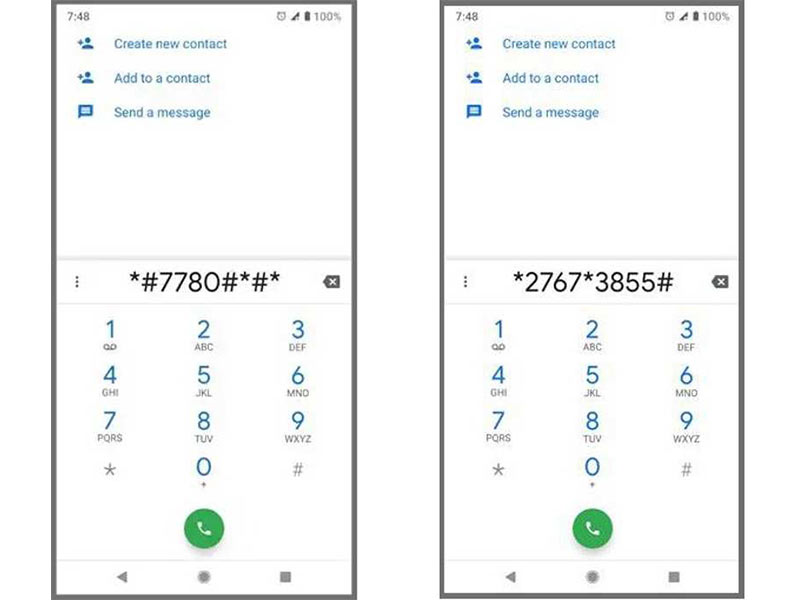
Step 1. Power on your phone, and tap Emergency Call or a similar option on the lock screen.
Step 2. When the Dialer screen appears, enter the master unlock code for Android, such as *#*#7780#*#* or *2767*3855#, using the on-screen keyboard.
Step 3. Once you press the Dial button, your phone should perform the function immediately. When it is done, you can unlock your phone directly.
Bonus: Difference Between *#*#7780#*#* and *2767*3855#
| Feature | *#*#7780#*#* | *2767*3855# |
| Common Name | Soft Factory Reset | Full Factory Reset |
| Main Purpose | Reset phone settings and data | Perform a deeper full reset |
| User Data | Deletes apps and user data | Deletes data more completely |
| Risk Level | High | Very High |
| Best Used For | Fixing persistent software issues | Preparing an old phone for resale or disposal |
*Both codes may erase your phone data. On newer Android versions, they may also not be supported or work differently depending on the device. Back up your data before trying them.
Part 4: Benefits and Downsides of Master Code to Unlock Phones
The master code is a unique combination that allows users to perform functions and check information on Android devices, such as unlocking the Samsung lock screen with master code. Understanding the benefits and drawbacks helps users make the best decisions.
What Are the Benefits of Using Master Code
1.Fix software-related issues. The factory reset master code can remove malware, correct system glitches, and eliminate performance issues.
2.Unlock any phone for free. The master code can remove the old password, and allow you to regain access to your phone without extra software or hardware.
3.Save time. You do not need to go through complicated steps when performing functions using the master codes. All you need to do is just dialing the right code.
What Are the Downsides of Using Master Code
1.There is no universal master code for all Android devices. Although the master code and secret codes are available to major manufacturers, you have to check them according to your phone brand.
2.Master code cannot fix hardware-related issues. The factory reset code can only fix software-related bugs.
3.Possibility of data loss if the master code entered is incorrect. When entering the master code, you should be careful and double-check it before pressing the dial button.
4.Unlocking an Android phone with the master code may void the warranty.
Therefore, it is important to weigh the benefits and drawbacks before deciding to use a master code to unlock an LG phone or another brand.
Part 5: Alternative Way to Master Code to Unlock Any Phone
The reliability of the master code varies depending on your phone brand and model, as well as the Android version. A code that works on one phone may be unavailable or unsupported on another, especially on newer versions of Android. If you simply want a more straightforward and stable way to unlock any phone, a dedicated Android unlocking tool, such as Apeaksoft DrodiAide Android Unlocker, an Android unlocking tool that works on a wide range of Android devices with a high success rate, can be your ideal solution.

Downloaded by over 1,000,000 users
- Unlock any phone without a master code or password.
- Work on passwords, PINs, patterns, and fingerprints.
- Unlock Samsung phones without data loss.
- Unlock any Android phone without the master code.
- Support most Android devices from Samsung, LG, Motorola, etc.
Secure Download
Step 1. Download this powerful Android unlocker for various Android devices onto your computer by clicking the button above.
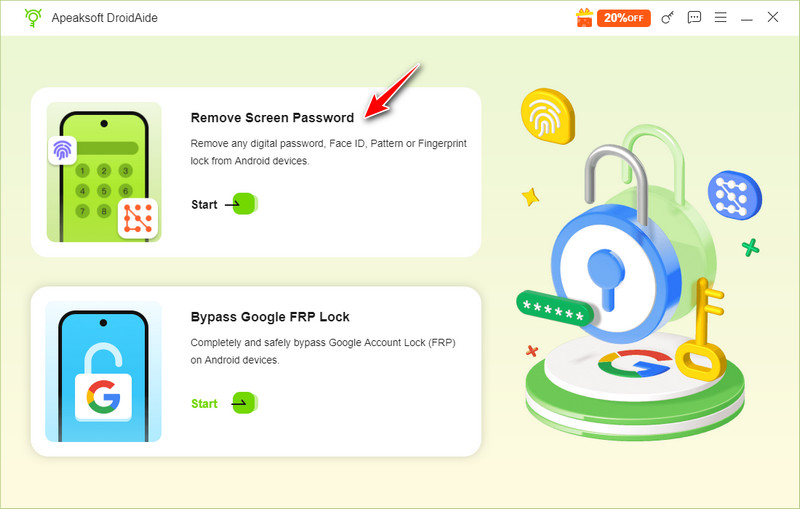
Step 2. Choose Remove Screen Password from the main interface.
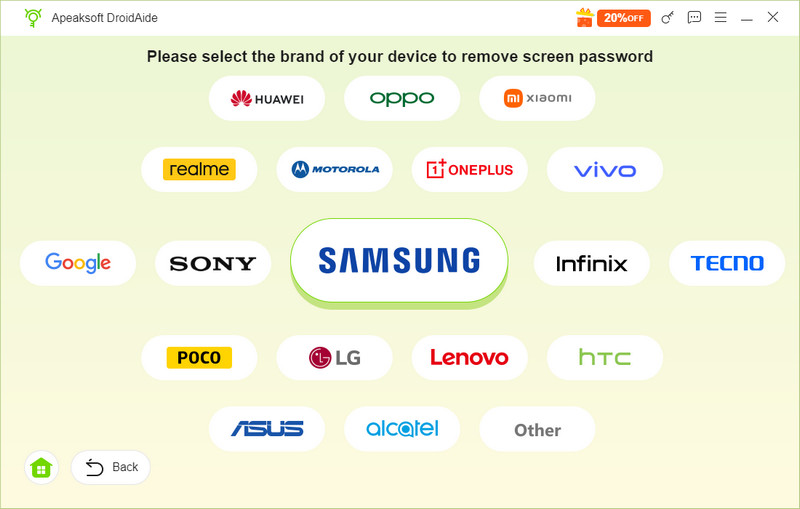
Step 3. Select your phone brand and connect your device to the computer. Usually, this software will recognize your phone brand automatically.
Step 4. Click the Remove Now button. Wait for the software to unlock your Android phone patiently.
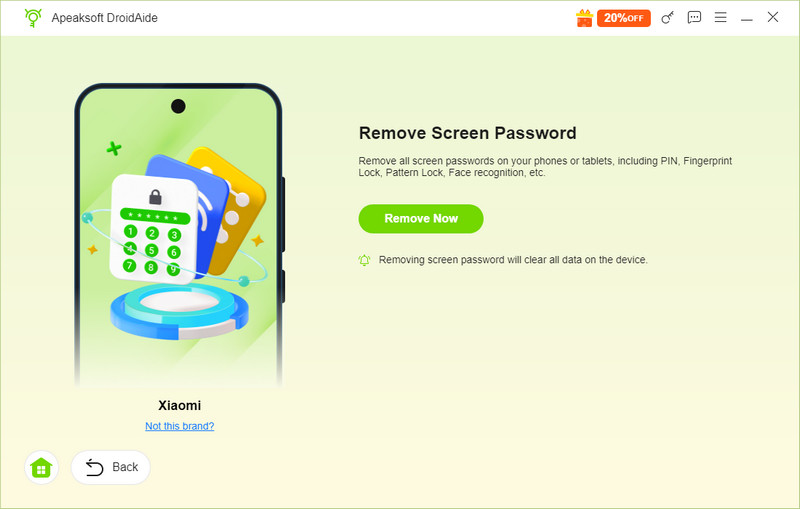
Tips: During the process, you should keep your phone connected to your computer. Plus, you'd better back up your phone before unlocking it to avoid data loss.
Conclusion
This guide has explained whether there is a Samsung pattern unlock master code and how to use the master code to unlock any Android phone. Although there is no universal master code for all Android devices, you can try it when you are locked out of your phone or tablet. If the master code is not available on your phone, you can try a third-party Android unlocking tool instead.
 Apeaksoft DroidAide
 Unlock your Android passwords and bypass the FRP lock easily.
Secure Download
Related Articles