



SamFw FRP Tool Review 2026: Does It Still Work on Android 15/16/17

Key Takeaways
- SamFw FRP remains a popular solution for bypassing FRP locks on Samsung devices, especially older models.
- It is currently available only for Windows PCs.
- Our tests have revealed that this tool operates most stably on Android 9 to 12, while its compatibility and success rate significantly decline on Android 14 and higher versions.
- Success rate heavily depends on Android brands and versions. multiple retries or additional troubleshooting may be required.
- Some antivirus programs may flag it due to its bypass-related functions.
The SamFw FRP Tool is a popular program to remove the FRP lock on Android devices. However, its effectiveness can vary depending on your Samsung model, security patches, Android versions, and more. That's why there are many people are asking whether SamFw FRP Tool version 5.4 is still effective.
This SamFw FRP Tool review will introduce what SamFw is, how to download and use it for FRP bypass on your legally owned Samsung phones, and what to do if SamFw FRP Tool does not work.
Disclaimer
This post is for educational purposes only. DO NOT bypass FRP on a lost, stolen, or unauthorized device, which may violate local laws and regulations. Please note that FRP bypass procedures may void your device's warranty, and unofficial downloads of SamFw FRP Tool may pose security risks.
PAGE CONTENT:
Part 1: What Is SamFw FRP Tool
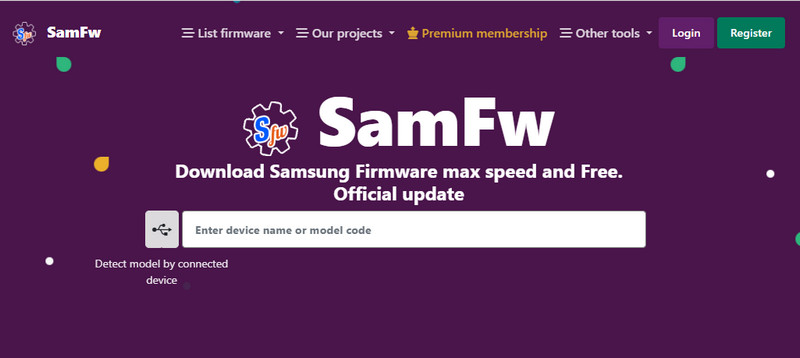
As mentioned at the beginning, SamFw FRP Tool is a free Windows tool that can bypass the Factory Reset Protection lock on most Samsung devices. This section will walk through its main features and performance.
Main Features of SamFw FRP Tool
The main feature of the SamFw FRP Tool is to bypass the FRP restriction on Samsung devices using a Windows PC and USB connection. Compared with many APK-based methods, it provides a more direct computer-based unlocking process. What's worth mentioning is that this program can also help you change CSC for your Android to obtain more features on your phone. There are also minor features, such as a one-click factory reset, Knox removal, Driver and Windows utility checks, and more.
Compatibility
SamFw FRP Tool is designed primarily for Samsung devices. Although there are some online courses (not official) claiming that it can also be used to bypass FRP for devices such as Xiaomi, OPPO, and Vivo in conjunction with ADB, the success rate is usually very low.
According to its official claims, SamFw FRP Tool supports Samsung Galaxy S, A, Note, and Z series devices running One UI and Android 9-15. However, compatibility and success rates may vary across different models and security patch versions.
Performance of SamFw FRP Tool
What’s impressive about the SamFw FRP Tool is that you can factory reset your Android and remove FRP in this program. You can also easily remove CSC and Samsung Knox to unlock more practical features on your Samsung devices. However, the SamFw FRP Tool won’t have a good performance on newer Android versions, although the most recent update of this program was in 2025.
There is also a SamFw FRP Tool paid version, which claims "supports most existing models, and supports up to android 14" when you unlock the FRP restriction. However, the lack of regular updates has significantly reduced its compatibility on newer devices and security patches.
Is the SamFw FRP Tool Still Workable?
Indeed, the SamFw FRP Tool still works when you unlock FRP on your Android device, particularly older Samsung models and firmware versions. It shows great reliability when bypassing FRP on devices up to around Android 12 and many Android 13, supporting popular models such as Samsung Galaxy S9/S10/S20 series, Galaxy A-series, and older tablets when running security patches from 2022 or earlier.
However, with the release of newer Android versions and security patches (post-2022), the success rate decreases greatly on newer phones/OS versions (Android 14, 15, and above). In a word, you can conclude that the SamFw FRP Tool offers less support on newer Android systems.
Below are detailed tested success rate for your reference
| Android Versions | Success Rate |
| Android 9-10 | High |
| Android 11-12 | Medium – High |
| Android 12 | Inconsistent results depending on security patch |
| Android 14 and above | Not supported |
Tips: Newer Android versions introduce stronger FRP enforcement and updated OEM security layers, such as stricter signature verification, enhanced ADB authorization policies, tighter boot chain protections, and updated Google FRP mechanisms, which require more advanced exploit methods or server-based services.
Part 2: Detailed Review of SamFw FRP Tool
This section will provide an unbiased SamFw FRP Tool review for your reference. Note that to ensure reliable results, the SamFw FRP Tool was tested on multiple Samsung devices under a controlled environment.
- The test devices covered different Android versions (Android 9-13) and security patch levels.
- All tests were performed on a Windows 10 64-bit PC with stable USB connections and original data cables.
- Each device was factory reset and locked with a Google account beforehand to accurately simulate real FRP lock scenarios.
Below are our test results
- SamFw FRP Tool offers a free version.
- It can successfully bypass FRP on several older Samsung models, particularly those running lower Android versions or outdated security patches.
- The whole process is relatively simple, and the tool was able to detect connected devices correctly in most cases.
- The success rate dropped noticeably on newer Samsung models with recent security updates.
- On some devices, the FRP bypass process stalled or failed, requiring repeated attempts or additional manual steps.

Bypass Google FRP Lock with One Click.
Part 3: How Does the SamFw FRP Tool Work
It’s not easy to use the SamFw FRP Tool, as many antivirus programs may flag or block it during installation or execution because it uses exploit‑based methods, modified ADB commands, and unofficial binaries. Therefore, you should turn them off before you execute the SamFw FRP Tool download. Next, we will show you how to download and use SamFw FRP Tool:
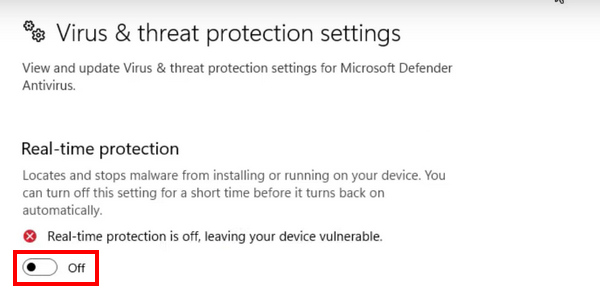
Step 1. Turn Off Virus & Threat Protection
Ensure that you’ve turned off other third-party antivirus programs. Then, go to the search box of Windows and type Virus & threat protection to quickly open the settings. Then, you should click the Toggle button to turn it off.
Step 2. Download SamFw FRP Tool
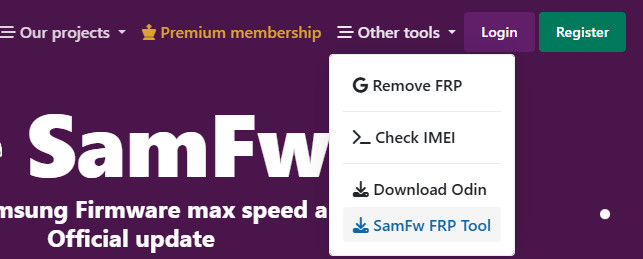
Go to the official website (https://samfw.com/) and click Other tools in the top navigation bar. Choose Remove Frp With Samfw from the drop-down list.
Step 3. Install Samsung Android USB Driver
Download and install a Samsung Android USB drive on your device.
Step 4. Connect Your Device to the Computer
Connect your device to your computer with any USB data cable. Open Emergency Call and dial *#0*# to entering the test mode.
Step 5. Remove the FRP Lock
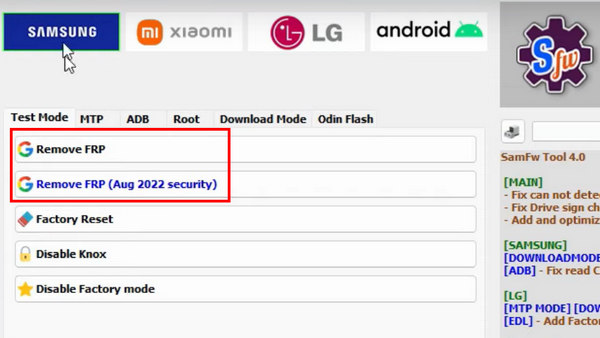
Choose your device and click the Remove FRP button to unlock FRP after you reset your Android phone.
Part 4: Best Alternative When SamFw FRP Tool Fails
As Android security continues to strengthen, SamFw often struggles on newer systems. If SamFw cannot detect your device, fails to enable ADB, or you want wider Android compatibility, a more intuitive interface, and a more stable performance, Apeaksoft DroidAide Android Unlocker can be a considerable alternative.
| Feature | SamFw FRP Tool | Apeaksoft DroidAide |
| Supported Brands | Samsung only | Samsung, Xiaomi, Redmi, POCO, vivo, OPPO, Motorola, Huawei, OnePlus, and more |
| Supported Versiosn | Android 9-15 | Android 6-16 |
| Interface | Complicated | Straightforward |
| ADB/Test Mode Operations | Manual | Automated |
| Success Rate | Unstable | Stable |
| Ease of Use | Moderate | Easy |
| Updates | Regular | Less frequent |

Downloaded by over 1,000,000 users
- Reliable alternative when SamFw FRP Tool fails.
- Bypass Google FRP Lock on Android with one click.
- Support many Android devices such as Samsung and Xiaomi.
- Support the latest Android 17.
- Simple steps and intuitive interface.
Secure Download
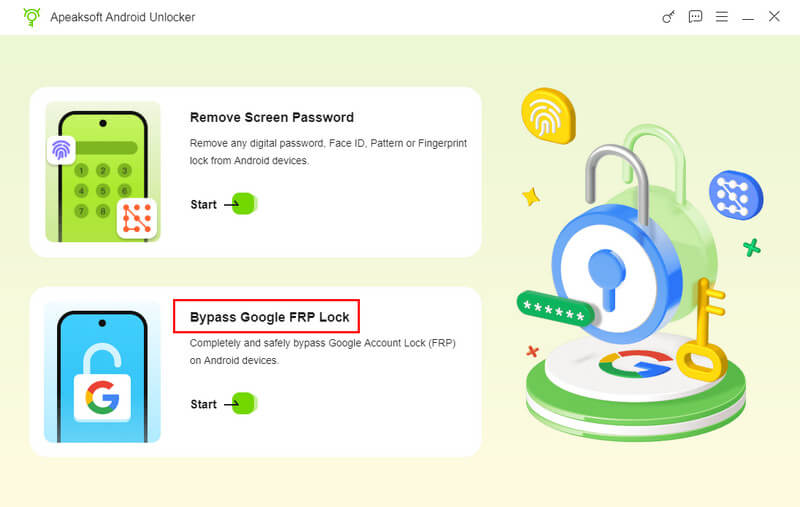
Step 1. Get Apeaksoft Android Unlocker from the link above, and then select the Bypass Google FRP Lock option on the main interface.
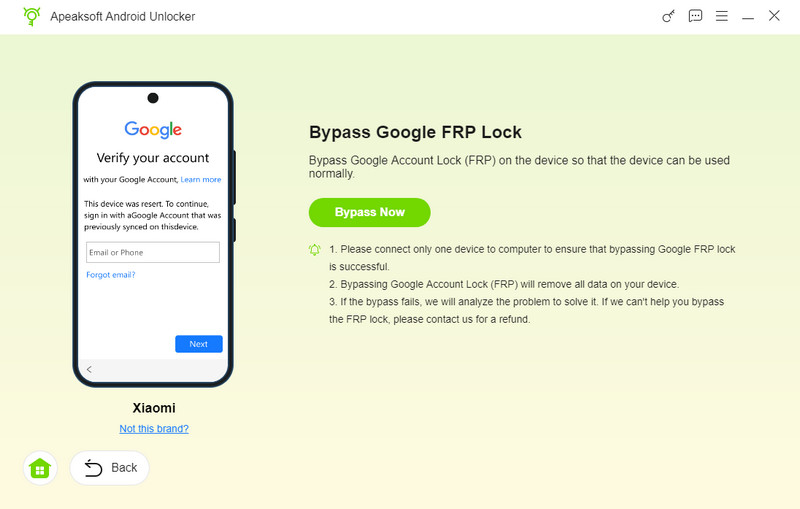
Step 2. Connect your device to the computer with a USB cable, check your phone’s model, and then click Bypass Now.
Step 3. Follow the instructions on the screen to remove the FRP lock.
Tips: Apeaksoft Android Unlocker supports many Android devices and versions, but it’s not 100% successful on all brands or models. Some phones may require specific conditions, like USB debugging enabled or certain firmware versions, for FRP removal to work properly.
Part 5: FAQs of SamFw FRP Tool
Is it safe to use the SamFw FRP Tool version 5.3?
It isn’t easy to figure it out. Although many users successfully use the SamFw FRP Tool to unlock Google Lock, many antivirus programs, including Windows Defender, may flag it as a potential threat.
Can the SamFw FRP Tool support Android 14 and later?
It depends. This program works well on Android 13 or below, but it usually fails to unlock FRP on Android 14. Maybe the SamFw FRP isn’t compatible with many phone brands on Android 14. You can seek help from other FRP bypass tools like Apeaksoft Android Unlocker.
Can the SamFw FRP Tool root Android?
No, it can’t. However, Sam FRP can remove CSC and Samsung Knox, which helps you access more restricted features.
Is SamFw legal?
Using FRP bypass tools can be legal only if you are unlocking a device you own or have permission to access. Using them on lost, stolen, or unauthorized devices may violate local laws.
Why does SamFw fail?
It often fails because newer Android versions and updated security patches.
Conclusion
SamFw FRP Tool offers free and paid methods to remove FRP on your Android. Although it can also unlock other restrictions on Android, it can’t support the latest Android versions. You can try a powerful alternative to SamFw FRP Tool - Apeaksoft DroidAide Android Unlocker to remove Google Lock on all Android versions without any hassle.
 Apeaksoft DroidAide
 Unlock your Android passwords and bypass the FRP lock easily.
Secure Download
Related Articles




