

Techeligible FRP - Detailed Guide to Bypass FRP & In-Depth Review

When you want to unlock the FRP restrictions on your Android devices, Techeligible FRP can be your amazing assistant. You can get many useful guides and tips from it. How much do you know about the Techeligible FRP Bypass? If you wonder if it can really help you remove the Google Account lock on your Android, please check this detailed review of Techeligible FRP and then determine whether to approach it or not.
This article also offers an alternative to Techeligible FRP for your Android devices, providing a reliable and tested FRP bypass solution.
Disclaimer: All FRP bypass operations should and must be performed on your legally-owned device. Bypassing FRP protection on stolen devices or devices obtained through illegal means may violate local laws and regulations. The information provided in this article is for educational and legitimate use only.
PAGE CONTENT:
Part 1: What Is Techeligible FRP
What is Techeligible FRP? Techeligible FRP is a website that offers guides and applications that can unlock FRP on Android. You can download FRP tools in Techeligible. It also provides many other useful programs and tips about fixing Android problems.
There will be a FRP lock screen each time you factory reset your Android phone once you have set up a Google account on your device. Techeligible is such a website that offers guides and tools to help you bypass the Google FRP lock and re-access your device.
Key Features of Techeligible FRP
You can view many Techeligible FRP tools and guides for many Android brands. It collects all Android phone models with detailed classifications. The supported Android brands include Samsung, LG, Sony, Google Pixel, etc.
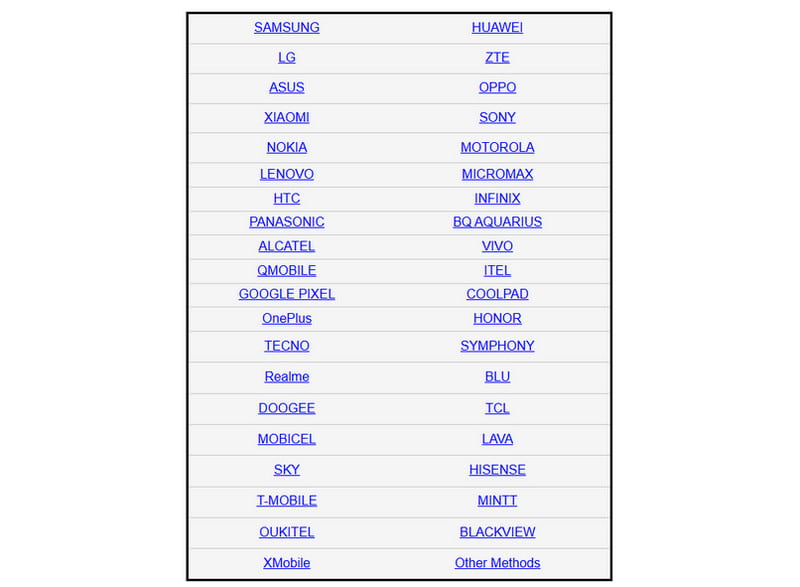
Techeligible FRP Bypass also offers FRP tools in an obvious section on the website, but it does not have its official bypass tool. You can view many third-party FRP bypass programs and apps with specific guides.

Techeligible FRP also collects many practical apps and programs to solve other Android problems, such as unlocking region restrictions, Android lock screen removal, etc. This website is meant to be a tech support platform for mobile and desktop users.
Techeligible FRP Tools Overview
| Tool | Usage |
| Google Account Manager | Manage Google account login prompts during the FRP bypass process. |
| Quick Shortcut Maker FRP Bypass | Create shortcuts to hidden system settings. |
| Apex Launcher | Temporarily access the Android home screen during FRP bypass attempts. |
| FRP Bypass ADB Tool | Uses ADB commands to remove or bypass FRP restrictions on compatible Android devices. |
| SamFw FRP Tool V3 | PC-based FRP. Remove Google account locks on selected Samsung models. |
| King Root | Provides root access on supported devices. |
| Octopus FRP Tool | Professional FRP unlocking tool |
Unbiased Techeligible FRP Review
- It keeps offering FRP unlocking methods for almost all phone brands.
- Techeligible FRP offers detailed guides with programs and download links.
- You can find many other Android problem solutions, such as screen unlocking and firmware flashing.
- All the guides and tools within are free.
- Techeligible.com does not develop any software itself and does not provide any guarantees regarding the tools or their effectiveness.
- Although there are multiple methods, not all are effective, and their success may vary depending on the specific device and software version.
- Some third-party tools carry a risk of viruses.
Part 2: How to Use Techeligible Bypass Tool
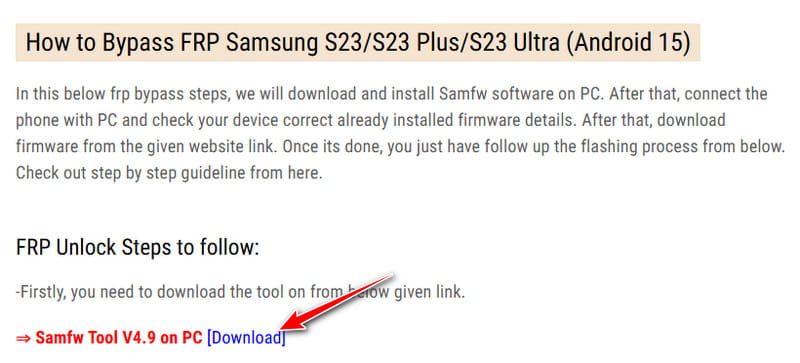
Since there’s no official Techeligible FRP tool, you can only go to the unlocking method of your phone model and download the app or program offered by Techeligible FRP Bypass. Then, check the corresponding guide to unlock the Google Account lock on your phone.
Generally, you should download an app on your Android or a desktop on your computer. Then, follow the on-screen guide to unlock FRP, and then restart your Android phone. You can restore your Android phone after a factory reset and then use your phone with familiar apps and settings. Below are the detailed steps:
Step 1. Go to Techeligible’s official website - https://www.techeligible.com/.
Step 2. If you want to know how to unlock FRP on your phone, you need to click the specific phone brand. Here, we take a Samsung phone as an example.
Step 3. Choose the corresponding series and models.
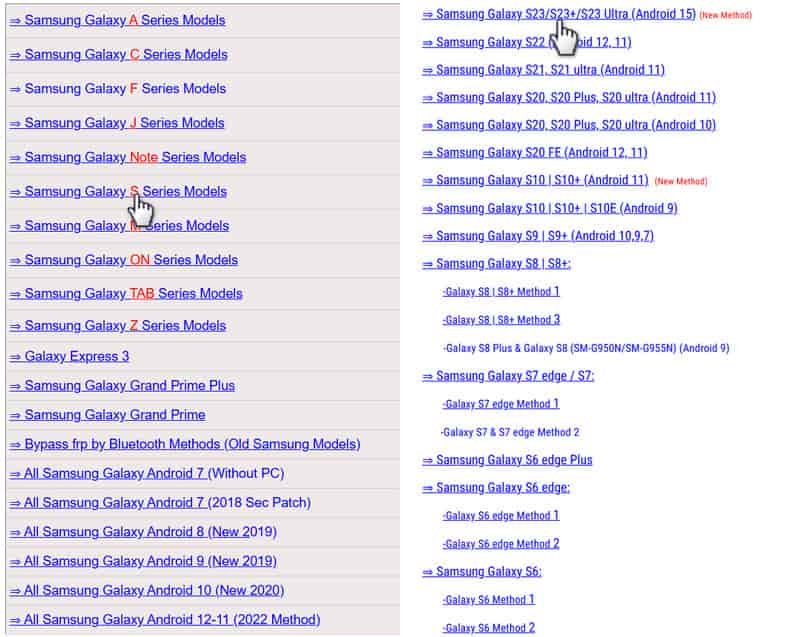
Step 4. Then, you’ll see the detailed methods offered by Techeligible FRP to unlock the specific phone model. You can get the FRP bypass tool mentioned in the article for free by clicking the download link.
Part 3: Techeligible FRP Bypass Not Working - Try Its Best Alternative
As we mentioned above, Techeligible FRP requires users to manually select their device brand and model, and its success rate can vary depending on the Android version (some methods only work on Android 9 or earlier, or up to Android 13). Most of the tools involved are third-party, which may pose security risks.
So, is there a Techeligible FRP alternative that is smarter, more compatible, and safer?
Apeaksoft Android Unlocker is here for you.
Best Alternative to Techeligible FRP
- Detect your device automatically once connected.
- Support the latest Android 16 and earlier.
- Official download source and endorsement.
- 24/7 customer support and technical support.
- Intuitive interface and easy-to-follow guide.
Secure Download
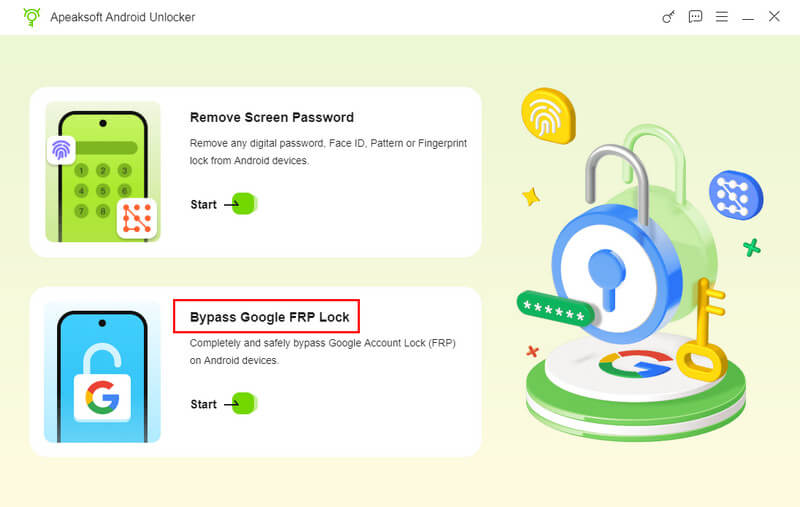
Step 1. Get Apeaksoft Android Unlocker from the link above. Select the Bypass Google FRP Lock option on the main interface.
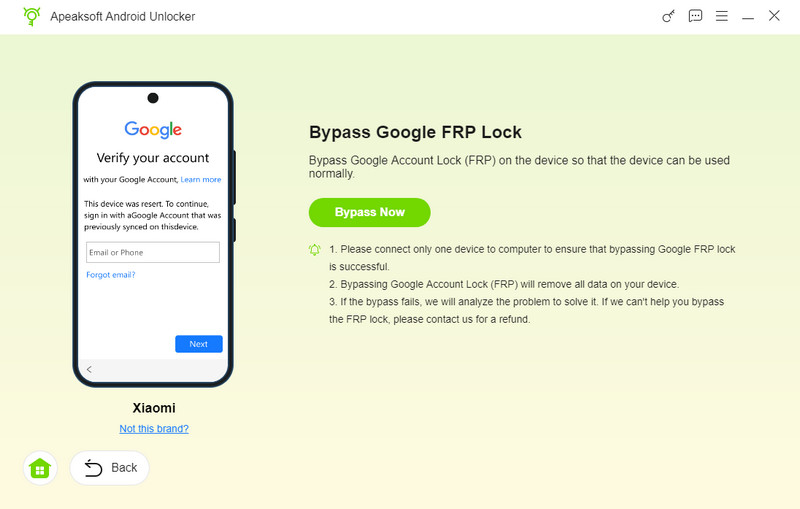
Step 2. Connect your device to the computer with a USB cable, check your phone’s model, and then click Bypass Now.
Step 3. Follow the instructions on the interface to activate the configuration environment. The FRP bypass process will be initiated once the environment is configured.
Part 4: FAQs of Techeligible FRP
Is it safe to unlock FRP with Techeligible FRP tools?
It depends. Some FRP unlocking tools can’t pass many antivirus programs, but there’s no true evidence to firm that those Techeligible FRP tools are harmful to your device or privacy, etc.
Does Techeligible FRP Bypass support the latest Android system?
Yes, it does. However, when you use Techeligible FRP tools to unlock the FRP in the latest Android system, the success rate is not satisfactory.
Can Techeligible FRP help me unlock MDM?
Yes, it can. Techeligible also offers many other unlocking methods on Android, including how to unlock the MDM on Android.
Conclusion
Techeligible FRP Bypass offers a great number of FRP bypassing methods for many Android phones. However, it would help if you took the time to find a suitable program and guide for your phone. Why not use a better alternative to Techeligible FRP? Apeaksoft Android Unlocker is your best assistant to unlock the Google Account lock with a USB cable and a few.
Related Articles
Do you want to bypass MDM on Android? You can read this article to check if your Android has MDM and then learn how to bypass it.
This tutorial will show you multiple practical methods to unroot Android smartphones and tablets with or without PC in detail.
If you usually download profiles from unknown sources, viruses may accumulate. Luckily, there are many ways to remove Android viruses easily.
What is USB debugging on Android phones? How to enable USB debugging? Read this article to enable USB debugging for Android mobile phones.



