A Concrete Tutorial to Remove iPhone Screen Time Passcode

The Screen Time feature is a serious way to control screen time consumption, app usage, and more on iPhone. Without the passcode, anyone cannot unlock the device during the downtime and get rid of restrictions for apps. Is it possible to hack Screen Time on iPhone? Yes. This guide shares the proven methods to remove Screen Time passcode and bypass Downtime, app limits, website restrictions, and more without a passcode.
PAGE CONTENT:
Part 1: How to Remove Screen Time Passcode Without Apple ID
Apeaksoft iFoneKit iOS Unlocker is an ideal iPhone Screen Time passcode remover. It is able to remove the Screen Time passcode on an iPhone or iPad without any restrictions. More importantly, the user-friendly interface makes it a good option for beginners.

Downloaded by over 1,000,000 users
- Remove the Screen Time passcode in three steps.
- Don’t require your iPhone passcode or Apple ID password.
- Work for locked or disabled iOS devices.
- Support a wide range of iPhone and iPad models.
Secure Download
Secure Download
How to Remove Screen Time Passcode Without Apple ID
Step 1. Install iOS Unlocker
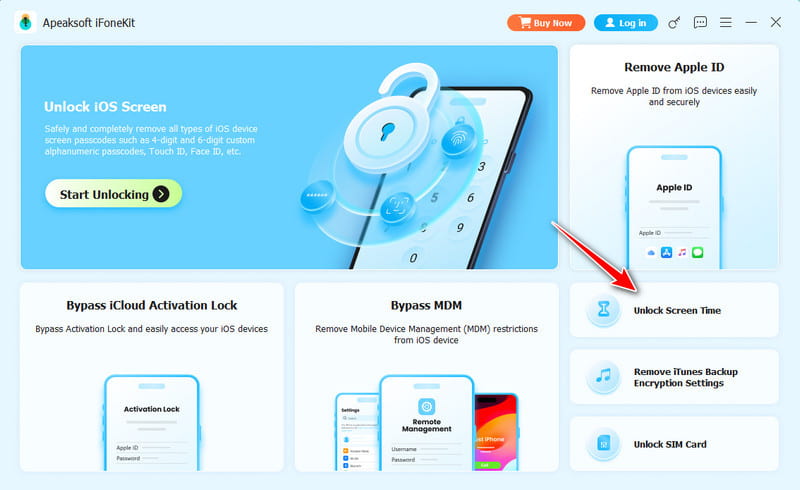
Start the Screen Time passcode remover software once you install it on your PC. There is another version for Mac users. Choose the Unlock Screen Time mode to continue.
Step 2. Link your iPhone
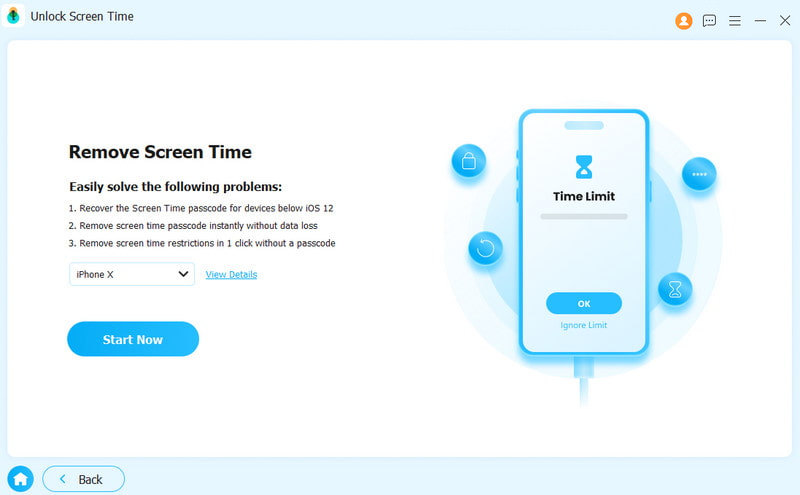
Link your iPhone to your computer with a Lightning cable. Make sure to trust your computer. The software will detect your device immediately. Choose the way your Screen Time passcode is set.
Step 3. Remove Screen Time passcode
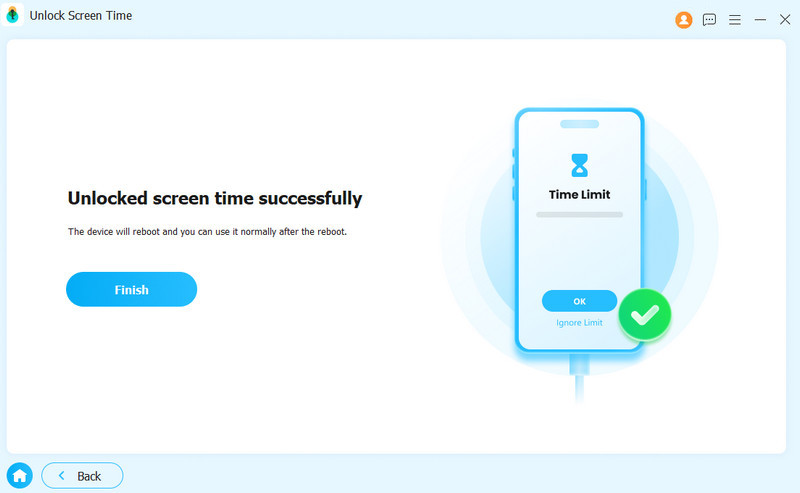
Click the Start Now button to initiate removing the Screen Time passcode without Apple ID if Find My is disabled. If Find My is enabled, follow the on-screen instructions to turn off Find My, and the software will start the process.
Part 2: How to Remove Screen Time Passcode on iPhone with Apple ID
Even if you forgot your passcode, you can remove the Screen Time passcode on an iPhone or iPad with your Apple ID credentials. The precondition is that you have updated to iOS 13.4 and iPadOS 13.4 or later.
Step 1. Run your Settings app.
Step 2. Go to Screen Time.
Step 3. Tap the Change Screen Time Passcode button.
Step 4. Choose Change Screen Time Passcode.
Step 5. Next, tap Forgot Passcode.
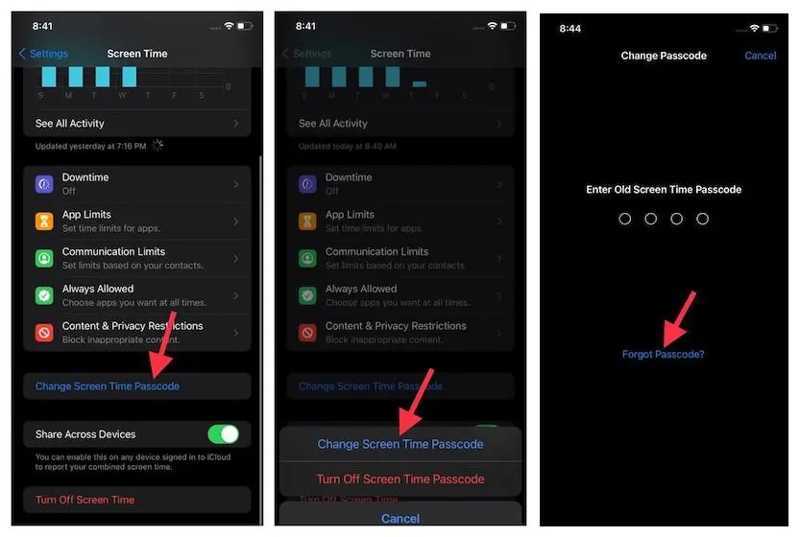
Step 6. Input your Apple ID email or phone number and hit OK.
Step 7. Enter your Apple ID password and tap OK.
Step 8. Type in a new passcode and confirm it.
Step 9. Then, go to Screen Time in Settings again.
Step 10. Tap Change Screen Time Passcode.
Step 11. Choose Turn Off Screen Time Passcode.
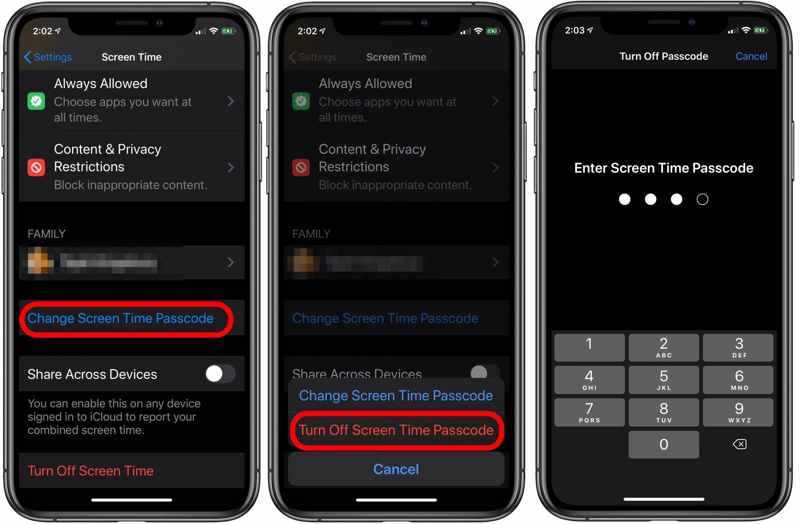
Step 12. Enter the new passcode and confirm Screen Time passcode removal.
Part 3: How to Hack Screen Time on iPhone Without Apple ID
If you forgot your Screen Time passcode, you can still hack the limitations on your iPhone. You can utilize bugs on iOS and iPadOS to bypass Screen Time without the passcode or Apple ID password.
How to Hack Apple Limits Without an Apple ID by Reinstallation
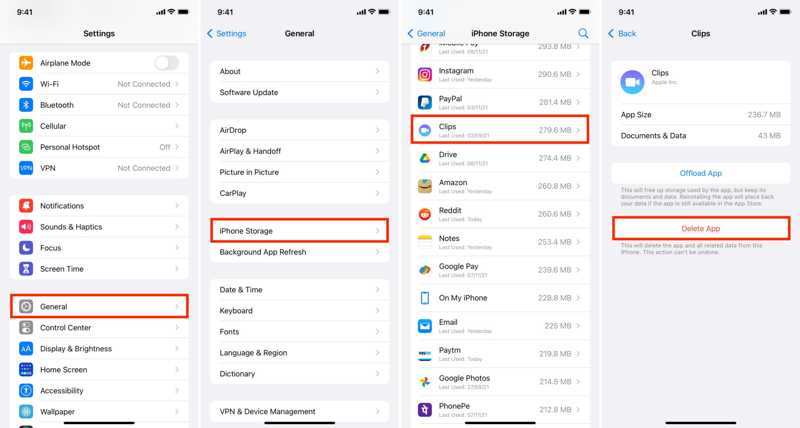
Step 1. Go to the Settings app.
Step 2. Navigate to General and iPhone Storage.
Step 3. Find the app to remove the Screen Time passcode and tap it.
Step 4. Tap the Delete App button and hit Delete App.
Step 5. Restart your iPhone.
Step 6. Then, go to the App Store.
Step 7. Search for the app you deleted, and install it.
Further Reading
How to Hack Downtime for Screen Time on iPhone
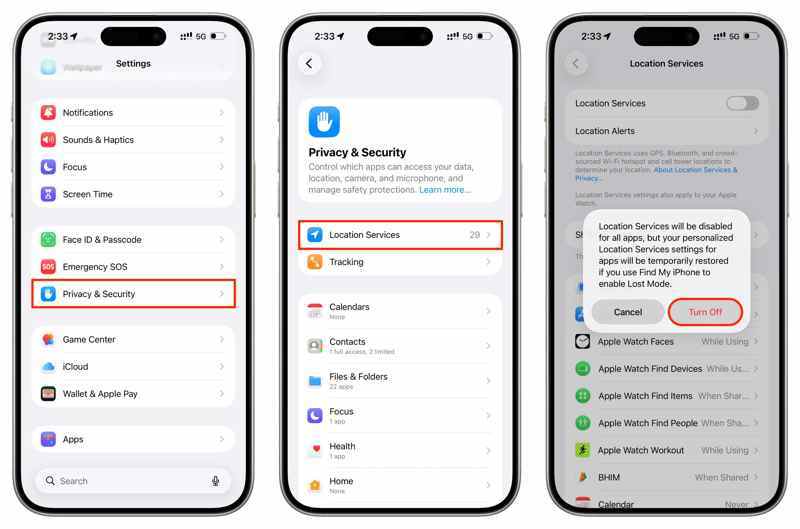
Step 1. If you want to hack downtime for Screen Time on your iPhone, open the Settings app.
Step 2. Choose Privacy & Security, and tap Location Services.
Step 3. Toggle off Location Services and choose Turn Off.
Step 4. Go to General in Settings, and tap Date & Time.
Step 5. Toggle off Set Automatically.
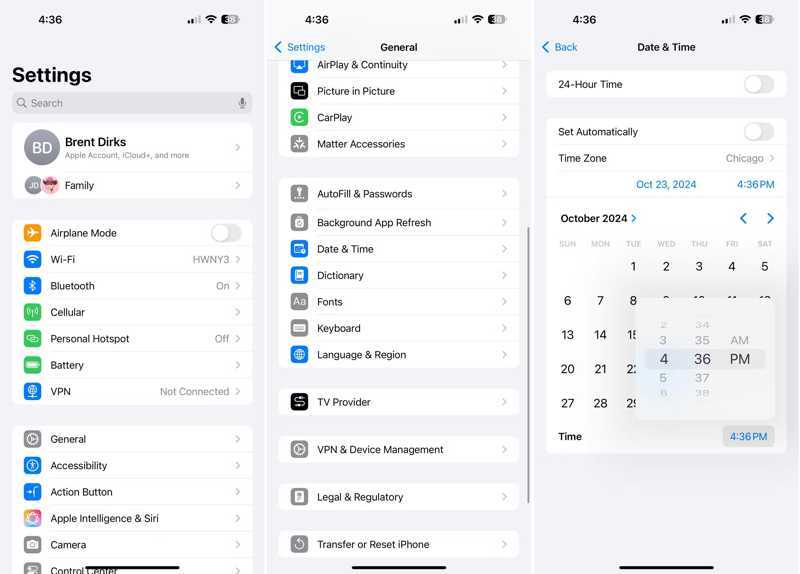
Step 6. Tap the Time Zone option and choose a city with the time zone that is a few hours earlier than yours.
Step 7. Now, you can bypass the downtime.
How to Watch Videos When YouTube Is Locked by Screen Time
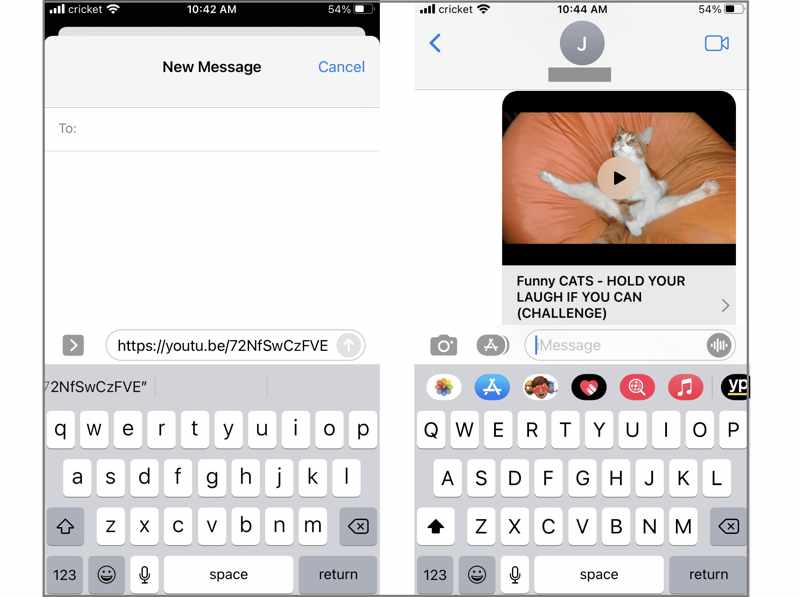
Step 1. If your YouTube app is locked by Screen Time, ask one of your friends to send you a YouTube video URL via iMessage or text.
Step 2. Go to the Messages app.
Step 3. Open the conversation.
Step 4. Tap the thumbnail to watch the video even if YouTube is restricted.
Conclusion
Now, you should understand how to remove the Screen Time passcode on your iPhone even if you forgot it. You can reset a passcode and then remove it with the new passcode. Moreover, we shared a few ways to hack downtime, app limits, and website restrictions without your Apple ID and password. Apeaksoft iFoneKit iOS Unlocker can help you get rid of the Screen Time passcode without any restrictions, so that you can use your device without limit.
 Apeaksoft iFoneKit
 Unlock all types of iOS passwords from iPhone, iPad and iPod.
Secure Download
Secure Download
Related Articles