How to Unlock Your iPhone With or Without Carriers

It is annoying if you find your iPhone is locked to a specific carrier when you wish to use a more cost-effective SIM card. According to major network providers, the SIM lock is used to enhance the loyalty of customers. However, it blocks users from switching carriers and SIM cards. The good news is that you can unlock an iPhone from the carrier if you discover the right ways.
PAGE CONTENT:
Part 1: How to Unlock an iPhone from a Carrier
In fact, major carriers allow users to carrier unlock an iPhone for free following the unlocking policies. It means that you can submit a request once you meet the policies. We demonstrate the policies and workflows for T-Mobile, AT&T, and Verizon users.
How to Unlock iPhone from T-Mobile
Device Unlock Policy
- 1.Your iPhone must be sold by T-Mobile.
- 2.Your device must not be reported as lost, stolen, or blocked.
- 3.Your account associated with your iPhone must be in good standing.
- 4.For Postpaid plans, your iPhone must have been active on the T-Mobile network for at least 40 days. All payments must be satisfied, and the iPhone must be paid in full. The process requires proof of purchase. If your iPhone is associated with a canceled account, the account balance must be zero.
- 5.For Prepaid plans, your iPhone must have been activated on the T-Mobile network for at least 365 days.
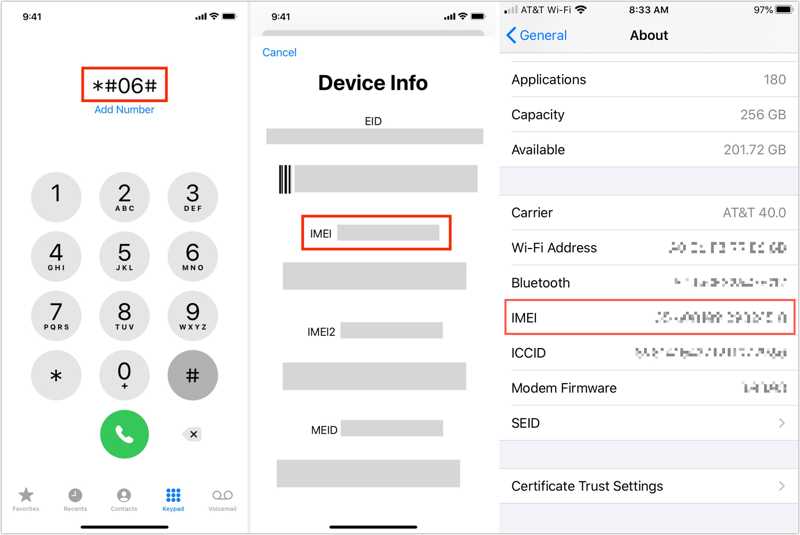
Step 1. Turn on your iPhone and go to Settings.
Step 2. Choose General, tap About, and check the IMEI number.
Tips: Alternatively, go to the Phone app, dial *#06#, and tap the Call button to display the IMEI number.
Step 3. Call T-Mobile customer support at 611 or 1-800-937-8997.
Step 4. Request an iPhone unlock from the representative.
Step 5. Provide your IMEI number and other required information.
Step 6. Once verification is done, T-Mobile will unlock an iPhone from the carrier.
How to Unlock iPhone from AT&T
Device Unlock Policy
- 1.Your iPhone must have been purchased more than 60 days ago.
- 2.Your iPhone must be paid in full, and your installment balance must be zero.
- 3.Your device hasn't been reported lost, stolen, or involved in fraud.
- 4.Your AT&T account must be current.
- 5.For Prepaid plans, your iPhone must be active for more than six months.
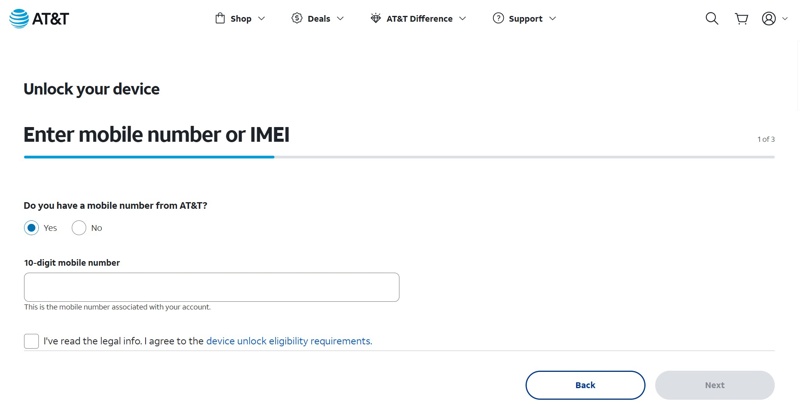
Step 1. Check and write down your IMEI number.
Step 2. Go to https://www.att.com/deviceunlock/unlockstep1 in a browser.
Step 3. Enter your phone number.
Step 4. Read the legal information, and check the Agree box.
Step 5. Click the Next button.
Step 6. Then, select if you are an AT&T customer, and enter your IMEI number.
Step 7. Hit the Next button.
Step 8. Next, offer your information and click Submit.
Step 9. An email will be sent within 24 hours. Press the confirm link to confirm unlocking your iPhone from the carrier.
How to Unlock an iPhone from Verizon
Device Unlock Policy of Postpaid Plan
- 1.Your iPhone was purchased directly from Verizon.
- 2.Your iPhone was not reported lost or stolen.
- 3.Your device financing agreement balance is paid in full.
Device Unlock Policy of Prepaid Plan
- 1.Your iPhone has been active for at least 365 days.
- 2.Your device has not been stolen or purchased fraudulently.
According to Verizon, the Prepaid iPhone will be automatically unlocked after 365 days of paid service. Moreover, all iPhones activated on or before January 26, 2026, will be remotely unlocked automatically 60 days after paid Activation. iPhones activated on or after January 27, 2026, will be unlocked upon request after 365 days of paid and active use. You can call *611 to make an unlock request.
Further Reading
Part 2: How to Unlock iPhone Without Carrier
If you cannot meet the carrier's unlock policy, you have to find a third-party unlock service online, such as Unlock Base. However, these services are not free. Moreover, you must provide your information. Plus, the success rate is different, depending on your situation.
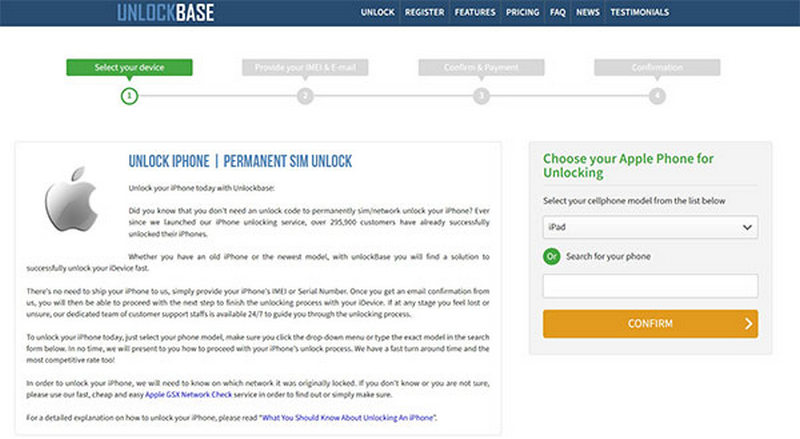
Step 1. Visit a reputable online unlock service in a browser.
Step 2. Select your device model and continue.
Step 3. Next, type in your IMEI number and email address.
You can find the IMEI number in the Settings app or by calling *#06#.
Step 4. Then, confirm unlocking your iPhone without a carrier and pay your bill.
Step 5. The service will receive your bill and send you an email with the rest steps.
Part 3: How to Unlock iPhone with Carrier Unlock Software
Can you unlock an iPhone locked by a carrier on your own? Yes, all you need is Apeaksoft iFoneKit. It enables you to get rid of carrier lock from any iOS device without restrictions. The onscreen instructions make it a good option for ordinary people.

Downloaded by over 1,000,000 users
- Get rid of the SIM card lock on any iPhone.
- Don't ask for any password or extra fees.
- Offer bonus features, like Apple ID removal.
- Support the latest versions of iPhone and iOS.
Secure Download
Secure Download
How to Unlock an iPhone Locked by a Carrier With a Computer
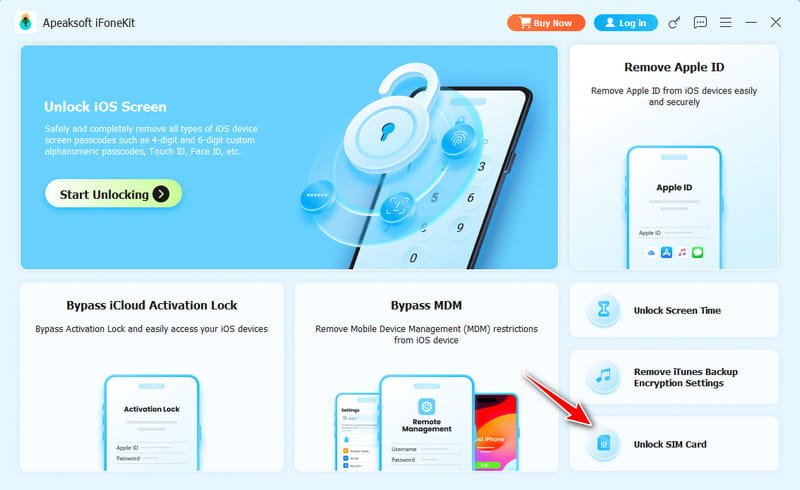
Step 1. Install carrier unlock software
Launch the carrier unlock software after you install it on your computer. It is available on Windows 11/10/8/7/XP/Vista and macOS 10.7 or above. Choose the Unlock SIM Card mode to proceed.
Step 2. Connect to your iPhone
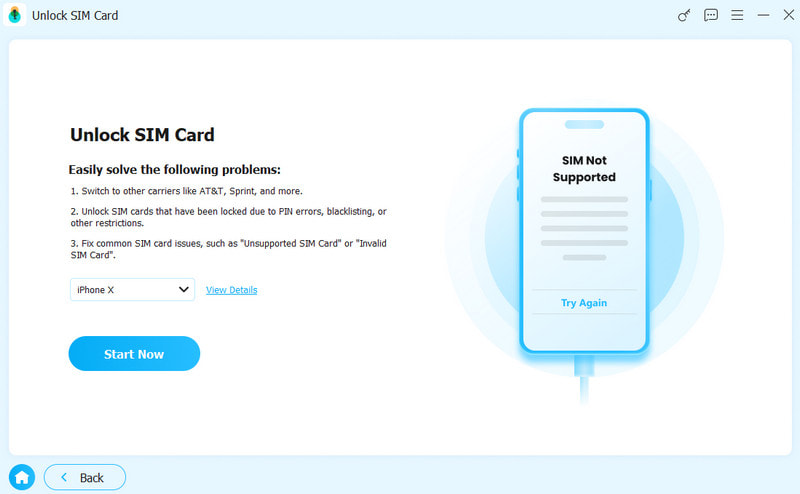
Connect your iPhone to your computer with a Lightning cable. If prompted, tap Trust on your screen to trust this computer. Once it is detected, click the Start Now button.
Step 3. Unlock the SIM card
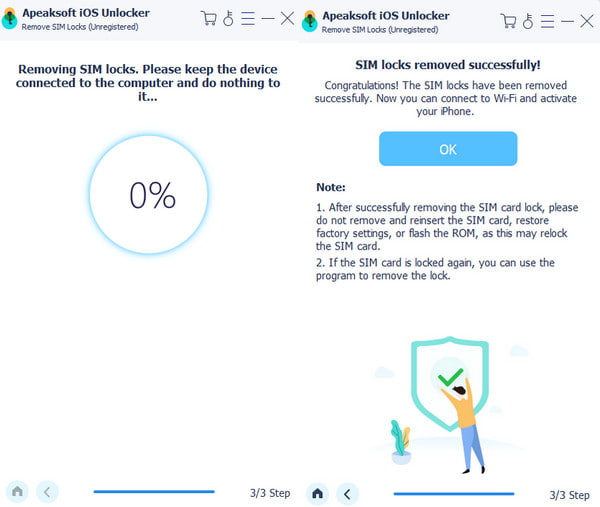
Check your iPhone information and click the Start Bypassing button to begin unlocking your iPhone from the carrier. Next, follow the onscreen instructions to set up your device.
Conclusion
This guide shared how to unlock an iPhone from the carrier in various situations. One easy way is to make a request to your carrier if you can meet the device unlock policy. If not, you have to use a third-party unlock service online. Of course, you have to pay the bill. Apeaksoft iFoneKit is a quick way to get rid of the carrier lock without any restrictions.
 Apeaksoft iFoneKit
 Unlock all types of iOS passwords from iPhone, iPad and iPod.
Secure Download
Secure Download
Related Articles