



How to Bypass the FRP Lock on BLU Phones After a Factory Reset

Key Takeaways
Bypassing BLU FRP is complicated due to the mixed chipsets it uses (MediaTek and Unisoc). However, you can still try different methods to perform BLU FRP bypass under certain conditions:
- Official methods like Google Account Recovery are the safest and most reliable option, but there may be a security cooldown period.
- Professional FRP unlock tools such as Apeaksoft DroidAide Android Unlocker, iToolab UnlockGo (Android), and imyFone LockWiper (Android), can simplify the process.
- Legacy methods such as SIM card, TalkBack, and Emergency Call only work on older Android versions and are mostly patched on modern devices.
- Firmware flashing methods are effective in rare cases but may carry device damage risks. Consider it if you are an advanced user.
Factory Reset Protection (FRP) is a built-in Google security feature. According to Google’s official documentation, it is designed after a factory reset by requiring the original Google account verification. Sometimes, it can become an issue if you forget your Google account credentials or are unable to verify the original account. This post will show you how to bypass FRP on BLU phones step by step with or without a PC.
Disclaimer
It is illegal to bypass FRP on a device that you do not own or are not authorized.
Downloading FRP bypass APKs from an unknown site may carry risks. Please choose reliable websites such as XDA Developers.
PAGE CONTENT:
- Part 1: BLU FRP Bypass Methods Comparison
- Part 2: [Official] Perform BLU View 2 FRP Bypass via Google Account Recovery
- Part 3: [Safe & Quick] Bypass FRP on BLU Phone with a Computer
- Part 4: Perform BLU View 3/C5L Max FRP Bypass Without PC Using a SIM Card
- Part 5: Bypass BLU Phone FRP Without PC Using System Loopholes
- Part 6: FAQs about BLU FRP Bypass
Part 1: BLU FRP Bypass Methods Comparison
To help you choose the most effective and suitable BLU FRP bypass method, we evaluated different approaches and simulated the actual equipment conditions that might occur after a factory reset. Our tests focused on compatibility, success rate, and practical usability across different Android versions and chipsets.
- Test Devices: BLU G91 Pro (MediaTek MTK), BLU View 4 (Unisoc SPD), BLU Studio X series (mixed firmware variants)
- Android Versions: Android 6.0, Android 8-10, Android 11-13 (modern patched devices), Android 14+ (latest security patch level)
- Simulated Environment: Factory reset state with a FRP-locked screen; Wi-Fi enabled
Tested Results
| Method | Best For | Android Support | Success Rate | Risk Level | Notes |
| Google Account Recovery | Users who can recover Google account access | All versions | ⭐⭐⭐⭐ | Low | May require a 24-72h security delay |
| SIM Card Method | Very old Android devices (Android 5–8) | Android 5-8 | ⭐ | Low | Rarely works on modern devices |
| TalkBack/Emergency Call Loopholes | Older devices with outdated security patches | Android 6-10 | ⭐ | Low | Mostly patched on modern Android versions |
| FRP Bypassing Software | Second-hand phones with no Google account access | Android 8+ (varies) | ⭐⭐⭐ | Medium | Success rate varies on latest versions |
Part 2: [Official] Perform BLU View 2 FRP Bypass via Google Account Recovery
If your BLU View 2 was set up with your Google account before and you can remember the email address that is used for your Google account, you can use Google Account Recovery to authenticate account ownership and regain access to your locked BLU phone.
Step 1. Go to google.com/accounts/recovery on Chrome. You'd better use another device where you frequently sign in with the same Google account.
Step 2. Enter your email address and select the Next button to move on. Since you forgot your password, here you should select Try another way.
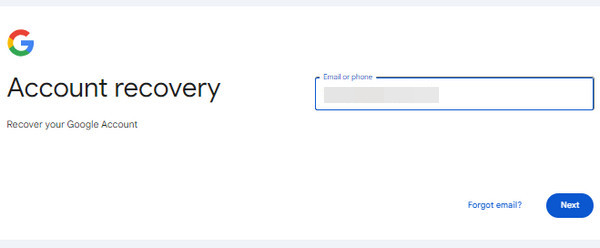
Step 3. Here, you can recall the old password that you used with this Google account and type it into the box. If you fail to recall one, you can hit the Try another way to proceed.
Step 4. If you have signed the same email address on another trusted device, you can check the email account and get the verification code. Enter the code into the box if you can.
Step 5. The last resort is to get a verification code from the phone number, since you are locked out of your phone, you can select I don't have my phone here.
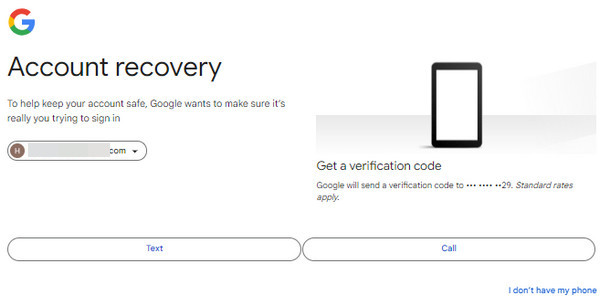
Step 6. If you have provided some matching information of your Google account, you can select Update password in a random step. Here, you can enter your new password and confirm it. Once you finish, you can select Save password and perform BLU View 2 (B131DL) FRP bypass without a PC.
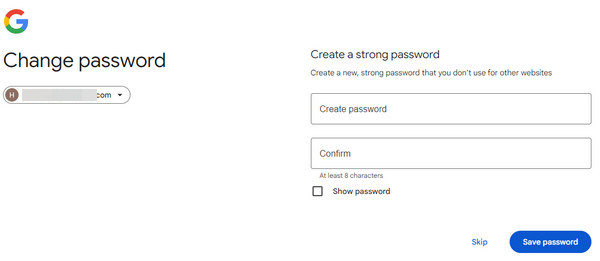
Tips: After resetting your Google account password, there may be a security delay (typically 24-72 hours) before the new password is usable on devices that have been factory reset before. This is a common Google security measure and not a system error.
Part 3: [Safe & Quick] Bypass FRP on BLU Phone with a Computer
For users who bought a second-hand phone and cannot contact the previous owner, using a dedicated FRP bypass tool on a computer is often considered a more stable and efficient way. Based on our tests with multiple BLU FRP bypassing tools, Apeaksoft DroidAide Android Unlocker offers a streamlined workflow with several simple slciks.

Downloaded by over 1,000,000 users
- Bypass Google FRP without a Google account.
- Regain access to your Android phone with no restrictions.
- Easy-to-follow steps and beginner-friendly interface.
- 24/7/365 customer and technical support.
- Also supports unlocking the BLU phone screen when you forgot the screen passcode.
Secure Download
Step 1. Free download and install this BLU FRP bypass tool from the download button above.
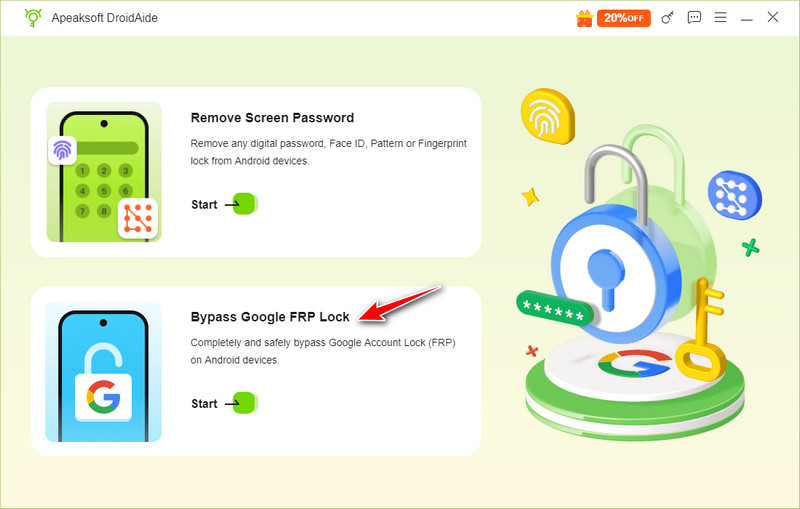
Step 2. Click Bypass Google FRP Lock on the software interface.
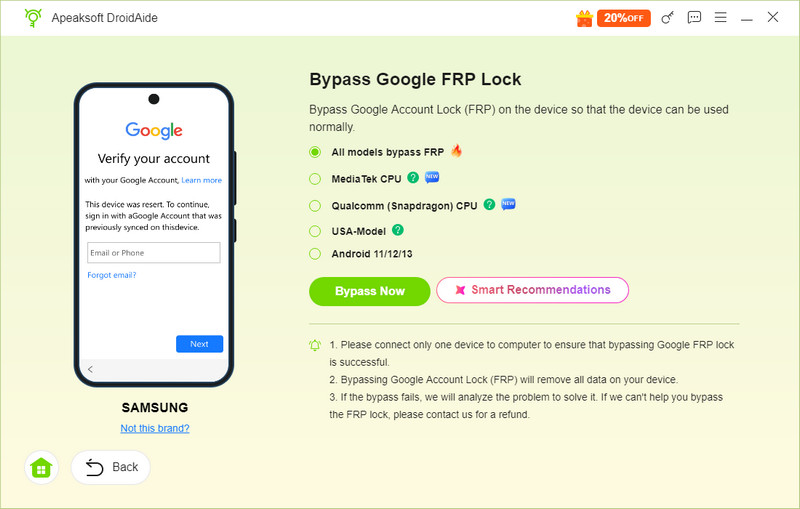
Step 3. Confirm your phone’s information and click the Bypass Now button.
Step 4. Click the Bypass Now button and follow the on-screen instructions to configure the environment.
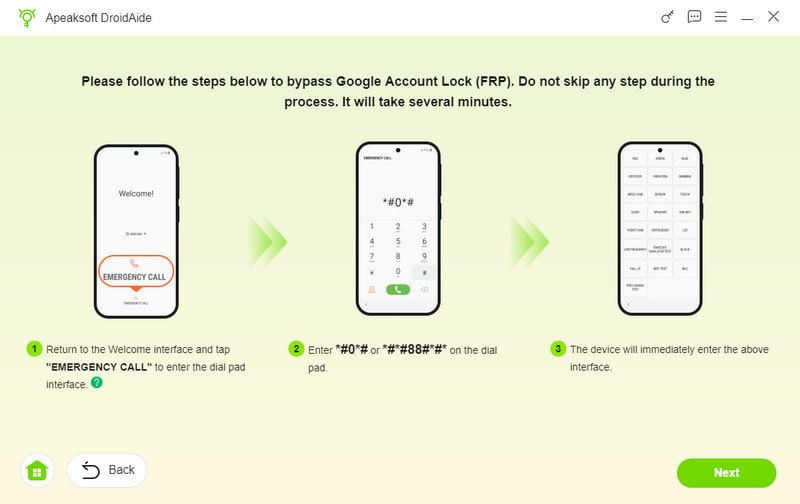
Step 5. Activate your device and wait for the FRP bypass to be finished.
Tips: This tool can also help you bypass FRP on TCL, Motorola, HTC, etc.
Part 4: Perform BLU View 3/C5L Max FRP Bypass Without PC Using a SIM Card
If you fail to remember your email address for your Google account, some older guides suggest using a SIM card as a workaround for BLU FRP bypass without an internet connection. However, this legacy trick only works on very old Android versions (Android 8 or earlier) and is unlikely to be effective on most modern devices.
Step 1. Insert a working SIM card into your locked BLU phone. Then, dial its number with another phone.
Step 2. Answer the call on your locked BLU phone and tap Add new contact to save it.
Step 3. Add any string of numbers and tap Save. Next, select Google to set up a new account.
Step 4. Then, restart your locked BLU phone and bypass the Google FRP without the Internet connection.
Part 5: Bypass BLU Phone FRP Without PC Using System Loopholes
If you are using an older Android device, you may be able to take advantage of certain system vulnerabilities that existed in earlier versions to bypass FRP. However, these loopholes were later patched in newer Android updates, so they might not work on most modern devices. Such methods are mainly for experimental or educational purposes, and results can vary depending on your phone’s model and firmware version.
If the manual tricks don’t work, it’s recommended to use a professional unlocking tool like Apeaksoft DroidAide or contact the official support team to remove the FRP lock safely and effectively.
FRP Bypass BLU Phone via Talkback (Android 11-13)
Step 1. Press and hold the Volume Up and Down keys at the same time for about 3 seconds to enter the Talkback mode.
Step 2. Draw an "L" shape pattern on the tutorial screen to activate the Use voice commands prompt.
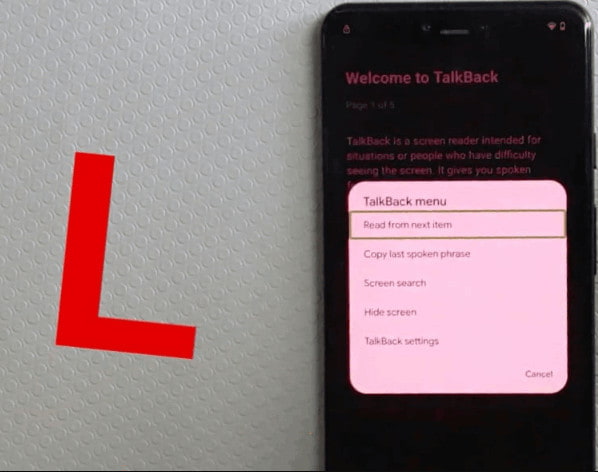
Step 3. Say "Open Google Assistant". Click twice on the keyboard. Enter Open YouTube in the search bar.
Tips: Now, you don’t need Talkback. Press and hold the Volume Up and Down keys together again for 3 seconds to disable it.
Step 4. Tap your profile and go to Settings on YouTube.
Step 5. Find About and open Google Privacy Policy to open the browser.
Step 6. Add a new Google account in the browser.
BLU FRP Bypass with Emergency Call (Android 6 and Earlier)
Step 1. Click Emergency Call and tap Emergency Information twice on the Welcome screen.
Step 2. Tap the Edit button - Name - Profile - Choose an image.
Step 3. Tap the menu button and long-press Drive or Photos to open App Info.
Step 4. Click Permissions and then press the Search pattern. Enter Settings.
Step 5. Disable Google services or add a new Google account in Settings.
Tips: The success rate of these loophole-based methods highly depends on Android security patch levels. These exploits are patched on most BLU devices updated to Android security patch level 2022-10 or later.
Part 6: FAQs about BLU FRP Bypass
Which method is the most time-saving to bypass the BLU FRP?
Using dedicated FRP removers like Apeaksoft DroidAide Android Unlocker is the most efficient and easiest way to bypass FRP on BLU phones.
Do all the methods work for all BLU models?
No. It depends on your Android models, versions, and firmware. We’ve also mentioned that some loopholes have been patched in new Android versions.
Will my data be lost using these BLU-FRP bypass methods?
Performing a factory reset will erase all your device data. The appearance of FRP usually indicates that the data has been deleted. If you want to avoid data loss, you should remove your Google account and back up important files before resetting.
Is it legal to bypass BLU FRP lock?
Keep in mind that you can only bypass the FRP lock on a device you own or have permission to use. Unauthorized bypassing may violate local laws or device terms.
Conclusion
Now, you can explore several Blu FRP bypass methods to readily bypass the Google FRP lock on your BLU phones. These approaches have been tested across different BLU models and Android versions, with varying levels of success depending on firmware and security patch level. Hope these methods will help you!
 Apeaksoft DroidAide
 Unlock your Android passwords and bypass the FRP lock easily.
Secure Download
Related Articles




