


What Is Easy Flashing FRP 8.0 APK & Does It Still Work in 2026

Key Takeaways
Easy Flashing FRP 8.0 APK is a free OTG-based FRP bypass tool that mainly works on older Android devices.
- Its success rate is the highest on Android 6-11.
- With Google updates and continuous security patches, this tool is not compatible with Android 12 and newer.
- The success rate also varies from device to device.
- Note that there are potential security risks when installing the APK from unknown sources.
- A PC-based FRP removal software is usually more reliable and compatible.
Bought a second-hand phone that’s still linked to the previous owner’s Google account? Factory reset your own device but forget the account details?
Don't worry - you're not alone. When you are stuck at the Google FRP screen, you may notice Easy Flashing FRP Bypassing 8.0 APK when you search for solutions on the Internet.
How to use Easy Flashing FRP 8.0 APK to bypass the FRP lock? Is Easy Flashing FRP 8.0 APK worth it? Does it work well to unlock FRP on your Android?
This article will give you a full review of this product.
Disclaimer
This article is for educational purposes only. FRP bypass tools should only be used on devices you legally own or are authorized to access. We do not encourage bypassing FRP on lost, stolen, or unauthorized devices. Availability and effectiveness may vary depending on the device model and Android version.
PAGE CONTENT:
Part 1: What Is Easy Flashing FRP Bypass 8.0 APK
Easy Flashing FRP Bypass 8.0 APK is an unofficial FRP bypass tool designed to unlock FRP on many Android phones. Whether it's FRP from Google or the phone brands, this app can remove it easily. Easy Flashing FRP APK 8.0 can remove the safeguard after you reset your Android, which makes it easier for you to set up the device without the login. Also, when you finish it, your Android phone will restart the protection. Unlike PC-based tools, it works directly on the phone using an OTG-based installation method.
The app exploits a setup loophole in older Android versions. During the installation process, users can install the APK file onto the device via an OTG data cable, thereby opening the system settings and performing another reset operation, which may remove the previously synced Google account.
However, you should note that Easy Flashing FRP 8.0 APK is no longer actively updated as frequently as before, and Google has gradually patched the loopholes it relies on in newer Android updates and security patches. Therefore, its compatibility with Android 12 and newer versions is very limited or even unavailable.
Part 2: Overview of Easy Flashing FRP Bypass 8.0 APK
Key Features
• Use an OTG cable to connect the USB to finish the installation on your device.
• Provided in an APK format, making it easy to download and transfer.
• Enables users to complete the entire operation directly on the mobile device, without the need for a PC or additional desktop software.
• Does not require access to Google services or logging into a Google account during the process.
Compatibility
| Dimension | Details |
| Supported devices | Samsung Galaxy A/J/M/S series, Huawei Y series, Honor, Xiaomi, Poco, Tecno, Infinix, Oppo, Realme |
| Supported Versions | Android 6.0 – 11+ |
Success Rate
| Android 6-8 | High |
| Android 9-10 | Medium |
| Android 11 and above | Low |
Unbiased Reviews
- Easy Flashing FRP 8.0 APK can quickly remove FRP for free.
- Effectively unlock FRP on Schok or other Android devices.
- Support various Android versions, including the latest one.
- It only works on older Android device and is not compatible with Android 12 and higher.
- It requires an OTG cable.
- Some safety protocols can't be bypassed.
- Low success on Samsung 2021+
- Unknown download source and potential safety risk.
Part 3: How to Use Easy Flashing FRP 8.0 on Your Android
It's very easy to use Easy Flashing FRP Bypass 8.0 APK to unlock FRP from Google on your Android phone. When you install the app, you only need to factory reset your Android phone, and then this app will give you prompts to do that. However, what's more important is how you can download the official Easy Flashing FRP 8.0 APK, for an unknown source may carry a potential virus to your devices.
Step 1. Go to the official website of Easy Flashing FRP Bypass 8.0 APK and download it.
Step 2. Find the APK file in the file manager or download manager in your browser.
Step 3. Transfer the downloaded APK file to a USB.
Step 4. Turn on your FRP-locked device and access the Google verification screen.
Step 5. Insert the USB into your locked device with an OTG cable. Your device will open the file manager automatically. Find your downloaded APK files there.
Step 6. When you install the APK files, there may be a prompt that prevents you from installing. Go to Settings - Security and enable Unknown Sources.
Step 7. Once the installation process completes, launch the app.
Step 8. Click Settings - Backup and Restore - Factory Reset in the app one by one.
Step 9. Your device will reset later. Restart your device, then, and add a new Google account if needed.
Part 4: Best Alternative to Easy Flashing FRP Bypass 8.0 APK
As you see, Easy Flashing FRP Bypass 8.0 APK doesn’t always work. Many users say it fails because it depends on old system bugs that newer Android versions have fixed. It also doesn’t support Android 12 or above, and installing it via OTG can be difficult or blocked on some devices.
In this case, Apeaksoft Android Unlocker provides a better alternative.
Best Alternative to Easy Flashing FRP Bypass APK
- Reliable official source. No APK file risks.
- Bypass the FRP lock by connecting your device to the computer.
- Finish the FRP bypass process with one click.
- Wider compatibility. Support multiple Android devices and the latest Android versions.
- 100% safe and proven high success rate.
Secure Download
Step 1. Get a free download of Apeaksoft Android Unlocker from the link above. The software will be launched automatically after the installation.
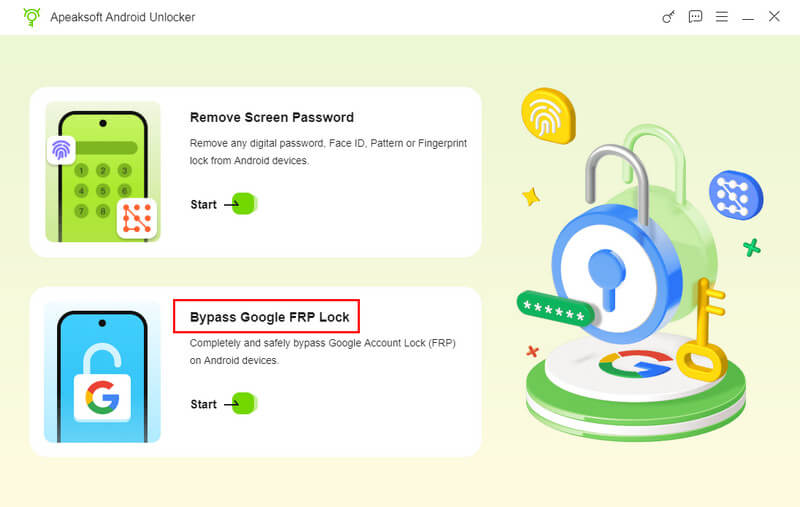
Step 2. Select the Bypass Google FRP Lock option on the main interface.
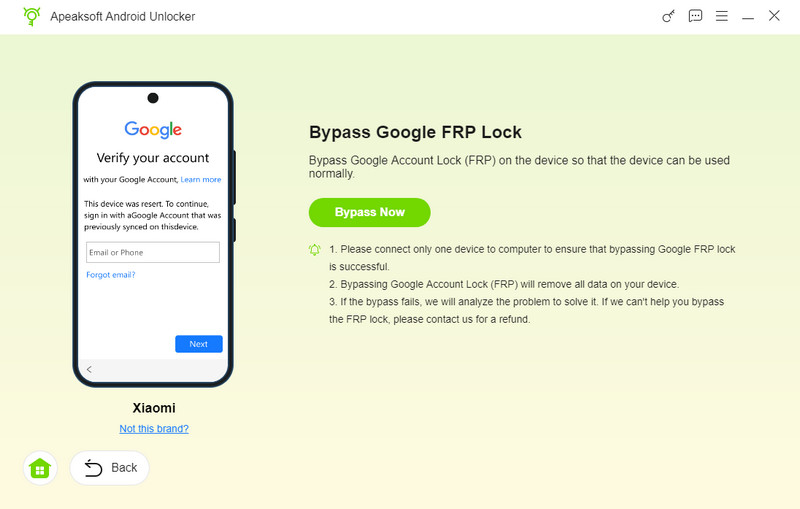
Step 3. Connect your device and choose your phone’s model. Click Bypass Now.
Step 4. Follow the on-screen instructions to set up your device, and then you can remove the FRP lock with ease.

Part 5: FAQs of Easy Flashing FRP Bypass
Can Easy Flashing FRP Bypass 8.0 APK remove the screen lock passcode?
No, Easy Flashing FRP 8.0 APK can't do Android lock screen removal. It can only remove FRP on your Android phone after you factory reset it.
Why do I fail to remove FRP with Easy Flashing FRP Bypass 8.0 APK?
It can't promise to bypass FRP one hundred percent successfully. If you want a higher success rate, you should use other Easy Flashing FRP 8.0 APK alternatives on your desktop, which are easier and more powerful.
Is it safe to use Easy Flashing FRP Bypass 8.0 APK?
It depends on the download source. Since it’s an unofficial APK, files from unknown sites may pose security risks, although it doesn’t remove all Android security protections.
Is Easy Flashing FRP Bypass 8.0 APK legal?
Yes - only if you use it on a device you legally own or are authorized to access. Otherwise, it may be illegal.
Conclusion
This article reviews Easy Flashing FRP 8.0 APK, which can remove Google Lock when you reset your Android phone. This app can do it well, but it has a lower success rate compared with Apeaksoft Android Unlocker, which is a desktop program with higher capability and compatibility. We hope that you can unlock your Android easily.
 Apeaksoft DroidAide
 Unlock your Android passwords and bypass the FRP lock easily.
Secure Download
Related Articles




