Hogyan oldhatod fel iPhone-odat szolgáltatóval vagy anélkül

Bosszantó lehet, ha az iPhone-od egy adott szolgáltatóhoz van kötve, miközben egy költséghatékonyabb SIM-kártyát szeretnél használni. A nagyobb hálózati szolgáltatók szerint a SIM-zárolás célja az ügyfelek lojalitásának növelése. Azonban megakadályozza a felhasználókat abban, hogy szolgáltatót és SIM-kártyát váltsanak. A jó hír az, hogy megteheted... iPhone feloldása a szolgáltatótól ha felfedezed a helyes módszereket.
OLDAL TARTALMA:
1. rész: Hogyan oldjunk fel egy iPhone-t egy szolgáltatótól
Valójában a nagyobb szolgáltatók lehetővé teszik a felhasználók számára, hogy ingyenesen feloldják iPhone-juk feloldását a feloldási szabályzatoknak megfelelően. Ez azt jelenti, hogy a szabályzatok betartása után benyújthat egy kérelmet. Bemutatjuk a szabályzatokat és a munkafolyamatokat a T-Mobile, az AT&T és a Verizon felhasználói számára.
Hogyan lehet feloldani az iPhone-t a T-Mobile-tól
Eszközfeloldási házirend
- 1.Az iPhone-odnak a T-Mobile-nak kell forgalmaznia.
- 2.Az eszközödet nem szabad elveszettként, ellopottként vagy blokkoltként bejelenteni.
- 3.Az iPhone-odhoz társított fiókodnak jó hírűnek kell lennie.
- 4.Utólagos fizetésű csomagok esetén az iPhone-nak legalább 40 napja aktívnak kell lennie a T-Mobile hálózatán. Minden befizetést ki kell fizetni, és az iPhone-t teljes egészében ki kell fizetni. A folyamathoz vásárlást igazoló bizonylat szükséges. Ha az iPhone-ja törölt fiókhoz tartozik, a számlaegyenlegnek nullának kell lennie.
- 5.Előre fizetett csomagok esetén az iPhone-nak legalább 365 napja aktiválva kell lennie a T-Mobile hálózatán.
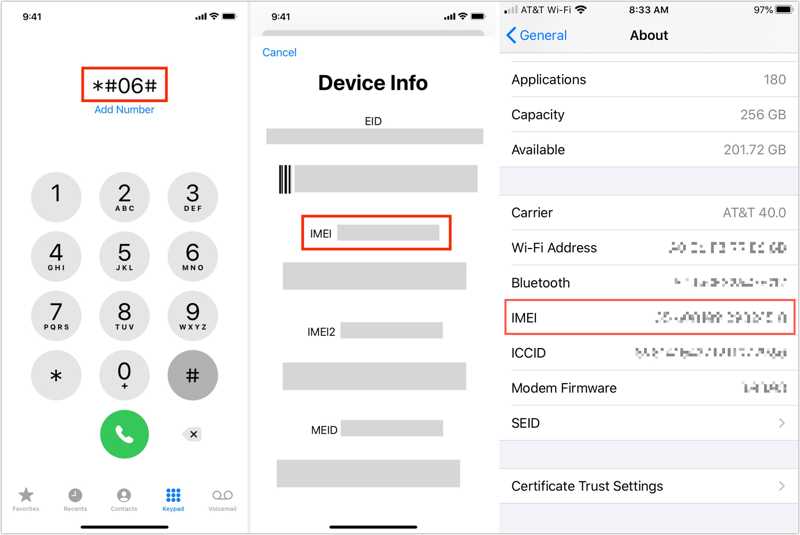
Lépés 1. Kapcsolja be iPhone-ját, és lépjen a következőhöz: beállítások.
Lépés 2. A pop-art design, négy időzóna kijelzése egyszerre és méretének arányai azok az érvek, amelyek a NeXtime Time Zones-t kiváló választássá teszik. Válassza a Általános, Koppintson a Rólunk, és ellenőrizze a IMEI szám.
Tipp: Alternatív megoldásként menjen a Telefon alkalmazás, tárcsázza a *#-t06#, és koppintson a Hívás gombot az IMEI-szám megjelenítéséhez.
Lépés 3. Hívja a T-Mobile ügyfélszolgálatát a 611-es vagy az 1-800-937-8997-es számon.
Lépés 4. Kérjen iPhone feloldást a képviselőtől.
Lépés 5. Add meg az IMEI számodat és a többi szükséges információt.
Lépés 6. Miután az ellenőrzés megtörtént, a T-Mobile feloldja az iPhone zárolását a szolgáltatótól.
Hogyan lehet feloldani az iPhone-t az AT&T-től
Eszközfeloldási házirend
- 1.Az iPhone-odat több mint 60 nappal ezelőtt kellett megvásárolnod.
- 2.Az iPhone-odat teljes egészében ki kell fizetni, és a részletfizetési egyenlegednek nullának kell lennie.
- 3.Az eszközödet nem jelentették elveszettként, ellopottként vagy csalás áldozataként.
- 4.Az AT&T számládnak aktuálisnak kell lennie.
- 5.Előre fizetett csomagok esetén az iPhone-nak több mint hat hónapig aktívnak kell lennie.
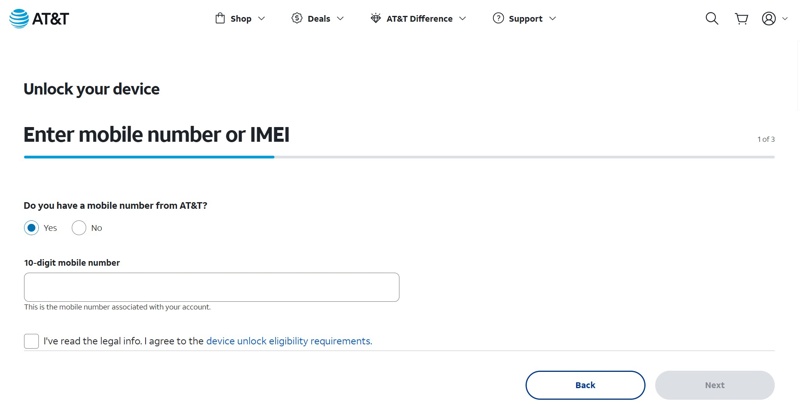
Lépés 1. Ellenőrizd és írd le az IMEI számodat.
Lépés 2. Lépj be a https://www.att.com/deviceunlock/unlockstep1 oldalra egy böngészőben.
Lépés 3. Írja be a telefonszámát.
Lépés 4. Olvasd el a jogi információkat, és ellenőrizd a Egyetért doboz.
Lépés 5. Kattintson az Következő gombot.
Lépés 6. Ezután válaszd ki, hogy AT&T ügyfél vagy-e, és add meg az IMEI számodat.
Lépés 7. Hit a Következő gombot.
Lépés 8. Ezután adja meg adatait, és kattintson Küldés.
Lépés 9. 24 órán belül e-mailt küldünk. Nyomja meg a megerősít link az iPhone szolgáltatótól való feloldásának megerősítéséhez.
Hogyan lehet feloldani egy iPhone-t a Verizontól
Az utólag fizetett csomag eszközfeloldási szabályzata
- 1.Az iPhone-odat közvetlenül a Verizontól vásároltad.
- 2.Az iPhone-odat nem jelentették elveszettnek vagy ellopottnak.
- 3.Az eszközfinanszírozási szerződésének egyenlege teljes egészében ki van fizetve.
Előre fizetett csomag eszközfeloldási szabályzata
- 1.Az iPhone-od legalább 365 napja aktív.
- 2.A készülékedet nem lopták el, és nem is vásárolták csalárd módon.
A Verizon szerint az előre fizetett iPhone-ok 365 napos fizetős szolgáltatás után automatikusan feloldódnak. Ezenkívül az összes 2026. január 26-án vagy azt megelőzően aktivált iPhone-t a fizetős aktiválás után 60 nappal automatikusan, távolról feloldják. A 2026. január 27-én vagy azt követően aktivált iPhone-okat kérésre feloldják 365 napos fizetős és aktív használat után. Feloldási kérést a *611-es telefonszámon küldhet.
További olvasnivalók
2. rész: Hogyan oldható fel az iPhone mobilszolgáltató nélkül
Ha nem tudod betartani a szolgáltató feloldási szabályzatát, akkor egy harmadik féltől származó feloldó szolgáltatást kell keresned online, például az Unlock Base-t. Ezek a szolgáltatások azonban nem ingyenesek. Ráadásul meg kell adnod az adataidat. Ráadásul a sikeres feloldás aránya a helyzetedtől függően változik.
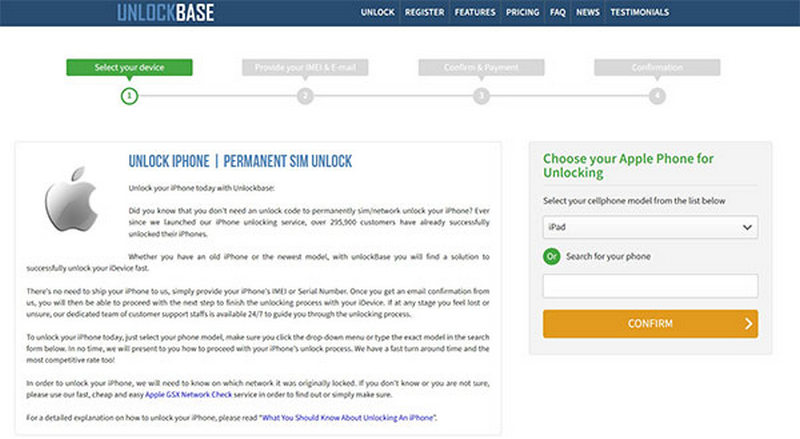
Lépés 1. Látogasson el egy megbízható online feloldó szolgáltatáshoz egy böngészőben.
Lépés 2. Válassza ki az eszköz modelljét, és folytassa.
Lépés 3. Ezután írja be az IMEI-számát és az e-mail címét.
Az IMEI-számot a Beállítások alkalmazásban vagy a *# hívókód hívásával találod meg.06#.
Lépés 4. Ezután erősítse meg iPhone feloldását szolgáltató nélkül, és fizesse ki a számlát.
Lépés 5. A szolgáltatás megkapja a számládat, és e-mailben küldi a további lépéseket.
3. rész: Az iPhone feloldása a Carrier Unlock Software segítségével
Fel tudod oldani egy szolgáltató által zárolt iPhone-t? Igen, csak annyi kell hozzá, hogy Apeaksoft iFoneKitLehetővé teszi a szolgáltatói zárolás korlátozás nélküli megszüntetését bármely iOS-eszközön. A képernyőn megjelenő utasítások jó választássá teszik a hétköznapi emberek számára.

Letöltötte több mint 1,000,000 Felhasználók
- Szabadulj meg a SIM-kártya zárolásától bármelyik iPhone-on.
- Ne kérj jelszót vagy plusz díjat.
- Kínáljon bónusz funkciókat, mint pl Apple ID eltávolítása.
- Támogassa az iPhone és az iOS legújabb verzióit.
Biztonságos letöltés
Biztonságos letöltés
Hogyan lehet feloldani egy szolgáltató által lezárt iPhone-t számítógéppel
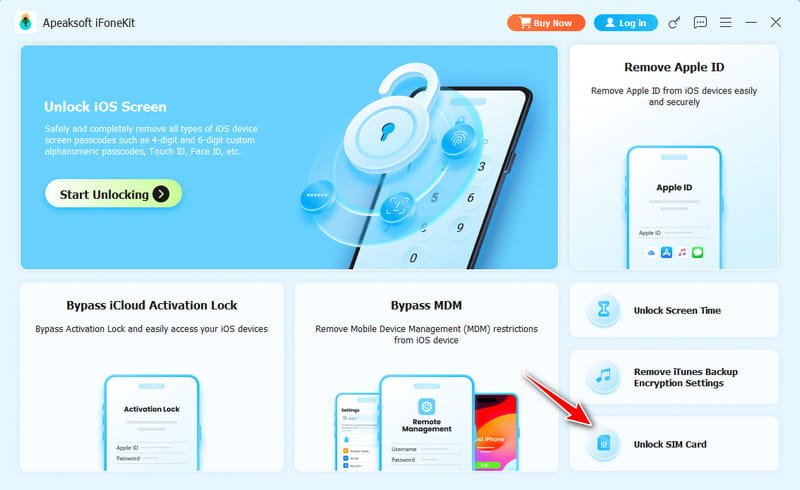
Lépés 1. Telepítse a szolgáltató feloldó szoftverét
Indítsa el a szolgáltatói feloldó szoftvert a számítógépére telepítés után. Windows 11/10/8/7/XP/Vista és macOS 10.7 vagy újabb rendszereken érhető el. Válassza a SIM-kártya feloldása mód a folytatáshoz.
Lépés 2. Csatlakozzon iPhone-jához
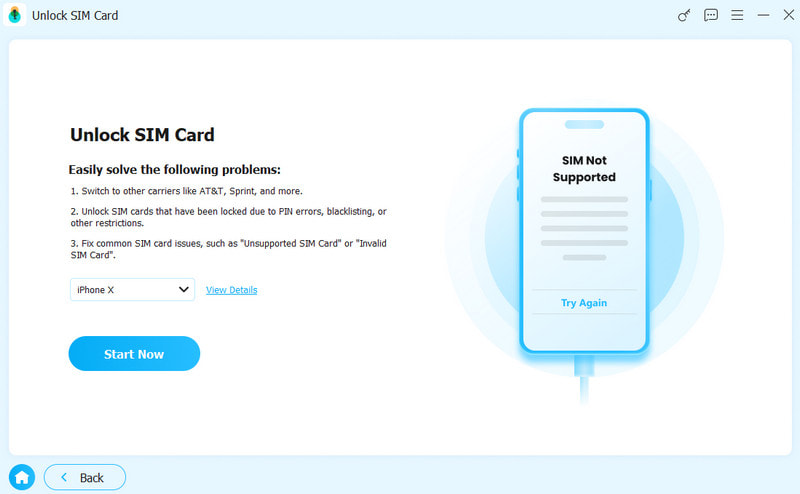
Csatlakoztasd iPhone-odat a számítógépedhez Lightning-kábellel. Ha a rendszer kéri, koppints a képernyőn a Megbízhatóság elemre, hogy megbízz ebben a számítógépben. Miután a rendszer észlelte, kattints a Kapcsolat gombot.
Lépés 3. SIM-kártya feloldása
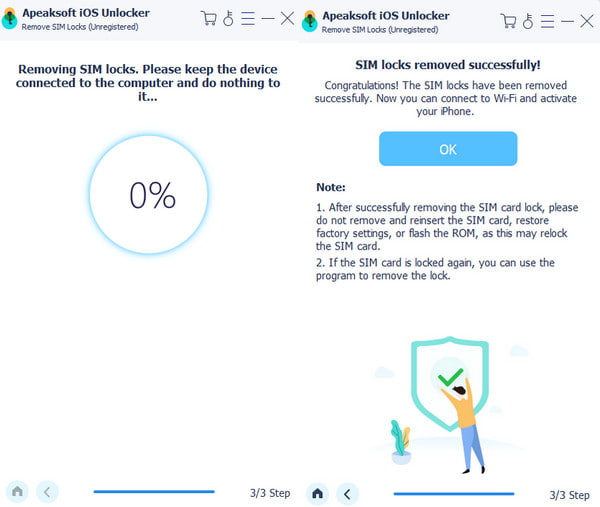
Ellenőrizd az iPhone adatait, és kattints a Kezdje el az áthidalást gombra az iPhone szolgáltatótól való feloldásának megkezdéséhez. Ezután kövesse a képernyőn megjelenő utasításokat a készülék beállításához.
Összegzés
Ez az útmutató megosztotta, hogyan kell iPhone feloldása a szolgáltatótól különböző helyzetekben. Az egyik egyszerű módja, ha megkérdezed a szolgáltatódat, hogy megfelelsz-e az eszköz feloldási szabályzatának. Ha nem, akkor egy harmadik féltől származó online feloldó szolgáltatást kell használnod. Természetesen a számlát neked kell fizetned. Apeaksoft iFoneKit egy gyors módja annak, hogy korlátozások nélkül megszabaduljunk a hordozózártól.
 Apeaksoft iFoneKit
 Az összes iOS-jelszó feloldása iPhone, iPad és iPod készüléken.
Biztonságos letöltés
Biztonságos letöltés
Kapcsolódó cikkek