

How to Find Where Do Photos Go on Computer and Mobile

Accidental photo deletion is a common problem on digital devices. It makes sense that manufacturers added something, like the Recycle Bin, into their operating systems. It means that your photos are not permanently erased from your hard drive or memory if you accidentally or intentionally delete a picture. That gives you a chance to get back your pictures. This article explains where deleted photos go on iPhones, Android phones, Windows, and macOS computers.
PAGE CONTENT:
Part 1: Where Do Deleted Photos Go on iPhone
Where Do Deleted Photos Go on iPhone
Once you tap the Delete button after selecting one or multiple photos on your iPhone, they will go to the Recently Deleted album and are stored here for up to 30 days. Before they are permanently removed, you can find out where deleted photos go on iPhone quickly.
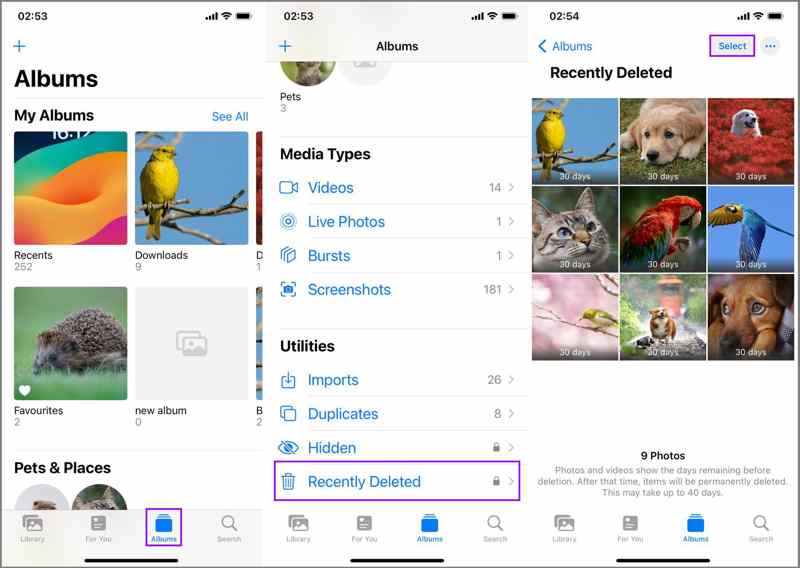
Step 1. Open the Photos app on your iPhone.
Step 2. Go to the Albums tab at the bottom.
Step 3. Choose the Recently Deleted album under Utilities.
Step 4. Here, you can see the deleted photos, recover some items, or permanently delete them.
Where Do Permanently Deleted Photos Go on iPhone
Where do photos go when permanently deleted on an iPhone? Before they are overwritten, your photos are still in the memory. Apeaksoft iPhone Data Recovery can help you find permanently deleted photos and enable you to recover them.
A Quick Way to Find Where Permanently Deleted Photos Go on iPhone
- Find permanently deleted photos on iPhone.
- View deleted photos, videos, and other data.
- Select specific photos on the iPhone for recovery.
- Won't interrupt existing photos on your iPhone.
- Work for a wide range of iPhones and iPad devices.
Secure Download
Secure Download

Here are the steps to find where permanently deleted photos go on iPhone:
Step 1. Scan your iPhone
Launch the photo recovery software after installing it on your PC. There is another version for Mac. Connect your iPhone to your PC with a Lightning cable. Then, the software will detect your device. Choose the Recover from iOS Device tab and click the Start Scan button.
Tips: If you have an iTunes or iCloud backup, choose Recover from iTunes Backup File or Recover from iCloud Backup File instead.
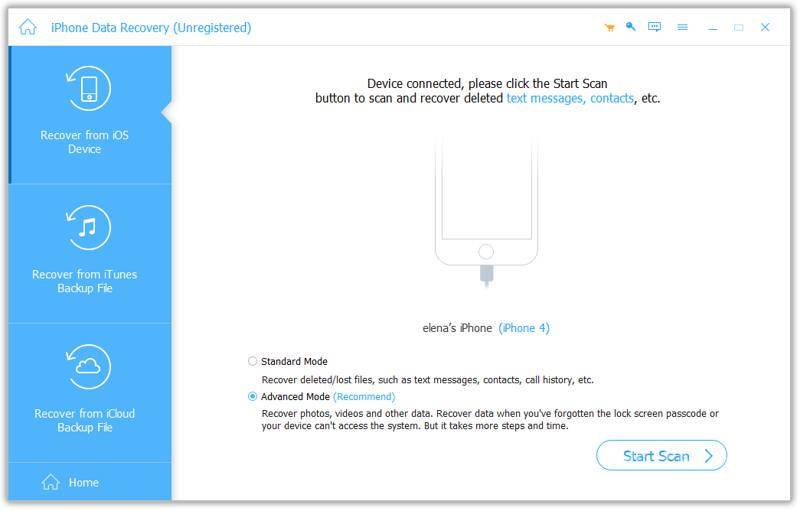
Step 2. Find deleted photos
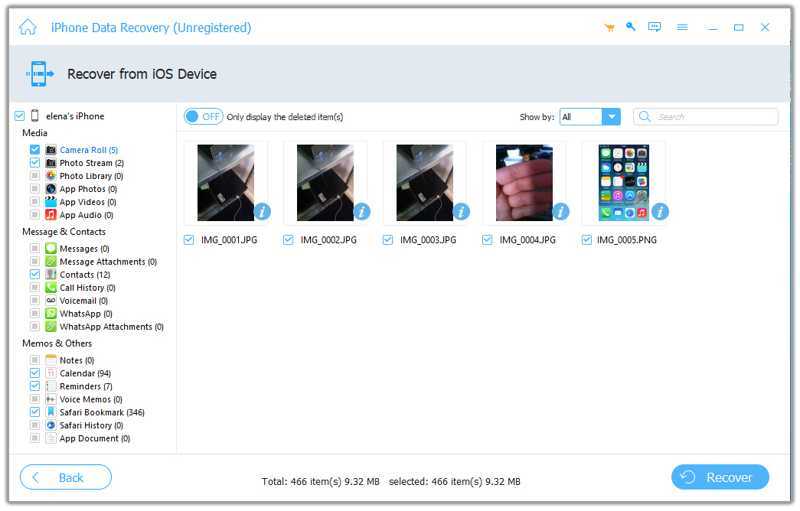
Once the iPhone scan finishes, select the data types you want to view, such as Camera Roll. Then, choose Show Deleted Only on the top ribbon to find where the permanently deleted photos are on your iPhone.
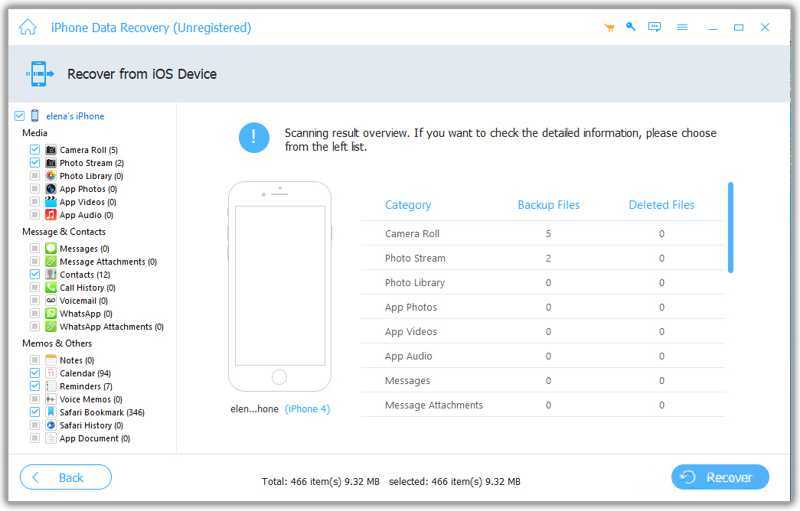
Step 3. Recover deleted photos
If you wish to recover deleted photos, select them and click the Recover button. Then, set an output folder and confirm it.
Part 2: Where Do Deleted Photos Go on Android
Where Do Deleted Photos Go on Android
Where do deleted photos go on Android? The built-in Files app comes with a Trash folder. You can find deleted photos and files in Trash. Bear in mind that the folder only keeps the recently deleted photos.
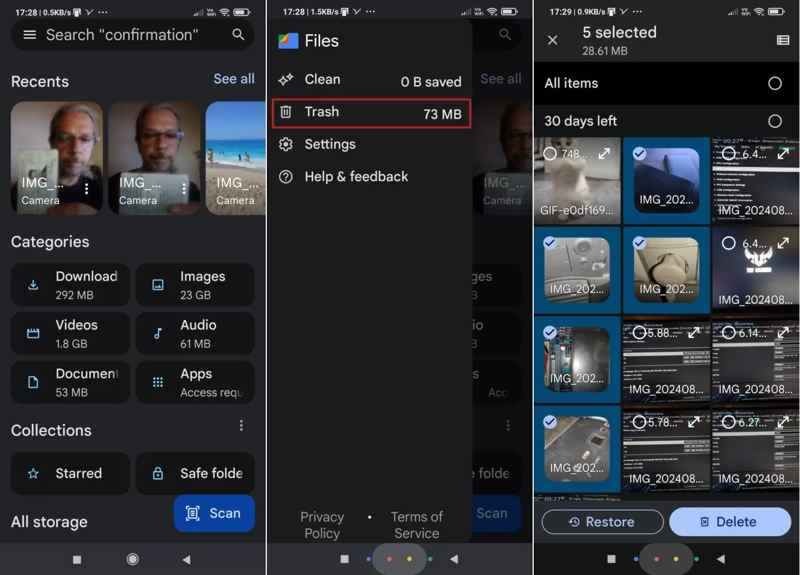
Step 1. Run the Files app on your phone.
Step 2. Tap the Hamburger button and choose Trash.
Step 3. Here, you might find recently deleted photos.
Step 4. Hold a photo, select desired items, and tap Restore.
Where Do Permanently Deleted Photos Go on Android
If you cannot find deleted photos in the Trash folder, they are permanently removed from your phone memory. Apeaksoft Android Data Recovery can help you find where permanently deleted photos go on your Android device.
A Fast Way to Find Where Permanently Deleted Photos Go on Android
- Find permanently deleted photos quickly.
- Recover deleted photos without backup.
- Work on photos in the Gallery and apps.
- Support a wide range of Android brands.
Secure Download
Secure Download

Here are the steps to find where permanently deleted photos go on Android:
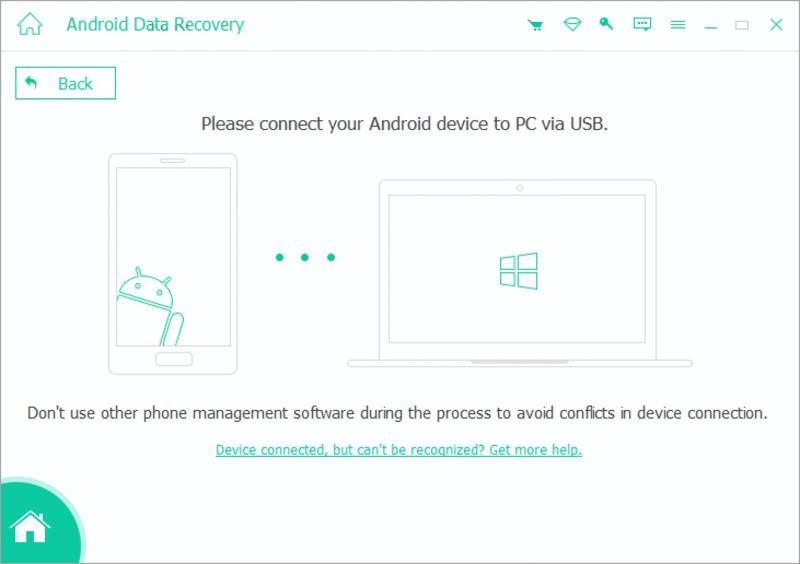
Step 1. Connect to your phone
Install the photo recovery tool on your computer and launch it. Plug your phone into your computer with a USB cable. Turn on USB Debugging mode on your phone and wait for the tool to recognize your device.
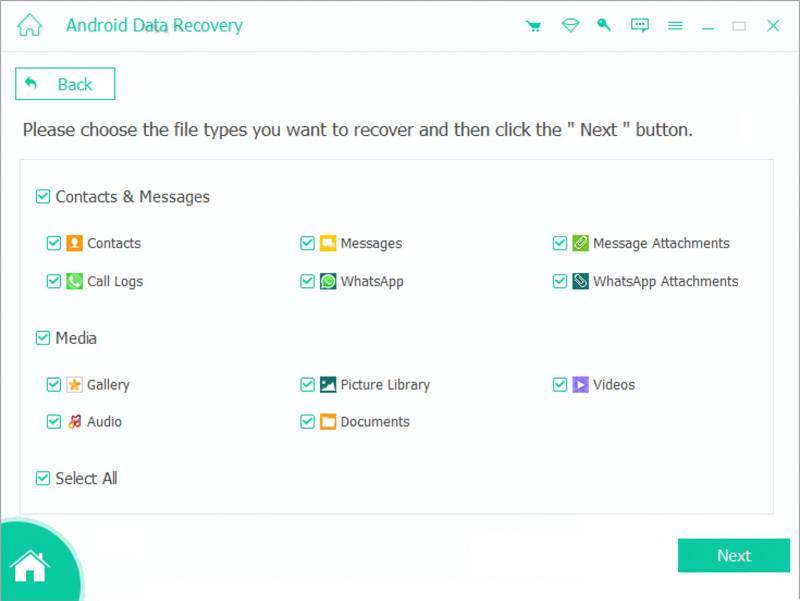
Step 2. Find deleted photos
Check the box next to Gallery and other file types you want to find. Click Next to start finding photos on your phone.
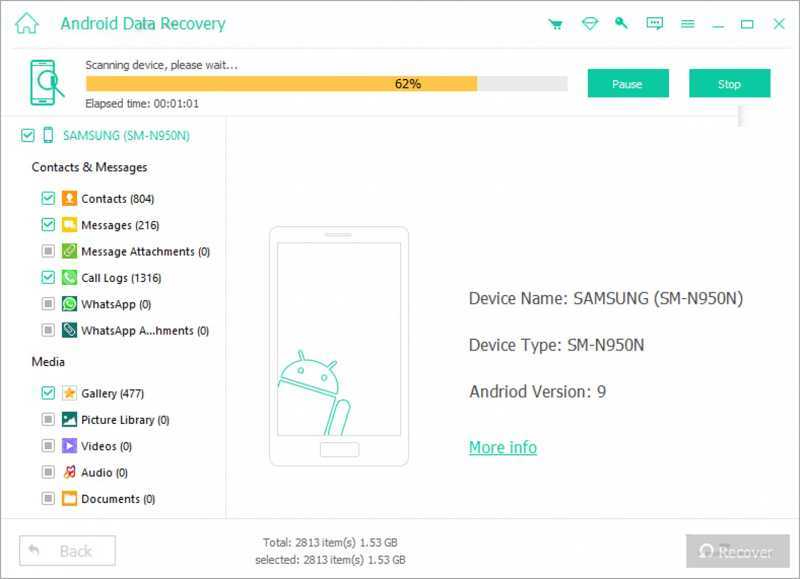
Step 3. Recover deleted photos
Next, select Gallery and toggle on Only display the deleted items to view deleted photos on your phone. Select the desired photos and click Recover. Follow the onscreen instructions to save the photos.
Further Reading
Part 3: Where Do Deleted Photos Go on Windows and Mac
Where Do Deleted Photos Go on Windows and Mac
If you delete a photo on Windows or Mac, it will be removed to the Recycle Bin or Trash folder. Before you empty the folder, you can find where deleted photos go on your computer efficiently.
On Windows
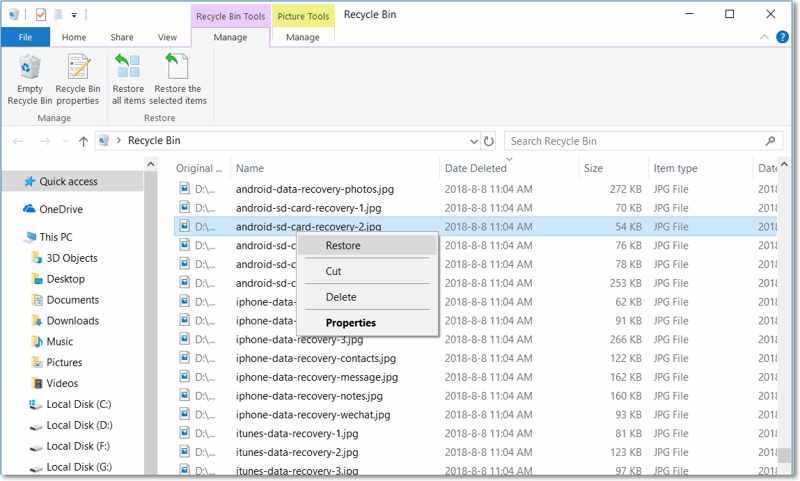
Step 1. Open the Recycle Bin from your desktop.
Step 2. Find the deleted photos and select them.
Step 3. Right-click on a selected photo and choose Restore.
On macOS

Step 1. Run the Trash from the Dock bar.
Step 2. Select a deleted photo.
Step 3. Right-click on it and choose Put Back.
Where Do Permanently Deleted Photos Go on Windows and Mac
Where do permanently deleted photos go on your computer? Apeaksoft Data Recovery can help you find them and allow you to restore photos even if they are permanently deleted or corrupted.
An Ultimate Way to Find Where Deleted Photos Go on Windows/Mac
- Retrieve deleted photos with one click.
- Preview photos for selective recovery.
- Support almost all photo formats.
- Compatible with Windows 11 to XP, macOS 10.7 or above.
Secure Download
Secure Download

Here are the steps to find where permanent photos go on your computer:
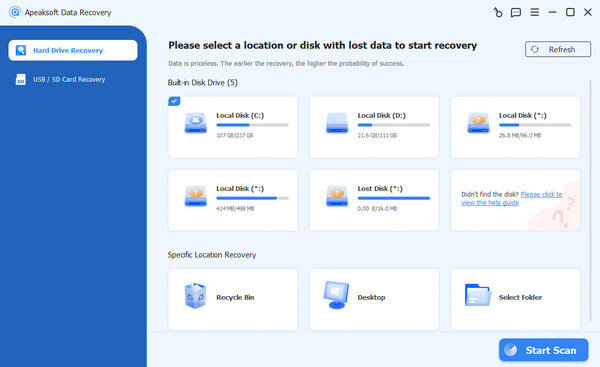
Step 1. Install photo recovery software
Run the photo recovery program once you install it on your computer. Go to Hard Drive Recovery, pick a desired disk, and click Start Scan.
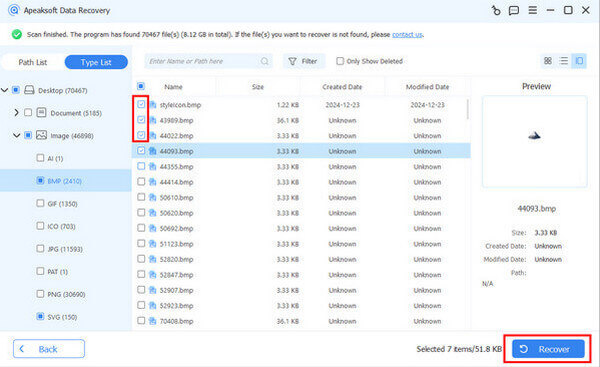
Step 2. Find deleted photos
Next, go to the Type List tab, select Image, and check Only Show Deleted to find deleted photos.

Step 3. Recover deleted photos
Select the photos you want to restore, click the Recover button, set an output folder, and confirm photo recovery.
Conclusion
Now, you should understand where photos go when permanently deleted on an iPhone, Android phone, or computer. You can follow our guide to find recently or permanently deleted pictures, even if you don't have a backup. Apeaksoft iPhone Data Recovery, Apeaksoft Android Data Recovery, and Apeaksoft Data Recovery are able to find permanently deleted photos without backup.
Related Articles




