Apeaksoft iPhone Transfer Review 2026: Tested Features & Performance

If you frequently have the need to transfer photos, videos, contacts, messages, or other files between iPhones, iPads, and computers, a dedicated iPhone transfer tool may help you save a lot of time. This report tests Apeaksoft iPhone Transfer in terms of its transfer speed, supported data types, ease of use, stability, and data integrity across common iOS transfer scenarios. If you're ready to get started, keep reading.
PAGE CONTENT:
A Quick Look at Apeaksoft iPhone Transfer
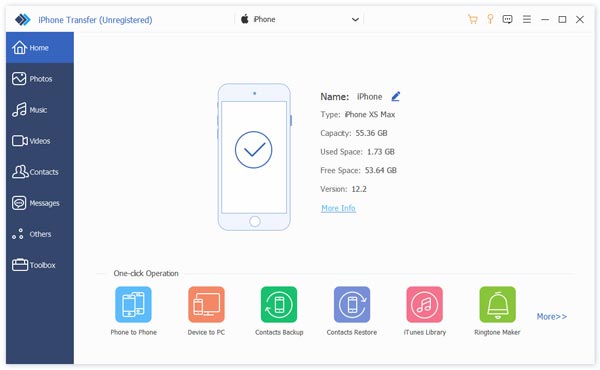
Apeaksoft iPhone Transfer is a data transfer and management tool that can transfer data between iPhone, iPad, iPod touch, and Windows or Mac computers. It can meet your daily transfer needs, such as moving files to a new iPhone, transferring data to a computer for backup, or moving selected content between iOS devices.
Unlike cloud-based services such as iCloud, Apeaksoft iPhone Transfer lets you directly transfer and manage data through a computer via a USB cable. You can preview and selectively choose what data to transfer.
| Items | Tech-Specs |
| Developer | Apeaksoft Studio |
| Supported Devices | iPhone, iPad, iPod touch |
| Computer Platforms | Windows and Mac |
| Transfer Directions | iOS device to iOS device, iOS device to computer, computer to iOS device |
| Supported Data | Photos, videos, music, contacts, messages, podcasts, ringtones, voice memos, playlists, calendars, Safari history, call history, books, app data, and more |
| Connection | USB |
| Trial Version | Available |
Standout Features of Apeaksoft iPhone Transfer
Transfer Data Between iOS Devices
One of the main reasons to use Apeaksoft iPhone Transfer is to move data directly between iOS devices. This is particularly useful when switching from an old iPhone to a new one. Instead of manually downloading files or relying entirely on cloud sync, you can select the data you need and transfer it directly.
Transfer iPhone Data to Windows or Mac
Apeaksoft iPhone Transfer also enables you to transfer data between iOS devices and computers. You can export photos, videos, music, contacts, messages, and other supported data from your iPhone to a Windows PC or Mac for backup or management.
Selective Data Transfer
The most outstanding feature of Apeaksoft iPhone Transfer is that it enables you to transfer data selectively when you do not need to transfer everything from your iPhone. Unlike a full iCloud Backup restore, Apeaksoft iPhone Transfer lets you preview and select specific data to transfer.
Multiple Data Type Support
Compared with other basic iOS transfer tools, Apeaksoft iPhone Transfer covers a broader range of data types, including photos, videos, music, contacts, messages, call history, voice memos, books, calendars, podcasts, Safari history, WhatsApp, Viber, Messenger, and more.
Secure Download
Secure Download
Lab Testing Methodology & Real Transfer Performance Results
To evaluate the real-world performance of Apeaksoft iPhone Transfer, we tested its transfer speed, stability, ease of use, and data integrity across several common iOS transfer scenarios. We tested photos, videos, music, contacts, and mixed data to see how the software performs with different file types and transfer sizes.
Test Environment
| Operating System | Windows 11 64-bit/macOS 27 Golden Gate 27.0 |
| CPU | Intel Core i7/Apple M4 Pro chip |
| RAM | 16GB |
| iPhone | iPhone 17 Pro |
| iOS Version | iOS 26 |
| Connection | USB |
| Version | 2.1.56 (at the time of testing) |
| Testing Date | October 2026 |
We tested three common transfer directions: iPhone to PC, PC to iPhone, and iPhone to iPhone. We also tested different types and sizes of iOS data.
Real Transfer Performance Results
For the first test, we transferred 1,000 photos with a total size of 4.82 GB from an iPhone to the Windows PC. The transfer took 2 minutes and 18 seconds, with an average transfer speed of approximately 35.7 MB/s.
We then transferred 5.12 GB of videos. The process took 2 minutes and 41 seconds, resulting in an average speed of approximately 32.6 MB/s.
For a mixed-data test like photos, we transferred 10.24 GB of photos in 5 minutes and 34 seconds.
| Test | Data | Size | Files | Transfer Time | Avg. Speed |
| iPhone to PC | Photos | 4.82 GB | 1,000 | 2m 18s | 35.7 MB/s |
| iPhone to PC | Videos | 5.12 GB | 25 | 2m 41s | 32.6 MB/s |
| PC to iPhone | Music | 2.06 GB | 320 | 1m 09s | 30.6 MB/s |
| iPhone to iPhone | Mixed data | 10.24 GB | 1,845 | 5m 34s | 31.4 MB/s |
In our test, transfer speeds stayed around 30-36 MB/s. The photos and videos opened normally after transfer, and we did not observe visible quality loss in the transferred media.
Pros & Cons Verified By Our Hands-On Lab Tests
- Fast transfer performance in our tests.
- Supports iPhone, iPad, and iPod touch.
- Transfers data between iOS devices and Windows/Mac.
- Supports many common iOS data types.
- Allows users to preview and selectively transfer data.
- No iCloud connection is required for direct computer-based transfers.
- A USB connection is required for direct device transfers.
- iTunes must be installed on the computer, although it does not need to be running during the transfer.
Full Pricing Tiers
Apeaksoft iPhone Transfer offers a free trial and paid licenses. The current lifetime license is listed at $49.96 for one PC, while the 1-month license is $15.60 at the time of writing.
| Plan | Price | License |
| 1-Month License | $15.60 | 1 PC/Mac |
| Lifetime License | $49.96 | 1 PC/Mac |
| iPhone Transfer + WhatsApp Transfer | $65.00 | 1 PC/Mac |
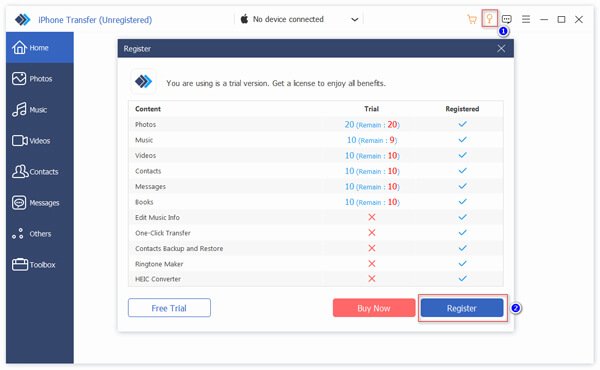
The free trial lets you test the basic transfer functions before purchasing, but some features and transfer quantities are limited.
| Content | Free Trial Limit |
| Photos | 20 |
| Media | 20 |
| Contacts | 10 |
| Each Kind of Message | 10 |
| Each Node under Others | 10 |
Apeaksoft iPhone Transfer vs iMazing vs AnyTrans vs EaseUS MobiMover
This section will compare Apeaksoft iPhone Transfer with three popular alternatives based on their key features and capabilities.
| Feature | Apeaksoft iPhone Transfer | iMazing | AnyTrans | EaseUS MobiMover |
| One-Click Transfer | Yes | No | Yes | Yes |
| Selective Transfer | Yes | Yes | Yes | Yes |
| Contacts Backup & Restore | Yes | Yes | Yes | No |
| HEIC Converter | Yes | Yes | No | Yes |
| Ringtone Maker | Yes | Yes | Yes | No |
| iCloud Manager | Yes | No | Yes | No |
| Automatic Wireless Backup | No | Yes | Yes | No |
| Backup Browsing & Extraction | No | Yes | Yes | No |
| Android to iPhone | No | No | Yes | No |
| Advanced iOS Management | Basic | Yes | Yes | Basic |
Conclusion
Apeaksoft iPhone Transfer covers most everyday file transfer and management needs, such as transferring contacts from iPhone to iPhone, backing up iPhone data to a computer, and more. If you need a straightforward iOS transfer tool without relying on iCloud, Apeaksoft iPhone Transfer may be your better choice.
 Apeaksoft iPhone Transfer
Transfer iOS data among iOS devices, computer and iTunes.
Secure Download
Secure Download
Related Articles