Apeaksoft MobieTrans Review: Features, Performance & Pricing

Hesitating about whether to use Apeaksoft MobieTrans? This Apeaksoft MobieTrans review tests its performance, supported data types, ease of use, and stability to help you decide whether it meets your everyday iPhone, Android, and PC transfer needs. Keep reading!
PAGE CONTENT:
What Is Apeaksoft MobieTrans
Apeaksoft Studio is a software provider devoted to data management and transfer solutions. Apeaksoft MobieTrans is one of its popular data transfer tools. Compared with Apeaksoft iPhone Transfer, it is relatively more comprehensive because it supports data transfers between iPhones, Android devices, and computers in multiple directions. It would be a useful choice for users who have multiple devices across different platforms.
| Items | Tech Specs |
| Developer | Apeaksoft Studio |
| Supported Devices | iPhone, iPad, iPod touch, Android |
| Computer Platform | Windows 11/10/8.1/8/7/Vista/XP |
| Transfer Directions | iOS device – iOS device, iOS device – Android, iOS device – Windows PC, Android – Windows PC |
| Supported Data | Photos, videos, music, contacts, messages, and more |
| Connection | USB |
| Trial Version | Available |
Key Features of Apeaksoft MobieTrans
Transfer Data Between iPhone and Android
One of the standout features of Apeaksoft MobieTrans is its ability to transfer data directly between Android and iPhone. Since Android and iOS are different operating systems, it is challenging to transfer data between them. Indeed, there are tools such as Move to iOS that can help users migrate from Android to iPhone, but they are mainly designed for device migration and may not offer the same flexibility for selective data transfer.
Apeaksoft MobieTrans provides a more flexible solution. When you transfer photos, videos, music, contacts, messages, or other supported data between Android and iPhone, you can preview your data and select what you want to transfer.
Transfer Data Between Android/iPhone and Windows PC
Apeaksoft MobieTrans also lets you move data between your iPhone or Android phone and computer. It supports data such as photos, videos, music, and more. It works great, especially when you want to back up your photos, edit videos, or process audio files on your computer.
Secure Download
Selective Data Transfer and Management
The most outstanding feature of Apeaksoft MobieTrans is its support for selective data transfer. Many data transfer tools, including built‑in phone features, sync everything at once. This not only takes quite a lot of time but also moves over files you do not actually need. Instead, Apeaksoft MobieTrans allows you to preview files first and choose only the data you need to transfer.
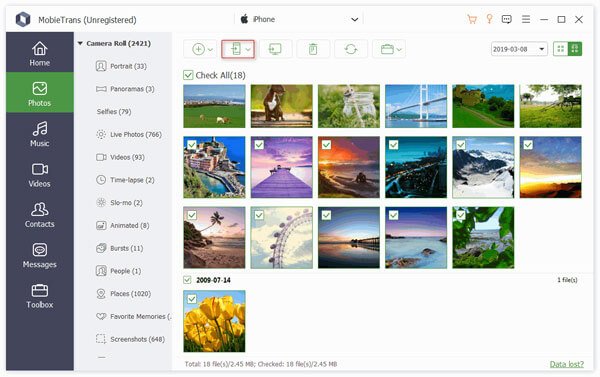
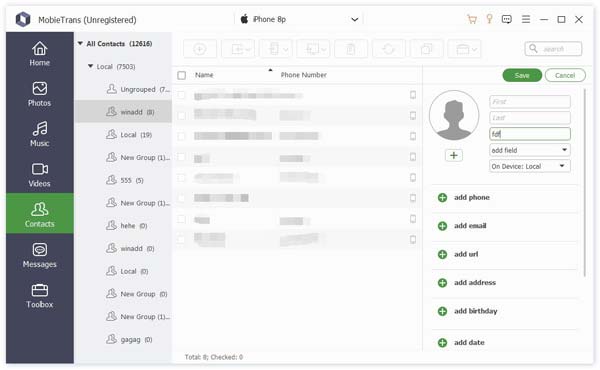
Besides, you can also manage your phone data directly within this program, such as contacts, photos, videos, music, and more. It enables you to organize, rename, or delete multiple files with ease.
HEIC Converter and Ringtone Maker
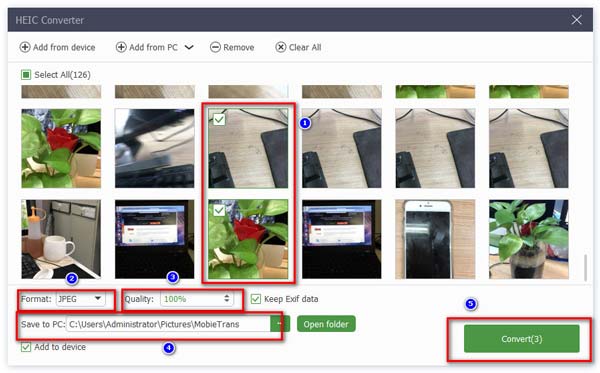
Apeaksoft MobieTrans also provides two practical built‑in tools: HEIC Converter and Ringtone Maker. Generally, photos taken on iPhones are saved in HEIC format. This format is not well supported on computers or Android devices, so you can use this tool to convert them into more compatible formats such as JPG or PNG. This lets you edit or share them on computers or Android phones with ease.
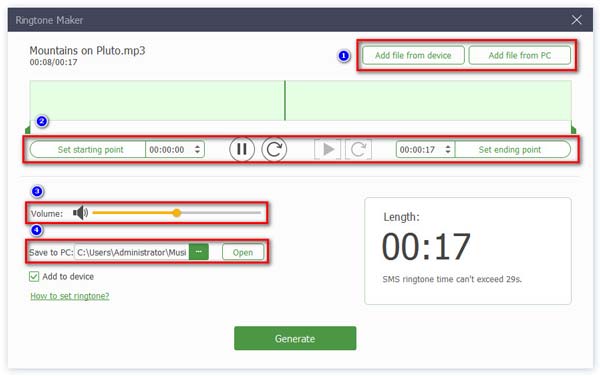
In addition, the Ringtone Maker lets you create custom ringtones. You can clip your favorite segments from audio or video files and turn them into your personalized ringtone.
Our Testing Method & Real-World Transfer Performance
To objectively evaluate the real‑world performance of Apeaksoft MobieTrans, we carried out all tests on physical devices instead of simulated environments. We checked transfer success rates, file integrity, and overall stability across different transfer tasks.
- Test environment: We test this tool on iPhone 16 Pro Max (iOS 27), Samsung Galaxy S25 (Android 16), Windows computer (Windows 11)
- Test files: The test set included 300 photos (2.8 GB), 20 videos (4.2 GB), 50 audio files (0.6 GB), and 386 contacts.
- Test scenarios: We tested 4 transfer directions: Android to iPhone, iPhone to Android, iPhone to Windows PC, and Android to Windows PC
- Test criteria: Preview, selective transfer, data completeness, quality loss, transfer speed, ease of use
Test Results
| Transfer Scenario | File Size & Type | Transfer Time | Quality Retention | Stability |
| Android to iPhone | 2.8GB Photos + 0.6GB Music | 3 min 12 s | 100% Original Quality | Stable |
| iPhone to Android | 4.2GB Videos + 386 Contacts | 4 min 45 s | No Compression / No Data Loss | Stable |
| iPhone to Windows PC | All 7.6GB Mixed Files | 6 min 20 s | Full Original Resolution & Sound Quality | No Crash / No Interruption |
| Android to Windows PC | All 7.6GB Mixed Files | 5 min 58 s | Complete File Preservation | Smooth & Responsive |
- Besides device‑to‑computer transfer, it supports cross‑platform data transfer between iPhone and Android devices.
- You can choose what to transfer with a clear preview view.
- It keeps the original quality of your data during transfer.
- It provides straightforward on‑screen guidance.
- It doesn't require an internet connection.
- You need a computer and a USB cable.
- Large media files may take a considerable amount of time.
- It only has the Windows version.
How Much Is Apeaksoft MobieTrans
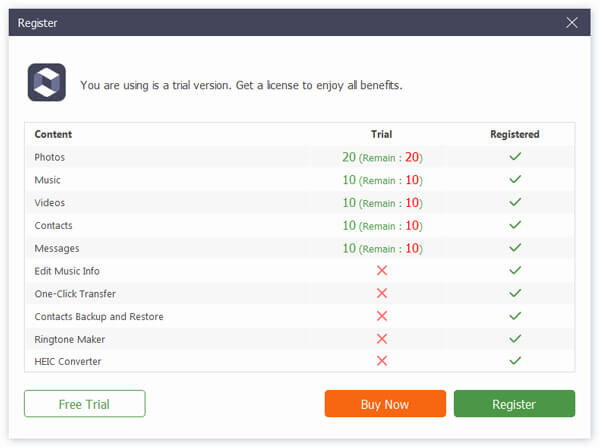
Apeaksoft MobieTrans offers a free trial and paid licenses. At the time of writing, the 1-month license is $17.95, while the lifetime license is $49.96 for one PC. Prices may change at any time. Please go to the Apeaksoft MobieTrans Pricing page to check the latest plan.
| Plan | Price | License |
| 1-Month License | $17.95 | 1 PC |
| Lifetime License | $49.96 | 1 PC |
| MobieTrans + WhatsApp Transfer | $65.00 | 1 PC |
What's worth mentioning is that Apeaksoft MobieTrans provides a trial version. You can experience it by transferring a limited amount of data to test its performance before purchasing.
Apeaksoft MobieTrans vs AnyTrans vs iMazing
To see how Apeaksoft MobieTrans compares with other popular iPhone transfer tools, we compared their key transfer and management features below.
| Feature | Apeaksoft MobieTrans | AnyTrans | iMazing |
| iOS-Android | Yes | Yes | No |
| Phone-computer | Yes | Yes | Yes |
| Selective Transfer | Yes | Yes | Yes |
| Contact Management | Yes | Yes | Yes |
| HEIC Converter | Yes | No | Yes |
| Ringtone Maker | Yes | Yes | Yes |
| WhatsApp Transfer | Add-on | Yes | Yes |
| Windows Version | Yes | Yes | Yes |
| Mac Version | No | Yes | Yes |
We can see from the table that MobieTrans, AnyTrans, and iMazing all support basic data transfer between phones and computers. However, they differ in their supported transfer directions and additional features. Compared with the other two tools, Apeaksoft MobieTrans offers more comprehensive features for cross-platform data transfer and management. However, if you use a Mac, AnyTrans or iMazing may be a better choice, as MobieTrans currently does not offer a Mac version.
Conclusion
All in all, Apeaksoft MobieTrans is worth trying if you need to transfer data between multiple devices. It covers most of the data types that can meet daily transfer needs. Its transfer speed was generally satisfactory in our tests as well. Moreover, it offers a free trial for you to test its transfer features before deciding whether to purchase it.

Related Articles