How to Unlock SIM Card Lock on Your iPhone Quickly

Switching carriers can open up a world of possibilities, allowing you to use your device with cost-effective plans or while traveling abroad. Plus, ensuring your iPhone functions seamlessly with your preferred carrier is crucial. If you purchase a new iPhone locked to a specific carrier, you cannot use a SIM card from another carrier. This guide explains how to get a SIM unlock on your iPhone and use your favorite carrier.
PAGE CONTENT:
Part 1: How to Check If Your iPhone Is Locked
Your iPhone might be locked to your carrier, but you can unlock the iPhone SIM lock. However, the method varies, depending on your situation. Most carriers have device unlock policies. If you follow the policy, your device may be SIM unlocked automatically, or you can ask your carrier to unlock your SIM card. If not, you have to use a third-party SIM unlock service. Before finding out how to unlock SIM card on iPhone, it is important to distinguish whether your iPhone is locked or not.
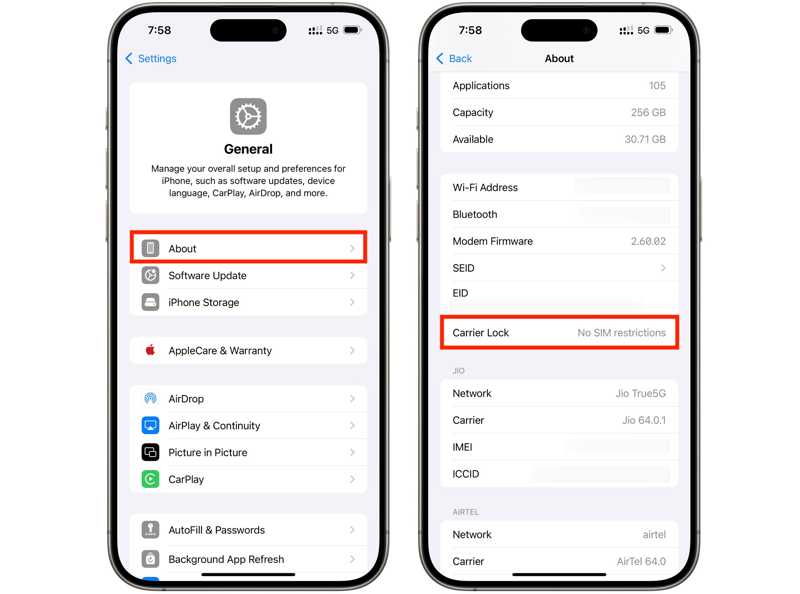
Step 1. Run your Settings app.
Step 2. Go to the General and About.
Step 3. If there is No SIM restrictions next to Carrier Lock, it means your iPhone is not locked to the SIM card. On the contrary, if there is a message like SIM locked, it means your iPhone is locked to SIM card.
Part 2: How to Unlock SIM Card on iPhone from Carriers
As mentioned previously, if you follow your carrier's device unlock policy, you can ask your carrier to unlock the iPhone SIM lock for free as long as you meet the unlock requirements.
Device Unlock Policy
The policy is different, depending on your carrier. Here, we list the common device unlock policy below:
- You must purchase your device for at least 60 days.
- You must purchase your iPhone from your carrier or authorized retailers.
- You must pay in full or in installments the balance.
- Your account status must be current.
- Your device must not be reported stolen or fraudulent.
You can find the detailed device unlocking policy on your carrier's website.
| Carrier | Device Unlock Policy |
| Verizon | https://www.verizon.com/support/device-unlocking-policy/ |
| AT&T | https://www.att.com/deviceunlock/ |
| T-Mobile | https://www.t-mobile.com/responsibility/consumer-info/policies/sim-unlock-policy |
| U.S. Cellular | https://www.uscellular.com/legal/device-unlock-policy |
| Mint Mobile | https://www.mintmobile.com/help/how-to-unlock-your-phone/ |
Essential Information Needed to Unlock iPhone SIM Card from Carrier
In addition to device unlock policies, you also prepare essential information, such as:
- Your iPhone IMEI number. Open the Phone app, dial *#06#, and check the IMEI number. Or go to the Settings app, navigate to General, choose About, and view IMEI number.
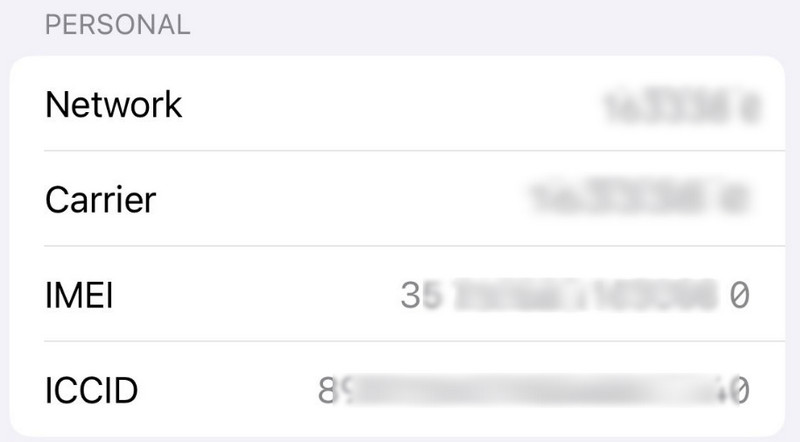
- Your network account and password.
- Your contract and relevant information.
How to Unlock SIM Card from Carrier on iPhone
Step 1. You have three options to contact your carrier:
Option 1: Call your carrier's support number
| Carrier | Customer number |
| Verizon | 800-922-0204 |
| AT&T | 800-331-0500 |
| T-Mobile | 877-453-1304 |
| U.S. Cellular | 888-944-9400 |
| Mint Mobile | 800-683-7392 |
Option 2: Visit your carrier's website.
| Carrier | Official Website |
| Verizon | https://www.verizon.com |
| AT&T | https://www.att.com |
| T-Mobile | https://www.t-mobile.com |
| U.S. Cellular | https://www.uscellular.com |
| Mint Mobile | https://www.mintmobile.com |
Option 3: Access your carrier's app.
Step 2. Offer your information.
Step 3. Request SIM unlocking.
Step 4. When your carrier receives your request, it will unlock your SIM card.
Part 3: How to Unlock the SIM Card Without Carriers [Editor's Choice]
If you can't unlock the SIM card through your carrier or are unable to meet the carrier's requirements, a third-party iPhone unlocking tool, such as Apeaksoft iFoneKit iOS Unlocker may be an alternative option. These tools are designed to unlock various iPhone locks including the SIM lock with a simple process.

Downloaded by over 1,000,000 users
- Unlock the SIM card and remove carrier restrictions easily.
- Help you use your iPhone with different compatible carriers.
- Offer bonus features, like Apple ID removal.
- Support various iPhone models and iOS versions.
Secure Download
Secure Download
How to Unlock iPhone SIM Card Without Carrier
Step 1. Connect to your iPhone
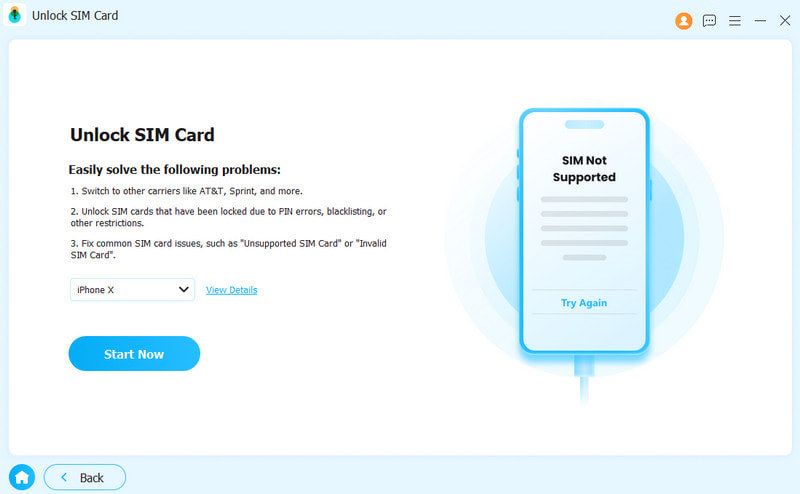
Launch the iPhone Unlocking software after you install it on your PC. Plug your iPhone into your PC with a Lightning cable. Choose the Unlock SIM Card mode.
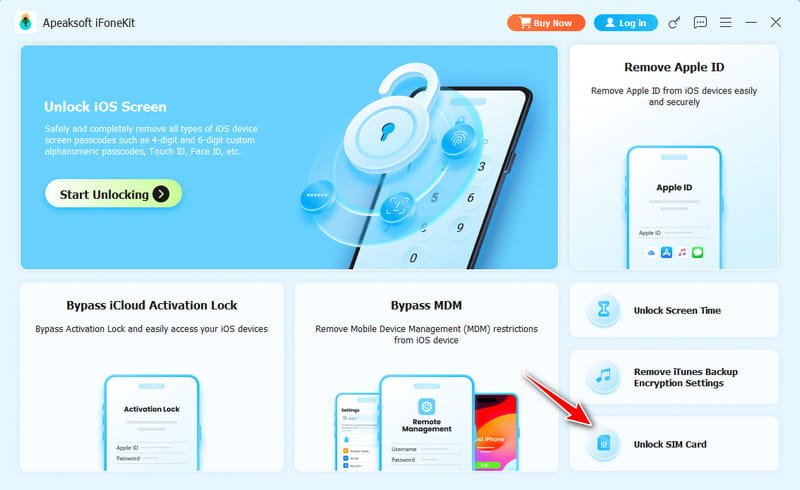
Step 2. Start the SIM removal
Check your iPhone information and correct it if any item is wrong. Click the Start Now button to download the necessary firmware. Then, press the Start Bypassing button to continue. If there is no jailbreak, you need to follow the onscreen instructions to jailbreak your iPhone first.
Step 3. Set Your iPhone
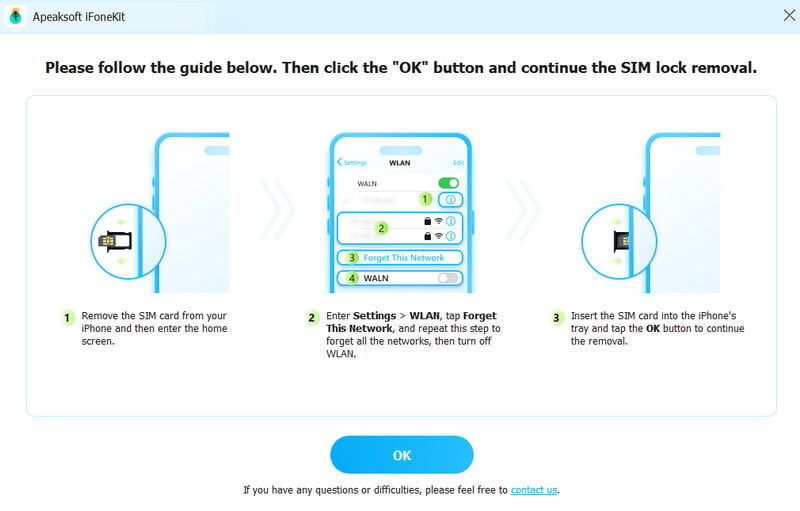
Follow the onscreen instructions to adjust your iPhone settings. Then, press the OK button to.
Step 4. Unlock SIM card successfully.
Wait for a while. Your SIM restrictions will be removed soon.
Part 4: How to Unlock iPhone SIM Card Online
If your iPhone cannot meet the unlocking policy or you cannot provide enough information, you have to unlock your iPhone SIM card using a third-party tool, such as DirectUnlocks. Bear in mind that these services are not free and the prices are different depending to your iPhone model.
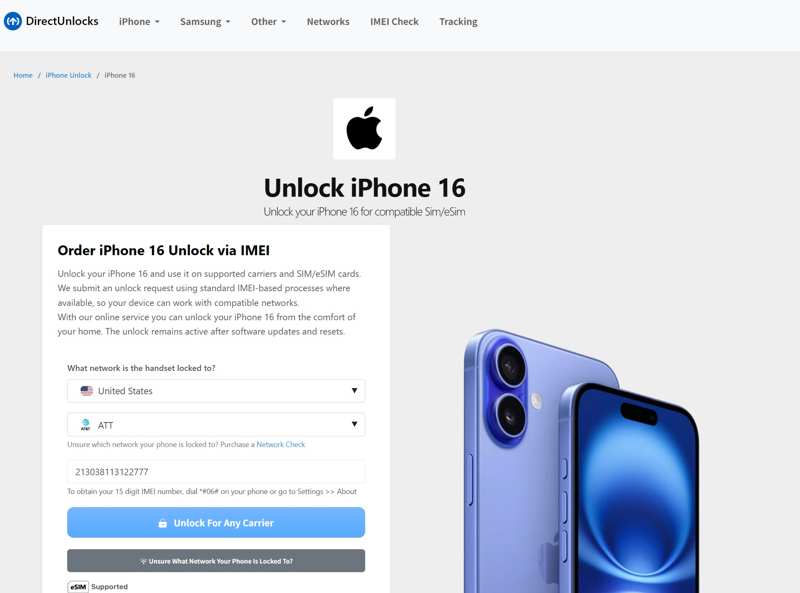
Step 1. Go to www.directunlocks.com in a browser.
Step 2. Click the iPhone menu and choose your iPhone model.
Step 3. Select your country, carrier, and enter your iPhone IMEI number.
Step 4. Click the Unlock for Any Carrier button to proceed.
Step 5. Then, pay for your order with a credit or debit card.
Step 6. Leave your email address and other information.
Step 7. After the service unlocks your SIM card, it will email you the unlock code and the remaining steps.
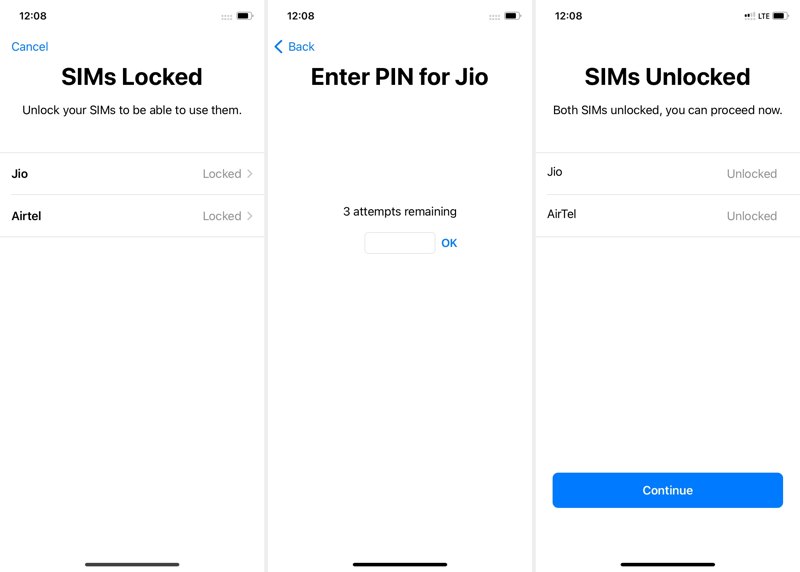
Step 8. Next, take the SIM card from your iPhone and insert it into another phone.
Step 9. When prompted, enter the unlocking code and confirm unlocking the iPhone SIM.
Part 5: FAQs About Unlocking SIM Card on iPhone
Can I unlock a SIM-locked iPhone with a PIN?
No. iPhone carrier locks are removed by the carrier after you meet their unlock requirements. You don't usually enter an unlock PIN manually.
Will unlocking the SIM card erase my iPhone data?
No. Unlocking an SIM-locked iPhone does not erase your data. Your apps, photos, contacts, messages, and other content will remain on the device.
Can I unlock my iPhone SIM card for free?
Yes. If you meet the carrier's unlock requirements, you can request a free SIM unlock from your carrier.
Conclusion
This guide shared 4 ways to unlock the SIM card on your iPhone. You can check whether your iPhone is SIM locked in your Settings app. Requesting a SIM unlock from your carrier is an easy method to get rid of the SIM lock. The PIN code is another method if you can meet your carrier's device unlocking policy. Another option is a third-party unlocking software like Apeaksoft iFoneKit iOS Unlocker or online service.
 Apeaksoft iFoneKit
 Unlock all types of iOS passwords from iPhone, iPad and iPod.
Secure Download
Secure Download
Related Articles