

How to Recover LOST.DIR Files on Android - 3 Solutions

"I am using a Samsung Galaxy S25, and I find that a folder called LOST.DIR automatically appears after every reboot. What is it?"
Some Android phone users may have heard of LOST.DIR or even have used it. But most people are not familiar with it. Considering that many people do not understand this feature, we are going to tell you the basic knowledge about the LOST DIR folder on Android devices in this post. More importantly, we will provide a detailed guide on LOST.DIR data recovery.
PAGE CONTENT:
Part 1. What Is a LOST.DIR File
First of all, let’s find out what a LOST.DIR file is. As mentioned, LOST.DIR Android is a system feature to help Android users recover files when the system boots up. It is much like the Recycle Bin of the Windows operating system. Most of the time, you cannot find anything at all. But when you are saving or moving files and your phone suddenly powers off or you pull the SD card forcefully, Android will put the copies of these files in LOST.DIR folder. So, the files can be recovered on the next boot.
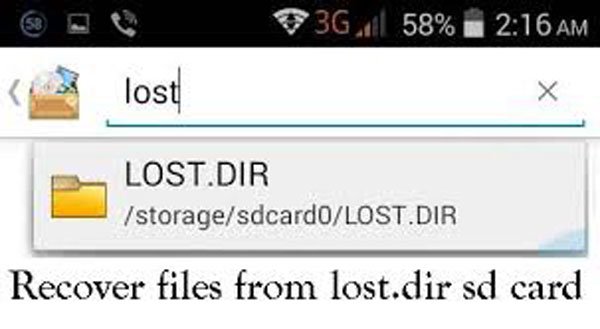
When Will You See LOST.DIR Files
Bear in mind that the copies are renamed in LOST.DIR folder. Even if you find some files with weird names in this folder, do not be surprised because they are just backup versions.
In the situations below, you will see LOST.DIR Files:
1. Pull off the SD card from your Android phone, especially when transferring data.
2. Download photos, videos, and other documents on an Android phone, but the process is disrupted suddenly.
3. Your Android phone is freezing and not responding suddenly, while you are doing something on it, such as taking photos.
4. The Android phone powers off while some read-write process is on.
Part 2: How to Recover Files From LOST.DIR from SD Card
If you do not continue to write new data to the SD card or mobile phone storage and do not overwrite the original data, you can use a professional data recovery tool to recover LOST.DIR files from the SD card. To avoid file loss permanently from an SD card of your Android phone, you’d better quickly recover them before the space is overwritten by new data. Therefore, we recommend that you try a professional LOST.DIR recovery tool, such as Apeaksoft Data Recovery.
Best LOST.DIR Files Recovery Tool
- Restore lost LOST.DIR files in original quality and format.
- Get back lost LOST.DIR files from your Android device in one click.
- Support various data types and formats, such as video, audio, document, email, ZIP, etc.
- You can decide to recover all of them or certain files selectively.
Secure Download
Secure Download

How to Recover Files from LOST.DIR Folder
Step 1. Download and install the latest version of Data Recovery on your PC, as well as connect the external SD card of your Android phone to the computer.
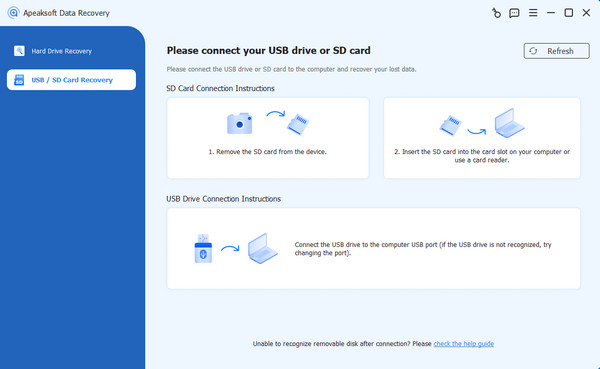
Step 2. Once you’ve launched the best LOST.DIR recovery software, choose the USB/SD Card Recovery option in the left panel. Find your SD card, and press the Scan Disk button.
Step 3. Choose your desired data type in the left navigation bar. You can see more detailed information on the right page. Select one file, and you can press the button in the top-right corner to preview it before the recovery.
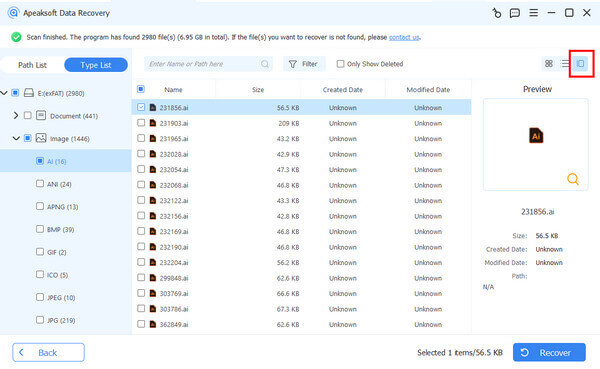
Step 4. Press the Recover button to trigger the LOST.DIR recovery process.
Tips: Moreover, this software also lets you get back the deleted orphaned files on the computer easily.
Part 3: How to Recover LOST.DIR Files by Adding a Filename Extension
Files in the LOST.DIR folder usually do not have their original file names or extensions. They are only named with numbers. If you find files inside, you can try to modify their extensions to attempt to restore the LOST.DIR file.
If you suspect it is an image, try adding the file name suffix or .png.
If you suspect it is a video, change it to .mp4 or .3gp.
If you suspect it is a document, change it to .pdf, .docx, etc.
More Tips - Recover Lost Android Data Directly
If your Android phone suddenly shuts down, crashes or is interrupted while saving photos, downloading files, or moving files, you can also recover the lost data without going through the LOST.DIR folder because sometimes the files in the LOST.DIR folder are damaged or unrecognizable. At this time, using professional Android data recovery tools will be more efficient and secure. Here, we recommend Apeaksoft Android Data Recovery.
Recover Android Data in One Click
- Retrieve Android data lost from system crash, accidental deletion, etc.
- Recover photos, videos, contacts, messages, etc., on Android.
- Support most Android models like Samsung, LG, Google, etc.
Secure Download
Secure Download

Step 1. Free download this software by pressing the button above. Install and launch it.
Step 2. Connect your Android phone to your computer.
Step 3. Enable the Developer mode on your phone.
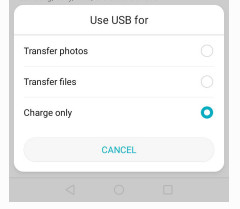
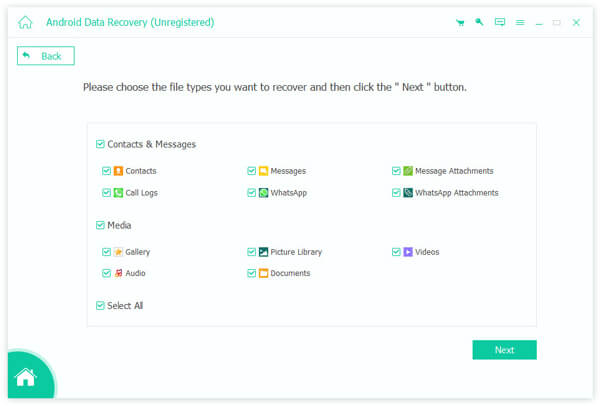
Step 4. Choose and check the data type you want to recover.
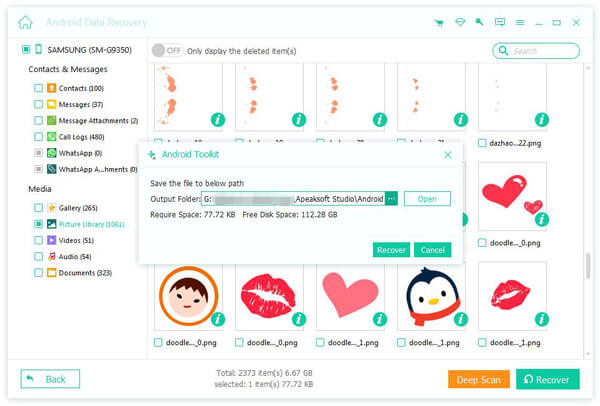
Step 5. Preview and recover them.
Part 4: FAQs of LOST.DIR Recovery
Is it safe to delete the LOST.DIR files?
The LOST.DIR folder stores the temporary files for your Android phone, and it plays an important role in recovering lost data. If you are sure there are no important files in the folder, it is safe to delete LOST.DIR to free up more space. Of course, it won't take up too much space either if it remains.
What happens if we delete the LOST.DIR folder from an SD card?
It will free up more space for your Android phone after you delete the LOST.DIR folder, but the data stored in the LOST.DIR folder will go forever, even if you use the data recovery software. After you delete the LOST.DIR folder, it will create a new LOST.DIR folder on your phone to store the new data.
How to prevent Android from creating Android Lost.DIR?
The creation of LOST.DIR comes when your phone gets stuck in a sudden crash or corruption. For preventing LOST.DIR from being created, you just need to prevent the SD card from being corrupted, just like ejecting safely, never remove while files are being modified on your phone, etc.
Conclusion
Based on the introductions above, you might understand what the LOST.DIR is. Android LOST.DIR file gives you the hope to get back lost data when Android freezing, power off, crash, etc.
In order to help you recover LOST.DIR files, we also shared a professional LOST.DIR recovery application, Apeaksoft Data Recovery. It supports a wider range of data types and formats. Plus, this digital data recovery tool simplifies the process of LOST.DIR recovery.
Now, you can stop worrying about data loss and feel free to use your Android phone!
Related Articles




