

[2026 Guide] How to Recover Data from a Toshiba Hard Drive (HDD)

Toshiba is a famous technology company producing diversity consumer electronics, including HDD hard drives.
If you have a Toshiba HDD that worked fine previously, it suddenly became corrupted, and all your official documents on it were inaccessible. What can you do to recover files from a Toshiba hard drive?
In this tutorial, we are going to analyze why your Toshiba HDD data was lost and how to perform a Toshiba HDD recovery in detail.
PAGE CONTENT:
Part 1: Common Causes for Toshiba Hard Drive Data Loss
First of all, let’s talk about what causes data loss and needs a Toshiba hard drive recovery. In the following table, we have elaborated in detail on the possible causes and the data recovery possibility when this problem occurs for your reference.
| Cause of Data Loss | Description | Data Recovery Possibility |
| Accidental deletion | Delete the files on your Toshiba hard drive by hitting Shift + Delete keys unintentionally. Or empty the Recycle Bin after delete files on Toshiba HDD. | High – Recoverable before data is overwritten |
| Accidental formatting | Format the Toshiba hard drive by accident. | Medium to High – Quick format is often recoverable |
| File system corruption | The file system becomes corrupted or unsupported by the system. | Medium – Depends on corruption severity |
| Improper removal | Pull off Toshiba hard drive forcedly and improperly. | Medium – Files may become inaccessible due to file system issues |
| Power surge | Sudden power loss or electrical issues while the hard drive is reading or writing data. | Medium – May corrupt file system or interrupt file writing |
| Virus or malware attack | Virus, Trojan, ransomware and other malicious programs attack. | Low to Medium – Recovery depends on whether files are encrypted or overwritten |
| Hardware-related issues | Hardware damage, such as the cable connects external hard drive and your computer is broken. | Low – Physical damage often requires professionals |
Part 2: Common Ways to Perform a Toshiba HDD Recovery
Before You Start Toshiba HDD Recovery: Important Steps
- 1.Stop writing data to the affected Toshiba hard drive. It may cause data overwrite, reducing the recovery possibility.
- 2.Do not perform a system restore or factory reset. It will erase the existing data permanently.
- 3.Do not format your Toshiba HDD before the recovery.
- 4.Never save the recovered drive data back to the same place.
Try Toshiba HDD Recovery with Another Computer
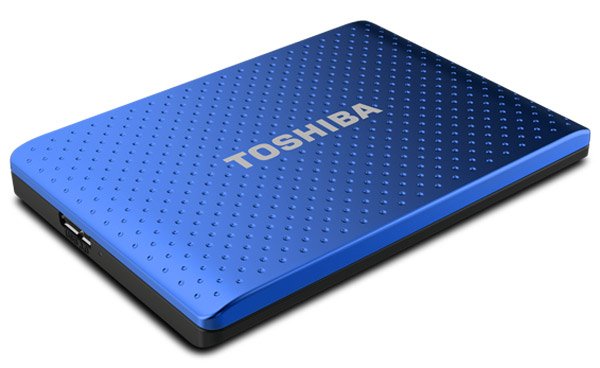
Whether your internal or external Toshiba hard drive works abnormal, you can remove it from the first computer and plug it into another machine. Maybe there are just some conflicts between the Toshiba HDD and the original computer, but not real problems. Therefore, you can change to connect your Toshiba HDD to another computer for troubleshooting.
Make sure that the Toshiba hard drive is connected to the computer correctly, and check that the cable is in good condition.
Recover a Toshiba External Hard Drive Using Professional Software
If your Toshiba external hard drive has lost files due to accidental deletion, formatting, or system errors, using professional data recovery software is the safest and most time-saving way to retrieve them. Apeaksoft Data Recovery is such an ideal tool. You can also use this tool to perform other hard drive recovery on a Toshiba laptop.
Reliable Tool for Toshiba Hard Drive Data Recovery
- Complete Toshiba drive recovery in one click.
- Recover data from RAM drive of Toshiba.
- Support recovering images, videos, audio, documents, emails, archives, and more.
- Restore deleted files to their original format and quality.
- Preview for selective Toshiba hard drive recovery.
- Available to Windows 11/10/8.1/8/Vista/XP and NTFS, FAT16, FAT32, exFAT, EXT, etc.
Secure Download
Secure Download

How to recover lost data on a Toshiba hard drive
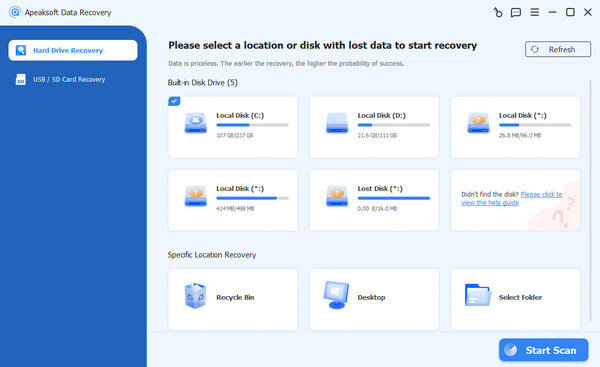
Step 1. Scan the entire Toshiba hard drive to look for data
Make sure to connect your Toshiba hard drive to your computer. Download and install the best Toshiba hard drive recovery tool on your PC.
Launch it and select your Toshiba HDD no matter it is an internal hard disk or external hard drive.
Once click the Start Scan button, Toshiba Data Recovery will work automatically.
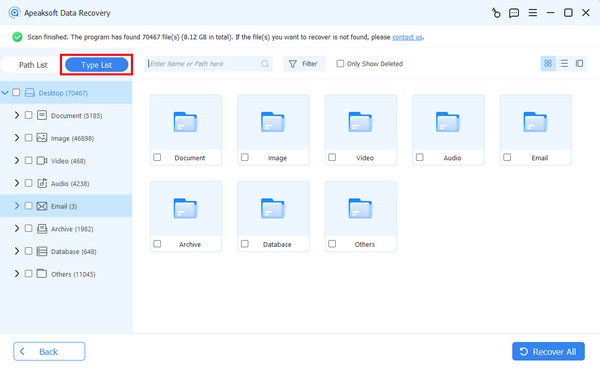
Step 2. Preview before Toshiba HDD recovery
When the result window shows up, select a data type from the left side and open the folders on the right pane to look at lost data. The Filter feature in the top ribbon could locate a single file quickly.
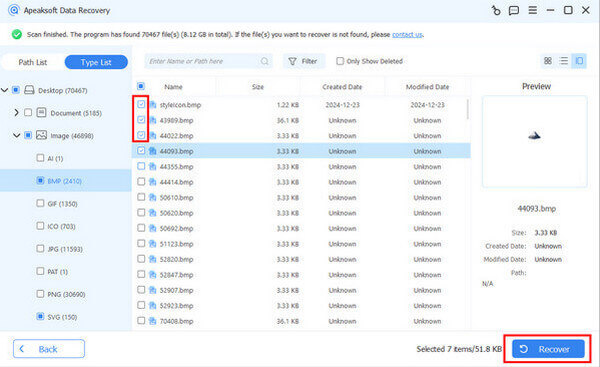
Step 3. Recover data from the Toshiba hard drive in one click
Select all files that you’d like to get back from the corrupted or damaged Toshiba hard drive. Finally, click on the Recover All button to trigger the Toshiba hard drive recovery process.
Tips:
Please note that this software cannot recover files that have already been overwritten. The recovery success rate varies depending on how the drive was used after data loss.
If your Toshiba hard drive is physically damaged, please seek help from a nearby data recovery service store.
Part 3: Recommended Tips to Prevent Toshiba HDD Data Loss
Although you can recover Toshiba hard drive data after accidental loss, it is better to take some simple preventive measures in advance to avoid many unnecessary troubles and protect important data from being lost.
- 1.Regularly back up your important files to another place.
- 2.Always safely eject the Toshiba external hard drive before unplugging.
- 3.Use a surge protector UPS to prevent power surges.
Conclusion
As a cost-effective choice, Toshiba HDD is popular around the world. It makes sense that many people search for how to make a Toshiba hard drive recovery on social platforms and forums when considering that so many people are using Toshiba HDDs.
Based on our introduction above, you might understand how to recover Toshiba HDD data and what to notice before and after the Toshiba HDD recovery. Apeaksoft Data Recovery can always be your first choice to protect your Toshiba HDD data safety.
Related Articles




