


What Is FRP Hijacker Tool and Its Guide & Best Alternatives

Key Takeaways
- FRP Hijacker is a free FRP bypass tool that only works well on older Samsung devices.
- FRP Hijacker mainly works on Android 5-9, with the highest success rate on Android 8-9.
- The success rate is low on Android 10 and newer due to updating security patches.
- The process is relatively complicated and requires a Windows computer.
- Newer FRP bypass software offer higher success rates on modern Android versions.
Locked out of your device after a factory reset and forgot your Google password?
Fortunately, FRP Hijacker can help you resolve this problem quickly. It is a free Samsung FRP bypass tool designed mainly for Android 5-9 devices. Does it really work? Is it safe? How can you use FRP Hijacker?
This article provides a comprehensive introduction and review of the best free FRP bypass tools for Samsung phones: FRP Hijacker by Hagard for your reference.
Disclaimer
This tutorial is for education purposes only. All FRP bypass tools must be used on devices that you legally own or have permission to unlock. Also note that bypassing FRP will void your device's warranty.
PAGE CONTENT:
Part 1: What Is FRP Hijacker
FRP Hijacker by Hagard is a free tool that can help you remove the FRP (Factory Reset Protection) lock designed for Samsung Galaxy phones. According to Android’s official security design, FRP is an Android security feature that requires you to verify your Google account after a factory reset to prevent unauthorized access. FRP Hijacker by Hagard is such a tool that helps you bypass FRP without Google account.
Key Features of FRP Hijacker
FRP Hijacker Tool is far more than a simple FRP bypass tool for Samsung Galaxy customers. In fact, it is a one-stop solution for troubleshooting most Galaxy phones running Android 5.0 to 9.0 (Lollipop - Pie). Its key features include:
- Bypass FRP lock on Samsung in download mode.
- Fix the Softbrick problem without flashing firmware.
- Perform ADB operation on any Samsung phone.
- Support all Samsung Galaxy phones.
- Get rid of FRP using a phone dialer.
Working Principle of FRP Hijacker
The working principle of FRP Hijacker is based on certain loopholes in the Android FRP mechanism, particularly on Android 5.0-9.0. It works by entering Download mode, using ADB commands to interact with the system and disable FRP. Sometimes, it will utilize special codes via the phone’s dialer to access hidden menus.
Compatibility of FRP Hijacker
| Supported Android Versions | Android 5.0-9.0 |
| Best For | Samsung + Android 8-9 |
| Platform | Windows Only |
| Difficulty | Medium |
Part 2: 2026 Unbiased Review of FRP Hijacker Tool
In this section, we will provide a thorough and unbiased review of FRP Hijacker based on our hands-on testing across multiple devices and Android versions, aiming to present an accurate review for your reference. Below are our testing results:
| Android 5-7 | Moderate success rate, effective on most devices with standard configurations. |
| Android 8-9 | High success rate |
| Android 10 and above | Very low success rate due to security patches |
Android versions, aiming to present an accurate review for your reference.
Apeaksoft's editorial team independently tests every tool. We verify compatibility, success rates, ease of use, and overall performance using real devices and the latest operating systems. Our reviews are based on hands-on experience, technical analysis, and user feedback. We regularly review and update the content to reflect software updates, operating system changes, and user feedback.
- Test Devices: Samsung Galaxy S8 (Android 9.0), Samsung Galaxy A5 (Android 8.0), Samsung Galaxy J7 (Android 7.0)
- Operating System: Windows 10
- Software Version: FRP Hijacker by Hagard 1.0.2.
- Network Setup: Standard Wi-Fi connection
- Simulated Scenarios: Google FRP lock after factory reset
- FRP Hijacker is free to download from the official website.
- It supports all the tested Samsung phones.
- Its success rate is highest on Android 8.0 and 9.0.
- We successfully bypass the FRP lock in download mode or using a phone dialer.
- It performs well on Windows 10.
- Your PC needs to install Microsoft Net Framework.
- Sometimes, it got stuck when bypassing FRP.
- It effectiveness on Android 10 and later is limited.
- It is not compatible with Mac.
- Program is blocked by antivirus software sometimes.
Part 3: Is FRP Hijacker Safe to Use
It is generally safe to use FRP Hijacker if you download it from official sources and use it on your own devices or have permission to unlock. However, like many tools that modify your phone's firmware, there are also potential risks:
- Some antivirus software will mistakenly label the FRP Hijacker as malicious software.
- FRP Hijacker mainly supports Samsung devices running Android 5.0 to 9.0. If used on devices that do not support it or on newer Android versions, the tool may not function properly.
- Some operations FRP Hijacker take will be regarded as an unauthorized operation by the manufacturer, resulting in invalid warranty.
- Remove the FRP lock on lost or stolen devices. This may involve illegal activities and bring legal risks.
Part 4: How to Use FRP Hijacker
If you decide to move on with FRP Hijacker after reviewing our evaluation, you can follow the step-by-step guide below to get started.
Before You Start
✔FRP Hijacker works best on Samsung Android 8-9.
❌Not Recommended for Android 10 and above.
⏱The whole process takes about 15 minutes.
How to Install FRP Hijacker by Hagard
Step 1. Access https://frp-hijacker-by-hagard.updatestar.com/ and download the latest version of FRP Hijacker.
Tips: Make sure that the Microsoft .NET Framework is properly installed on your Windows computer. Otherwise, the tool will report an error.
Step 2. You will get a RAR file on your computer. Unzip it and find the .exe file.
Step 3. Run the .exe file.
Step 4. Check the password in the FRP Hijacker password RAR file folder.
How to Use FRP Hijacker
Step 1. When setting up the tool, you may be asked to enter the password. Usually, the password is included in a text file alongside the RAR archive. Or, you can check the download page. Then, click Next to complete the setup process.
Step 2. Launch the FRP Hijack tool. Turn off your phone, and hold down the Volume Down + Power buttons at the same time. When you see the warning message on your phone, let the button combination go. Then press the Volume Up button when booting into the Download Mode.
Step 3. Connect your device to your PC with a USB cable.
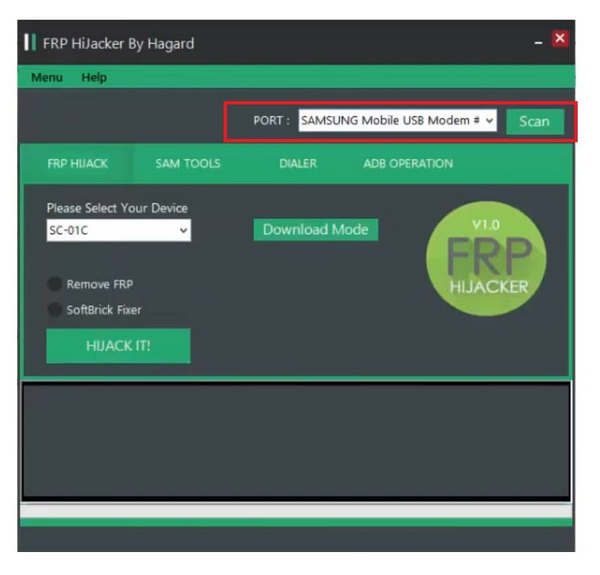
Tips: If your phone isn't detected, try installing a Samsung USB Driver or using the original USB cable.
Step 4. Hit the Scan button on the tool to detect your phone. Then select Remove FRP, and select your device model from the Please Select Your Device area.
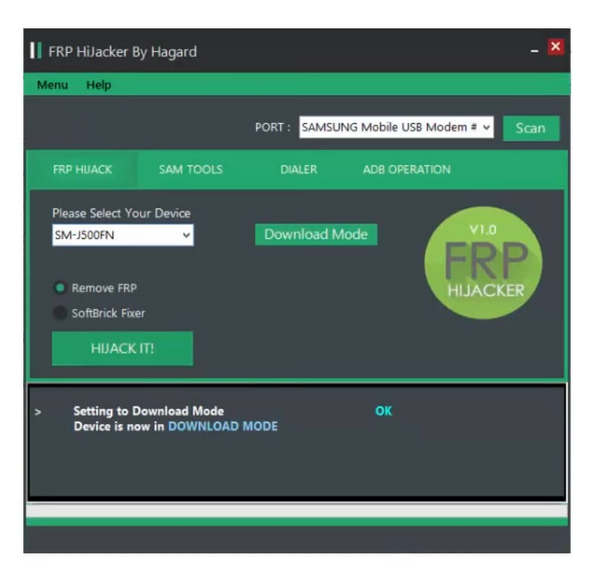
Tips: If the scan fails, try rebooting your PC or using a different USB port.
Step 5. Click the HIJACK IT! Button to trigger the FRP removal process.
Step 6. Follow the on-screen instructions carefully to ensure a successful removal.
Part 5: Top 2 Alternatives When FRP Hijacker Doesn't Work
As FRP Hijacker claims, it works only on older Samsung devices, while modern tools support Android 10–13 and offer higher success rates. If FRP Hijacker is not compatible with your Android version/model, or you’re stuck at the initial setup stage because you cannot find the password, you can consider switch to FRP Hijacker alternative solutions. Here, we list 2 popular alternatives to FRP Hijacker.
| Tools | Supported Brands | Supported Versions | Success Rate | Ease of Use | Support | Software Update | Best For |
| FRP Hijacker by Hagard | Samsung Only | Android 5-9 | ⭐⭐⭐ | ⭐⭐ | No | Seldom | Samsung Android 5-9 users who prefer free FRP bypass tools |
| Apeaksoft DroidAide Android Unlocker | All phones and tablets of Samsung and Xiaomi | Android 6.0 and above | ⭐⭐⭐⭐ | ⭐⭐⭐⭐ | 7/24/365 Professional Support | Always | Android 10+ users who need higher success rate and wider device support |
| iMyFone LockWiper (Android) | Mainly Samsung | Android 6-13 | ⭐⭐⭐⭐ | ⭐⭐⭐ | Professional customer support | Always | Users who need professional support and have much budget |
Top 1: Apeaksoft DroidAide Android Unlocker
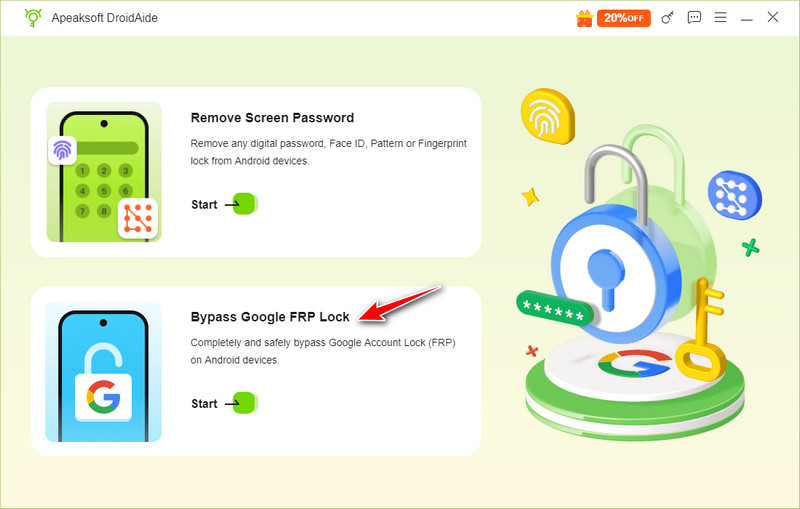
Similar to the FRP Hijacker Tool, Apeaksoft DroidAide Android Unlocker is a powerful FRP bypass tool. It enables users to get rid of FRP on relatively newer Android versions and broader device brands. The on-screen instructions are helpful for non-tech-savvy.
Secure Download
- Besides Samsung, it also supports Motorola, OnePlus, vivo, OPPO, Xiaomi, realme, Huawei, etc.
- Bypass the FRP Lock with only one click.
- Get full access to your Android phone with no restrictions.
- Work well on Windows 11/10/8.1/8/7.
- Support Android 6.0 - 16.
- You need a computer to work with you to finish the FRP bypass process.
- It is not compatible with Mac.
Top 2: iMyFone LockWiper (Android)
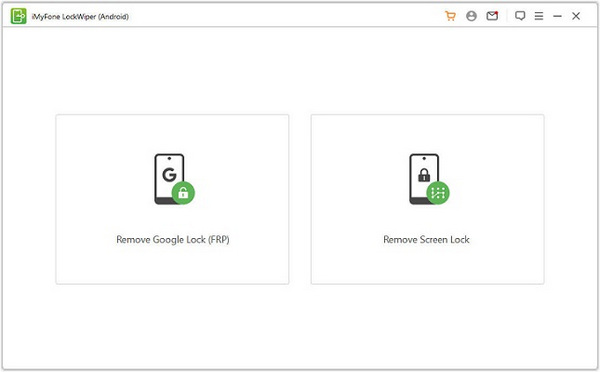
As its name indicates, iMyFone LockWiper (Android) is a lock removal software that can remove FRP and screen locks from your Samsung Android phones. Unlike FRP Hijack, you need to purchase a license before bypassing FRP, which costs from $29.95 to $49.78 per month.
- Bypass Google Account Verification quickly.
- Remove screen locks without data loss.
- Compatible with Samsung Galaxy phones.
- Deliver a high success rate.
- It lacks a free version.
- Your data will be erased after the FRP removal.
- It only works on Windows.
Part 6: FAQs of FRP Hijacker
Is FRP Hijacker legal?
Yes, it is a legal tool to bypass FRP and fix Softbrick problems on a Samsung Galaxy phone or tablet. Be aware that it should only be used in cases where legitimate access to a device is required.
Can I use FRP Hijacker for my LG phone?
No, this tool was designed for Samsung products only and it is not available to Android phones from other brands. If your LG phone is locked by a Google account, you will need an LG FRP bypass tool.
Is FRP Hijacker safe to use?
Yes, this tool is safe to use. Although a part of antivirus software may report FRP Hijacker as malware, it does not include any virus or malware if you download it from the official website. However, you’d better back up your phone before bypassing FRP using FRP Hijacker.
Why can't FRP Hijacker fail on my phone?
FRP Hijacker only supports Samsung devices running Android 5–9. It won’t work on Android 10 or newer or non‑Samsung phones.
Will FRP Hijacker erase data?
No, FRP Hijacker removes the FRP lock without deleting your phone data.
Conclusion
This article has reviewed FRP Hijacker by Hagard, one of the most popular FRP bypass tools for Samsung Galaxy phones. It can effectively remove Google lock and fix Softbrick for Samsung devices. Moreover, we recommended the top two alternatives if Hijacker does not work for you. Hope you will find this post helpful!
 Apeaksoft DroidAide
 Unlock your Android passwords and bypass the FRP lock easily.
Secure Download
Related Articles




