Apeaksoft iFoneKit iOS Unlocker Review Based Our Test

Today, there are lots of unlocking software programs for iOS devices on the market. According to our research, only partial can unlock iOS devices in different environments. For ordinary people, it is impossible to distinguish the effective tools. Apeaksoft iFoneKit iOS Unlocker, for example, is a specialized iOS unlocking tool designed to help iPhone and iPad users regain access to their devices. This article shares an in-depth review based on our lab testing.
PAGE CONTENT:
Part 1: What Is Apeaksoft iFoneKit iOS Unlocker
As mentioned previously, Apeaksoft iFoneKit iOS Unlocker is a powerful unlocking tool designed to help iOS users regain full control of their iPhone, iPad, or iPod Touch when access is restricted. Moreover, it works for almost all security measures on iOS devices, including screen locks, Apple Account password, Screen Time, MDM restrictions, and more.
Secure Download
Secure Download
Quick Snaps: Tech-specs and Compatibility
| Requirements | |
| Operating Systems | Windows 11/10/8.1/8/7/Vista/XP macOS 10.7 and above, including macOS 27 Golden Gate |
| Supported iOS | iOS 5 and iPadOS 5 or later |
| CPU | 1GHz Intel/AMD CPU or above 1GHz Intel processor and Apple M1/M2/M3/M4/M5 chip |
| RAM | 1G RAM or more |
| Supported iOS Devices | iPhone 4 and above iPad 11/10/9 and earlier, all iPad mini, iPad Air 7 and earlier, iPad Pro 8/7/6/5 and earlier iPod Touch 7/6/5/4/3/2 and earlier |
6 Key Features of Apeaksoft iFoneKit iOS Unlocker
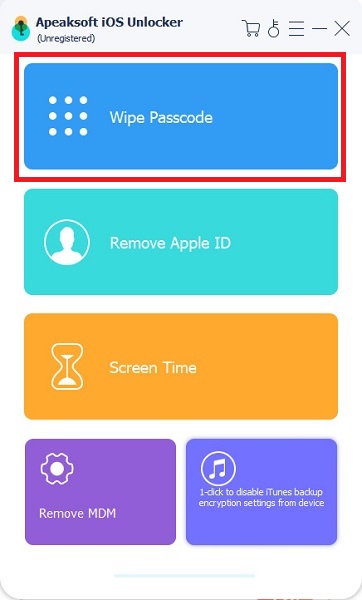
Apeaksoft iFoneKit iOS Unlocker comes with six core features. These features are available for different iOS-locked situations. They work together can help you remove any restriction passcode on iPhone efficiently.
- 1.Unlock the iOS Screen when you forgot the lock screen passcode on an iOS device. It can remove 4-digit and 6-digit passcodes, Face ID, and Touch ID. Moreover, it works for a locked, disabled, or frozen iOS device.
- 2.Remove Apple ID. If you forgot your Apple Account password or your account is locked by Apple, the software can help you remove it from your iOS device quickly.
- 3.Unlock Screen Time Passcode. To get rid of the parental controls on an iOS device when you forgot the Screen Time passcode, the software can complete the job with one click. Moreover, it protects your data during the process.
- 4.Bypass MDM. Another core feature is removing Mobile Device Management restrictions from iOS devices without the IT administrator's password.
- 5.Remove iTunes Backup Encryption Settings. After you forget your iTunes backup password, the software allows you to reset it without data loss.
- 6.Unlock SIM Card. If a specific network operator locks your iPhone, try unlocking the SIM card with iOS Unlocker. Bear in mind that this feature is available for iPhone 5s to iPhone X (A7 - A11) running iOS 12.0 - 16.
Part 2: Real-World Lab Testing & Unlock Performance Results
Tested Reviews for Apeaksoft iFoneKit iOS Unlocker
We tested Apeaksoft iFoneKit iOS Unlocker in our professional lab using a PC with Windows 11 64-bit and an iPhone 18 Pro, an iPhone X, an iPhone 7, and an iPhone 6s. Plus, we tested all core features to research whether they can work effectively.
Screen Lock Removal.
Tested Result: Work for all tested devices
Apeaksoft successfully removes the screen locks on all tested iOS devices. Remember that the process requires an internet connection to download firmware. Moreover, it performs a factory reset and erases all data on iOS devices.
Apple ID Removal
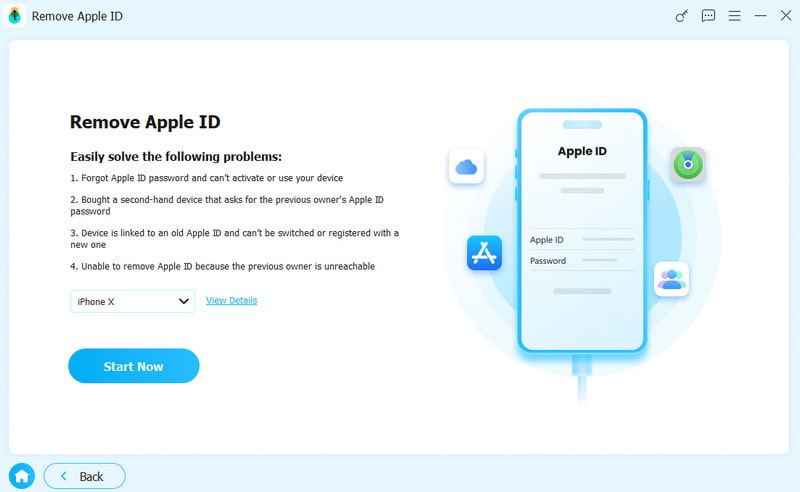
Tested Result: Work for all tested devices
The software can remove the Apple ID from activated devices, but bypassing Activation Lock requires jailbreaking your device. The process performs a factory reset. Moreover, you need to follow the onscreen instructions to set up your device to avoid rel-locking.
MDM Removal
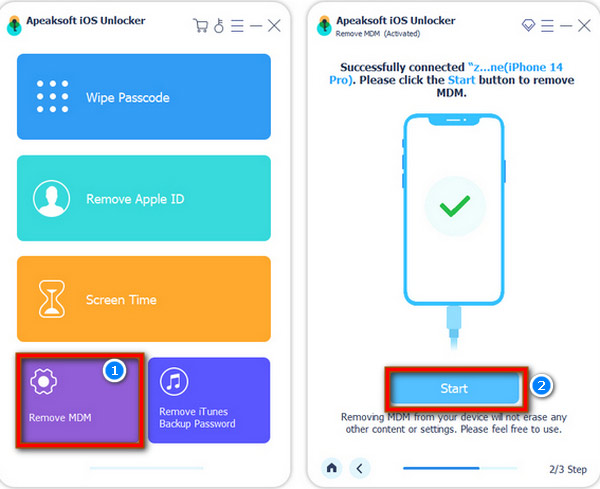
Tested Result: Work on all tested devices without data loss
The software can remove major MDM profiles from iOS devices without erasing data.
Screen Time Passcode Removal
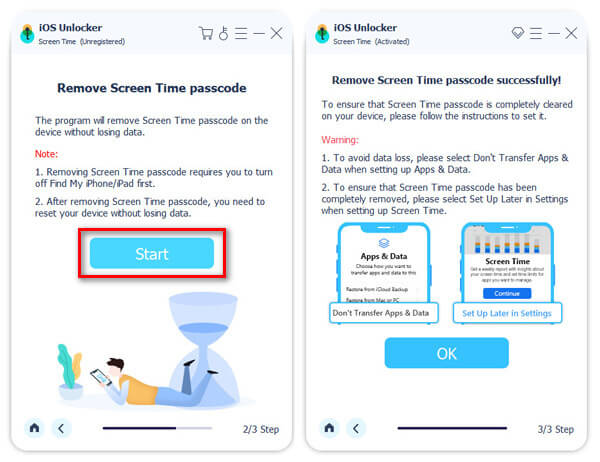
Tested Result: Work with precondition
According to our test, this feature can remove a forgotten Screen Time passcode without losing data. It requires you to turn off Find My iPhone before the process.
iTunes Backup Encryption Removal
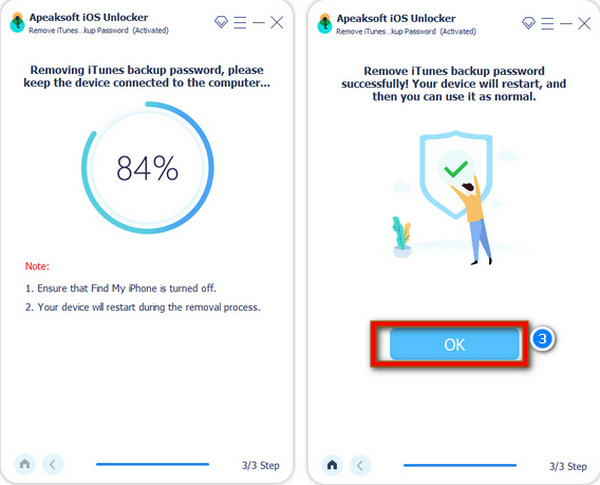
Tested Result: Work for all tested devices
Apeaksoft iFoneKit iOS Unlocker can successfully remove the encryption password from both iTunes and Finder backups.
SIM Restrictions Unlock
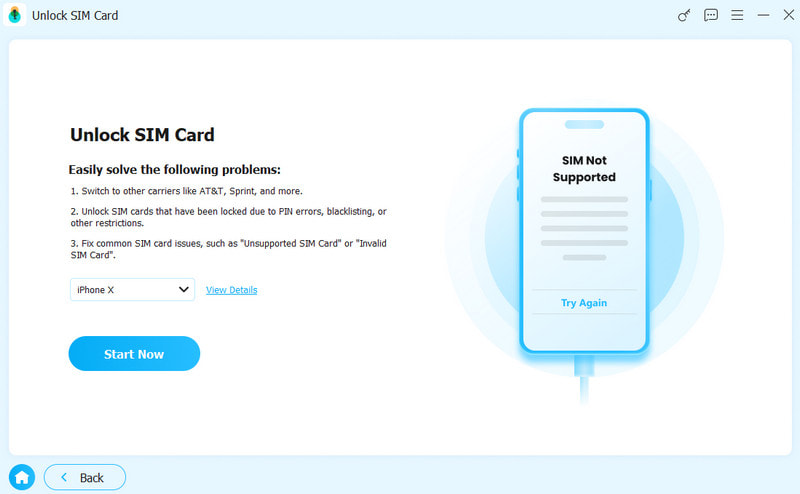
Tested Result: Work with limits
This feature can remove the SIM Card lock from specific iPhone models successfully.
Apeaksoft iFoneKit iOS Unlocker Full Pricing Tiers
Users can download Apeaksoft iFoneKit iOS Unlocker for free from the official website. After the free demo, users need to purchase a license. The 1-Month License costs $34.93, and the Lifetime License costs $59.96.
Part 3: Side-by-Side Comparison: iFoneKit vs Fixm8 vs EaseUS MobiUnlock
| iFoneKit | Fixm8 | EaseUS MobiUnlock | |
| Best for | Multiple unlocking functionalities | Unlock iPhone for free | Professional unlocking |
| Price | $34.93 per month and $59.96 lifetime | Free | $29.95 per year, $49.95 lifetime, and $399.00 for technician |
| Platform | Windows and macOS | macOS | Windows and macOS |
| Remove Screen Passcode | Yes | Yes | Yes |
| Remove Apple ID | Limited | No | Limited Only iPhone 5s to iPhone X running iOS 12 to 16.4 |
| Bypass MDM | Yes, without data loss | No | Yes |
| Remove Screen Time Passcode | Yes | No | Yes |
| User Reputation | Trustpilot 4.8/5 | Trustpilot 3.2/5 refund complaints | |
| Data Loss | Yes, when removing screen locks and Apple ID | Yes | Yes |
Bottom Line
If you need to bypass an MDM profile, unlock your screen without the passcode, reset a Screen Time passcode, or remove an old Apple ID password on a device that has no iCloud Activation Lock, Apeaksoft iFoneKit is the right option.
If you just need to freely erase the screen passcode on an old iOS device with no iCloud Lock, Fixm8 is a simple, free choice.
EaseUS MobiUnlock is similar to iFoneKit, but only delivers a high success rate on iOS 12.0 to 16.4.
To unlock iCloud Activation Lock on an iOS device, you must jailbreak it and use an iCloud bypass tool. However, the process may lead to serious results, such as data loss and hardware damage.
Part 4: Final Verdict of Apeaksoft iFoneKit iOS Unlocker
Apeaksoft iFoneKit iOS Unlocker is a feature-rich unlocking tool for iOS devices. It can remove screen locks, Apple ID, MDM, Screen Time passcode, and iTunes backup encryptions on a wide range of iPhones, almost all iPad devices, and iPod Touch.
Our technical analysis reveals that iFoneKit’s unlocking features work in most cases. Additionally, iFoneKit’s Trustpilot rating is 4.8/5. Its advantages lie in its strong reputation and its broader feature set.
Disclaimer
Unlocking your locked iOS device is legal. You must only use Apeaksoft iFoneKit iOS Unlocker on your own device. Apeaksoft’s End User License Agreement explicitly states that it doesn’t permit using the software for any illegal activity. Users bear full responsibility for any consequences of such use.
Conclusion
Now, you should understand what Apeaksoft iFoneKit iOS Unlocker is and what it can do exactly, the prices, its strengths and weaknesses, and more. According to our test, it can unlock an iOS device in different situations. Moreover, it can help you factory reset your device without a password. At last, we compared the unlocking software and the competitors. Our information can help you make the best decision before downloading the software when you forgot your lock screen passcode, Apple ID password, Screen Time passcode, MDM profile password, iTunes backup password, and more.
 Apeaksoft iFoneKit
 Unlock all types of iOS passwords from iPhone, iPad and iPod.
Secure Download
Secure Download
Related Articles