Can't Unlock T-Mobile iPhone? Here Are Effective Solutions

If you're using a T-Mobile iPhone, but the network has become terrible recently, you might feel stuck because the carrier lock prevents you from switching to a new carrier. How can you get rid of these annoying restrictions and change the carrier as you like? This guide will resolve this issue for you. Keep reading and learn the practical methods to unlock T-Mobile iPhone.
PAGE CONTENT:
Part 1: Understanding T-Mobile iPhone Unlock Policy
Many users wonder, "Can I unlock a T-Mobile iPhone for free?" The answer is yes. If your iPhone meets the policies below, you may unlock your T-Mobile iPhone easily without paying any bills.
- You bought the phone from T-Mobile.
- Your phone can't be reported as lost, stolen, or blocked to T-Mobile.
- The associated T-Mobile account is in good standing.
- Your phone must be paid in full without balances.
- For prepaid users, the phone must have been used for at least one year. If it has been used for less than one year, you must spend at least $100 in refills after activating it.
- For postpaid users, you must have used your phone for at least 40 days.
Note: If your phone has JUMP! On Demand and an active Equipment Installment Program (EIP) payment plan, it is not eligible for unlocking.
Part 2: How to Check if a T-Mobile Phone is Unlocked
Before you take measures, it's recommended to confirm the iPhone unlock status. You can check this using the following 2 methods.
Method 1: Through Your T-Mobile Account.
Step 1. Go to the T-Mobile account website and sign in with your account.
Step 2. Click Account and select the line or device you want to check.
Step 3. Under Device details, click Check device unlock status. If you see Device unlocked, your iPhone is already unlocked and can be used with any other compatible carrier. If you see Device locked, your iPhone is still locked to the T-Mobile network.
Method 2: Via the Settings App.
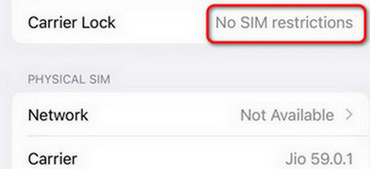
Step 1. Open the Settings app on your iPhone, then tap General > About.
Step 2. Scroll down to find Carrier Lock.
Step 3. If it says No SIM Restrictions, your iPhone is already unlocked and you don't need to.
Part 3: How to Unlock T-Mobile iPhone via T-Mobile Carrier
Before you unlock T-Mobile iPhone, check whether your device meets the requirements listed in Part 1. If your device is eligible, you can contact T-Mobile service to unlock iPhone from T-Mobile. It is the safest and most reliable method.
Step 1. Find your IMEI number.
Before contacting the carrier, you need to find your IMEI number. You can get this number by dialing #06# on your phone, or go to Settings > General > About to check your IMEI number.
Step 2. Submit an unlock request.
Go to T-Mobile app to submit an unlock request. If you can't find the app, you can dial 611 from your T-Mobile iPhone or call T-Mobile customer service at 1-800-937-8997 directly, then follow the instructions to complete the unlock process.
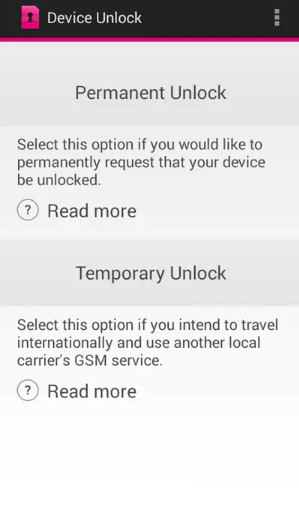
Step 3. Wait for Confirmation.
When your iPhone is unlocked, you'll receive a confirmation email from T-Mobile. You can insert a SIM card from a different provider into your phone to confirm it.
Part 4: How to Unlock T-Mobile iPhone via iFoneKit iOS Unlocker
Can I unlock T-Mobile iPhone without the carrier? Yes, you can use a professional T-Mobile iPhone unlock service to remove the SIM card carrier lock! Apeaksoft iFoneKit iOS Unlocker is an all-in-one solution to handle all kinds of iOS locks, including the T-Mobile carrier lock. Compatible with almost all iOS versions and models, it allows you to switch to any carrier and use your phone without restrictions!

Downloaded by over 1,000,000 users
- Unlock iPhone SIM card locks from various carriers.
- Unlock locked, disabled, damaged iPhones in minutes.
- Bypass iCloud Activation Lock without a password.
- Remove Screen Time and MDM limits safely and easily.
Secure Download
Secure Download
Step 1. Install and open this software on your computer, then choose the Remove SIM Locks mode on the main interface.
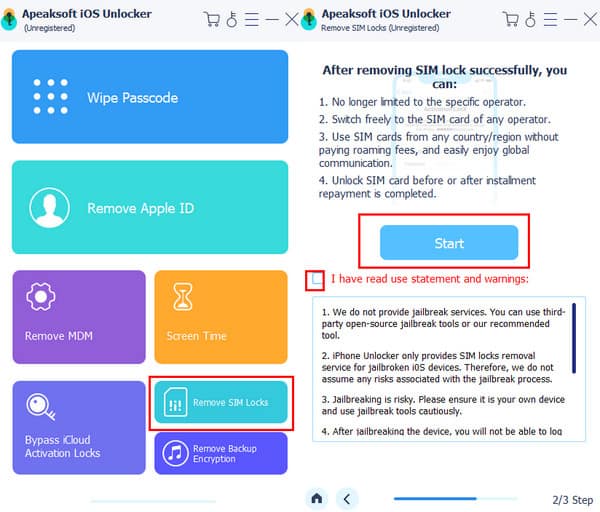
Step 2. Connect your iPhone to the computer, and click the Start Now button to continue.
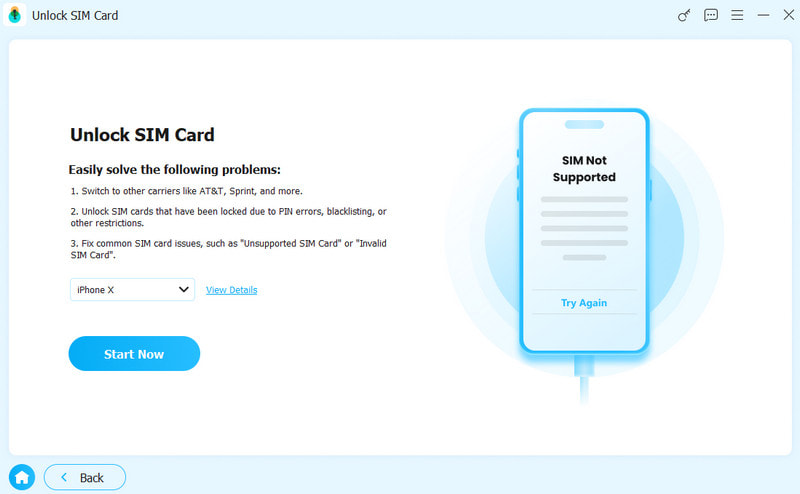
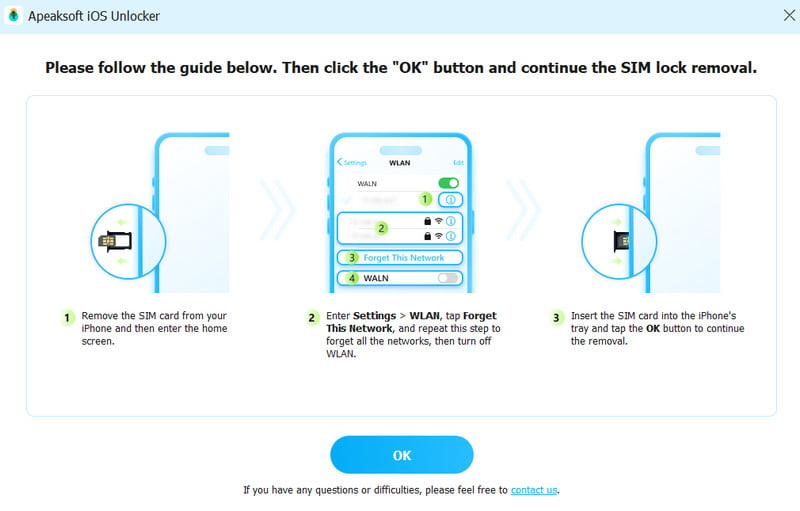
Step 3. Confirm your device information, and press the Start Bypassing button. Follow the on-screen tutorial to jailbreak and set your iPhone to the proper settings.
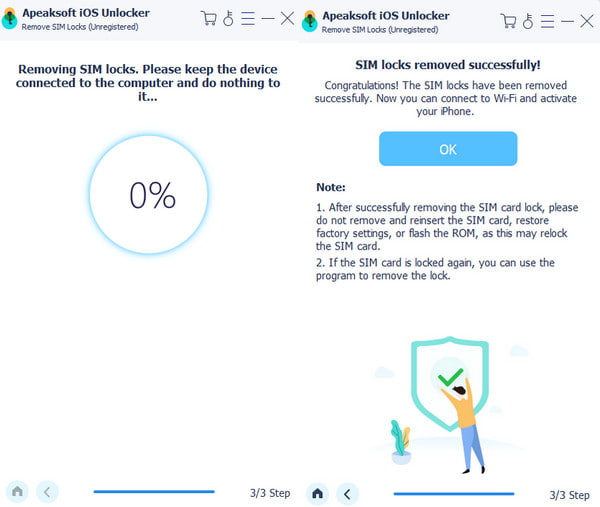
Step 4. Wait for the unlock process completes, then your SIM lock will be removed successfully.
Part 5: FAQs About Unlocking T-Mobile iPhone
Can I unlock my T-Mobile iPhone for free?
Yes. If your iPhone meets T-Mobile's unlock requirements, you can request an official unlock at no cost.
How long will it take for T-Mobile unlock process?
It usually takes 1-2 business days for T-Mobile carrier to unlock your phone. After receiving the confirmation email, you can insert a SIM card from another carrier to check whether it's unlocked.
Can I unlock T-Mobile online by myself?
Yes. You can choose a reliable T-Mobile iPhone unlock service, such as Apeaksoft iFoneKit iOS Unlocker, to unlock your iPhone SIM lock without the carrier.
Conclusion
If your iPhone meets all eligibility requirements, the official T-Mobile iPhone SIM unlock is a totally free, safe, and straightforward choice for you. If you prefer a faster way, a third-party SIM unlocker, like Apeaksoft iFoneKit iOS Unlocker, also works well as a workaround. Hope this guide has cleared up all your confusion about T-Mobile iPhone unlock iPhone!
 Apeaksoft iFoneKit
 Unlock all types of iOS passwords from iPhone, iPad and iPod.
Secure Download
Secure Download
Related Articles