Tenorshare 4MeKey Review - Features, Pros & Cons, Guide & Alternative

If you are considering Tenorshare 4MeKey for iCloud activation lock removal, you may wonder how it works, what it supports, and its strengths and limitations.
This post gives you a full Tenorshare 4MeKey review to explore its features, advantages, drawbacks, and usage. Moreover, we also introduce a great 4MeKey alternative to easily bypass the iCloud activation lock and regain access to your Apple devices.
PAGE CONTENT:
Part 1: Key Features of Tenorshare 4MeKey
iCloud Activation Lock is a security feature brought by Apple to protect iOS devices from unauthorized access. It can become problematic when users forget their Apple ID or purchase a second-hand device with an iCloud activation lock. This is where Tenorshare 4MeKey comes into play. It lets you bypass the iCloud activation lock with ease.
Key Features of Tenorshare 4MeKey
Unlike Tenorshare's other popular tool, 4uKey, which allows you to unlock iPhone without passcode or Face ID and bypass various screen locks, 4MeKey mainly focuses on bypassing iCloud Activation Lock and removing Apple ID-related restrictions.
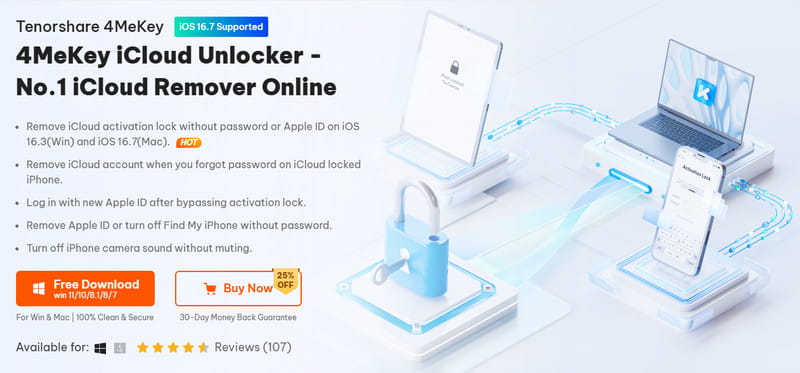
Tenorshare 4MeKey boasts several key features for iCloud activation lock removal. According to Tenorshare, it can bypass the iCloud activation lock from your iOS devices and help you regain access to your devices without the original Apple ID or password. It also offers additional features, such as removing an Apple ID without a password and turning off Find My on supported iOS versions.
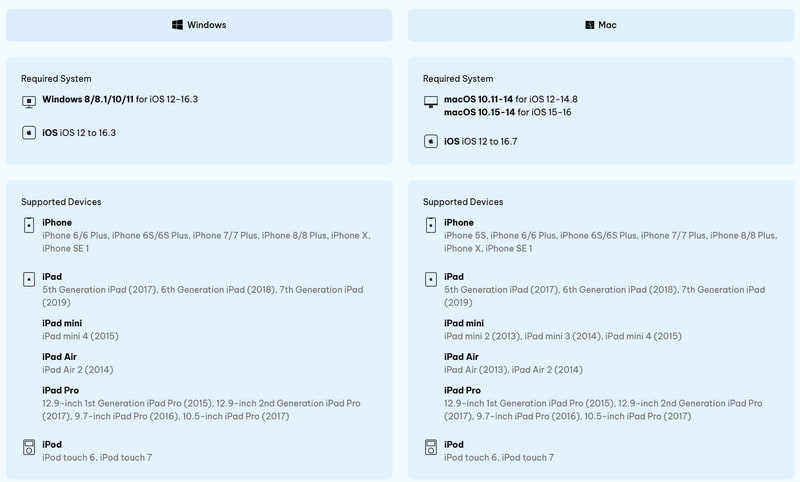
4MeKey adopts advanced algorithms to ensure you can remove the iCloud activation lock within minutes. It supports a broad range of iOS devices, including iPhone 5S through iPhone X, the first-generation iPhone SE, several iPad and iPad Pro models, and iPod touch 6/7, with supported iOS versions up to iOS 16.3 on Windows and iOS 16.7 on Mac.
Part 2: Detailed Review of Tenorshare 4MeKey
Tenorshare 4MeKey has several advantages, making it a preferred choice for iCloud activation lock removal. Tenorshare claims that 4MeKey has a high success rate in bypassing iCloud Activation Lock, which was also the case in our hands-on tests. In our tests, we successfully bypassed the Activation Lock on all 3 supported devices: an iPhone 6S (iOS 14.8), an iPhone X (iOS 15), and an iPhone 8 (iOS 16).
Moreover, 4MeKey has a user-friendly and intuitive interface that ensures all users can easily access all its functions. As mentioned above, 4MeKey gives a fast and simple way to remove the iCloud activation lock.
However, 4MeKey also has some limitations. Compared with some other paid unlocking tools that support iOS 17, 4MeKey has more limited compatibility, with support currently extending only up to iOS 16.7. Moreover, its feature set is also relatively limited compared with competing tools in a similar price range.
In addition, Tenorshare 4MeKey will jailbreak your iOS device before the iCloud activation lock is removed (though jailbreaking is also required by many similar tools). And according to Tenorshare, after the iCloud Activation Lock is removed, you cannot use the device for phone calls or cellular services, or sign in to iCloud with a new Apple ID from Settings.
Part 3: About Tenorshare 4MeKey Pricing
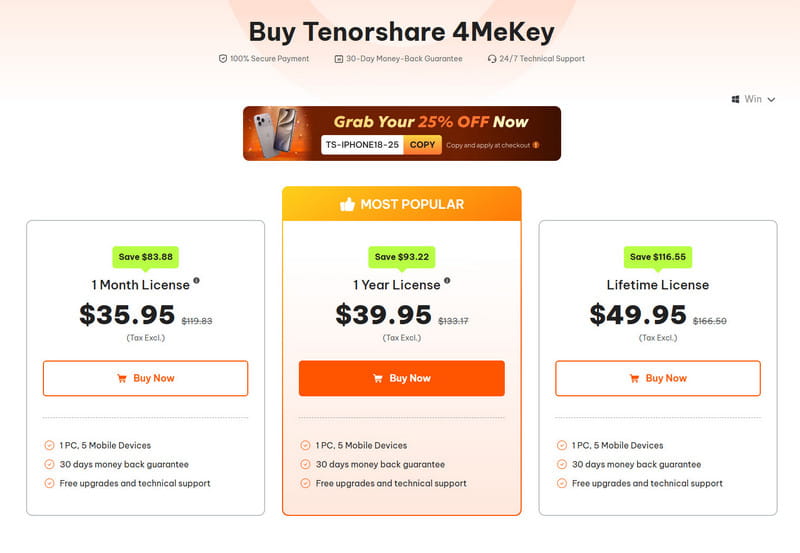
If you are ready to purchase this tool, you should note that Tenorshare 4MeKey offers separate pricing plans for Windows and Mac. At the time of writing, the current Windows version costs $35.95 for one month, $39.95 for one year, and $49.95 for a lifetime license.
At the time of writing, the Mac version starts at $45.95 for a one-month license, $59.95 for a one-year license, and $69.95 for a lifetime license.
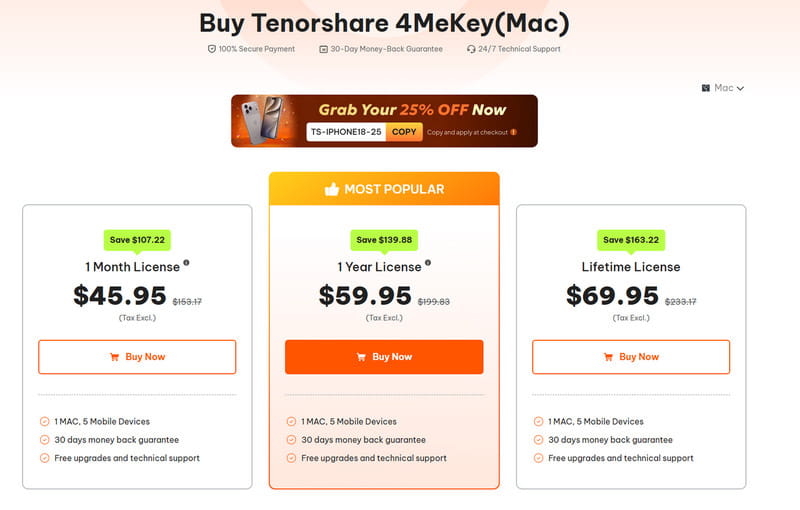
Overall, the lifetime license provides the best value for users who frequently encounter iCloud activation locks. However, the Mac version is more expensive than the Windows version. Mac users have to pay more for essentially the same core unlocking solution. In addition, compared with other paid unlocking tools in a similar price range, 4MeKey has more limited compatibility and a relatively narrow feature set, which makes it relatively less cost-effective.
Part 4: How to Use Tenorshare 4MeKey
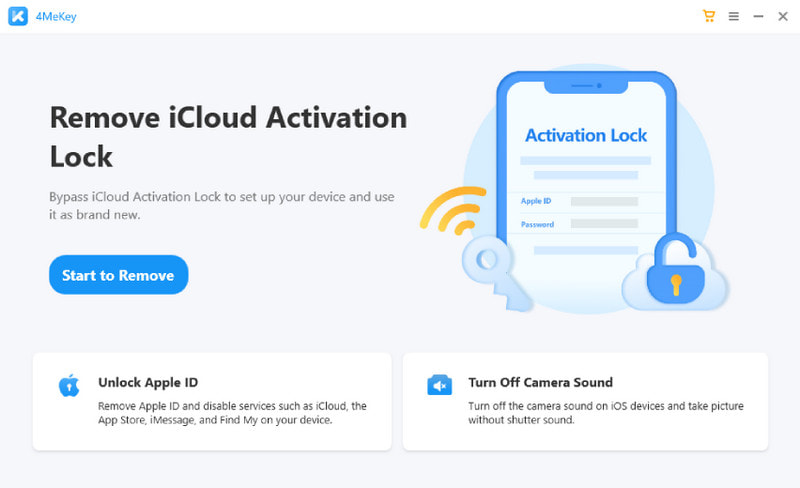
As we mentioned above, Tenorshare 4MeKey has an intuitive interface. Therefore, it is easy to use. Download and install Tenorshare 4MeKey from the official website onto your computer. Launch it and connect your device.
Click the Start to Remove button, and follow the onscreen instructions to jailbreak your device. After that, 4MeKey will initiate the iCloud activation lock removal process.
Part 5: Alternative to Tenorshare 4MeKey for iCloud lock Bypass
If you are looking for a paid iOS unlocking tool that covers more unlocking scenarios beyond iCloud activation bypass, such as screen passcode unlock, MDM bypass, Screen Time removal, SIM unlock, and more, you can try Apeaksoft iFoneKit iOS Unlocker, a reliable and efficient alternative that can help you regain access to your Apple device. What's more, it also supports a broader range of iOS versions, with support extending up to iOS 26.1 on Windows and iOS 18 on Mac.
Secure Download
Secure Download
| Feature | Tenorshare 4MeKey | Apeaksoft iFoneKit iOS Unlocker |
| Unlocking scenarios | iCloud Activation Lock, Apple ID removal, Find My, camera sound | iCloud Activation Lock, Screen Passcode, Apple ID, MDM, Screen Time, iTunes Backup Encryption, SIM Lock |
| Windows iOS support | Up to iOS 16.3 | Up to iOS 26.1 |
| Mac iOS support | Up to iOS 16.7 | Up to iOS 18 |
| Windows pricing | $35.95/month; $39.95/year; $49.95/lifetime | $34.93/month; $59.96/lifetime |
| Mac pricing | $45.95/month; $59.95/year; $69.95/lifetime | $34.93/month; $59.96/lifetime |
| Value consideration | More limited compatibility and feature set at a similar price | More unlocking scenarios at a comparable or lower entry price |
While both Apeaksoft iFoneKit iOS Unlocker and Tenorshare 4MeKey serve the same purpose, there are some differences between them. Apeaksoft iFoneKit iOS Unlocker offers more advanced features. You can free download it to remove the iCloud activation lock.
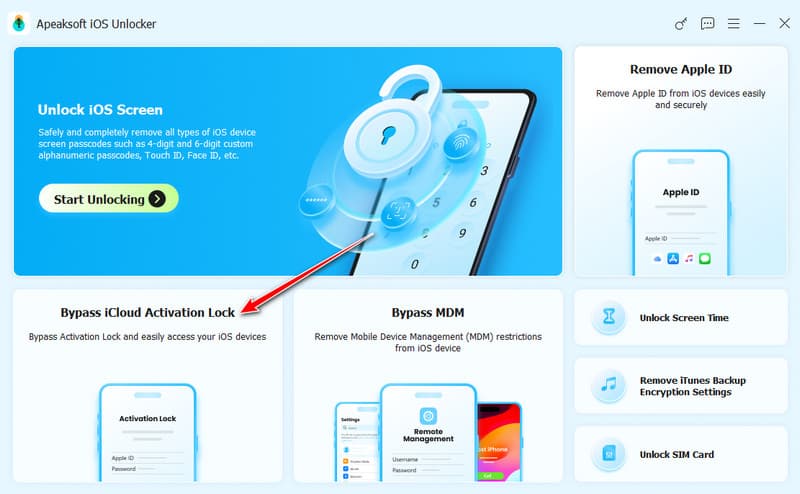
Step 1. Launch this best Tenorshare 4MeKey alternative and connect your iPhone or iPad to the computer. Choose the Bypass iCloud Activation Lock option to remove the iCloud lock.
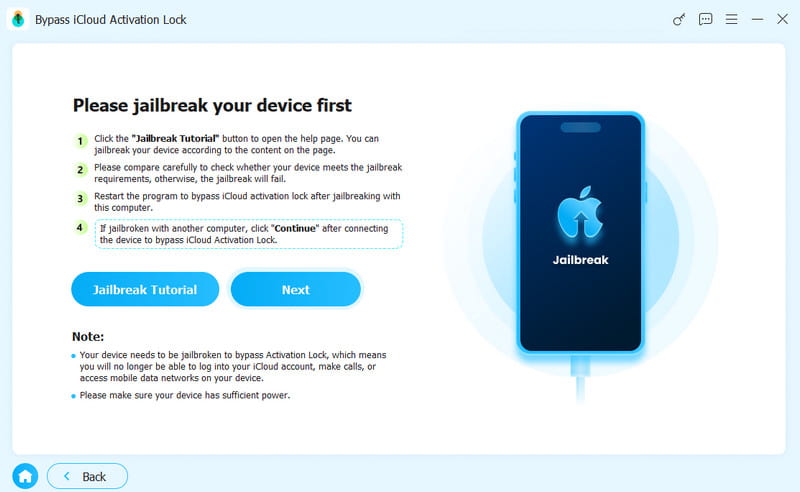
Step 2. Check your device info and click the Jailbreak Tutorial to jailbreak your iPhone. There will be an article prompt window.
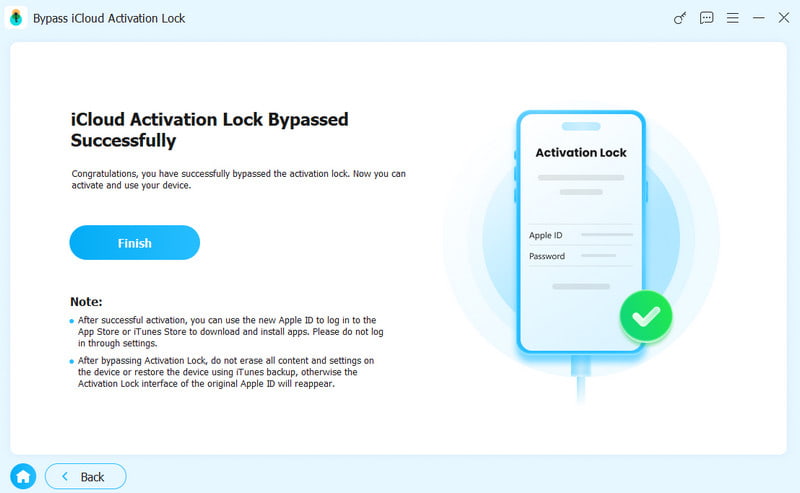
Step 3. Wait for the software to bypass the iCloud activation automatically after a successful jailbreak.
Part 6: FAQs About Tenorshare 4MeKey
Is it possible to unlock a locked iCloud?
You can unlock an iCloud account using your Apple ID and password. Suppose you have forgotten your Apple account or password. In that case, you can try the account recovery options provided by Apple, such as resetting your password through the Apple ID account page or contacting Apple Support for further assistance. Moreover, unlocking a locked iCloud account is possible through third-party iCloud unlocker tools.
Is 4MeKey a jailbreak tool?
No. Tenorshare 4MeKey is specifically designed to bypass the iCloud activation lock on iOS devices. However, the iCloud unlocking process requires the device to be jailbroken. Tenorshare 4MeKey provides the corresponding jailbreak tutorial in its program.
What happens if my iCloud gets locked?
If your iCloud account gets locked, that means you cannot sign in to your Apple Account or use Apple services. When your iCloud account is locked, you may be prompted to verify your identity or reset your password to regain access.
Conclusion
Tenorshare 4MeKey provides a convenient solution for unlocking iOS devices. This post gives you a 4MeKey review to tell its main functions, pros, cons, and pricing. Also, we recommend a great iCloud unlocker alternative - Apeaksoft iFoneKit iOS Unlocker, to easily bypass the iCloud activation lock.
 Apeaksoft iFoneKit
 Unlock all types of iOS passwords from iPhone, iPad and iPod.
Secure Download
Secure Download
Related Articles