Everything You Should Know about Apeaksoft Data Recovery

Losing important data from your hard drive can be stressful, whether you accidentally delete files, your disk crashes, your file system is corrupted, or you reset your PC. This problem can affect precious photos, business emails, business documents, and more. Fortunately, Apeaksoft Data Recovery can help you recover lost data from your hard disk without a backup. This article shares an honest review of the software.
PAGE CONTENT:
Part 1: What Is Apeaksoft Data Recovery
Apeaksoft Data Recovery is a powerful data recovery program designed to help anyone recover lost or deleted data from computers. Apeaksoft Studio, a reputable software brand, released it. The program is ideal for anyone who has accidentally deleted important files, including photos, videos, documents, PDFs, emails, and archives.
At a Glance: Apeaksoft Data Recovery Overview
Tech Specs
| Windows | Mac | |
| System requirements | Windows 11/10/8.1/8/7/Vista/XP | Mac OS X 10.7 and above |
| CPU | 1GHz Intel/AMD CPU or above | Apple M1/M2/M3/M4/M5 chip |
| RAM | 1G RAM or more | |
| Hard Disk | 200 MB or more of space | |
| Language support | English, French, Italian, Spanish, and more | |
Key Features of Apeaksoft Data Recovery
- 1.Recover lost files from a computer's local hard drive. Users can select specific drives or the Recycle Bin for data recovery.
- 2.Retrieve deleted files from removable drives. In addition to local hard drives, memory cards, USB, digital cameras, and SD cards are supported.
- 3.Recover data from a variety of file systems, such as NTFS, FAT16, FAT32, exFAT, EXT, and others.
- 4.Support both Quick Scan and Deep Scan. After a quick scan, it will automatically perform a deep scan to find as much data as possible.
- 5.Work for deleted, formatted, and corrupted files.
- 6.Compatible with over 200 file formats, such as JPG, PNG, MP4, GIF, MP3, Word, PPT, and much more.
- 7.Retrieve images, videos, audio files, documents, archives, emails, and more.
- 8.Deliver up to a 99.7% recovery success rate.
- 9.Integrate preview and useful features. Before recovering files, users can search for specific files and preview the content.
Secure Download
Secure Download
Part 2: Apeaksoft Data Recovery Real-World Performance
To help you learn how Apeaksoft Data Recovery works and how it performs, we tested it in our laboratory. We tested it on Windows 11 with an Intel CPU and at least 500 MB of free storage.
Scenario 1: Recover Files from Hard Drive
Operating System: Windows 11 64-bit
CPU: Intel Core i7-6700
Disk: SSD
Test Files: 10 JPG Images and 10 MP4 Videos
Losing files on a computer's internal hard drive is a common problem. Therefore, we use Apeaksoft Data Recovery to recover deleted files from hard drives. As a desktop software program, you can download and install it on your computer from the official website for free. Plus, the free trial enables you to use core features.
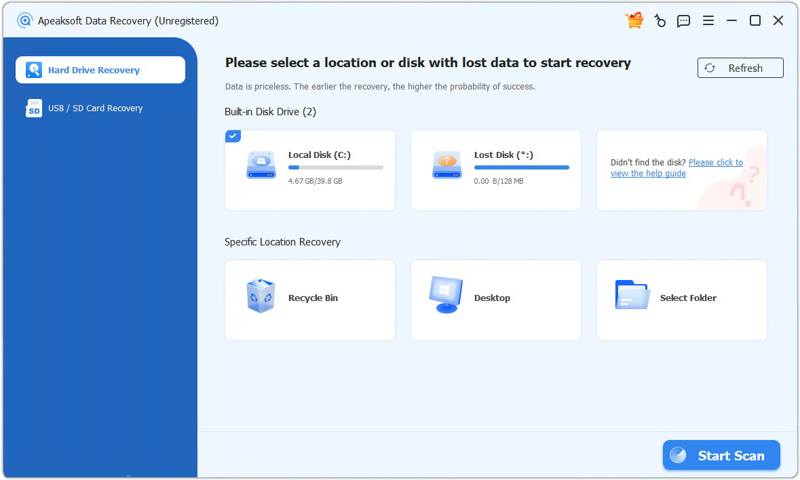
Run the installer file and follow the on-screen instructions to install it on your desktop. Next, open the software from your desktop or Applications folder. To recover data from hard drives, choose the Hard Drive Recovery tab on the sidebar and select a location or disk with lost data. Click the Start Scan button to begin scanning the disk.
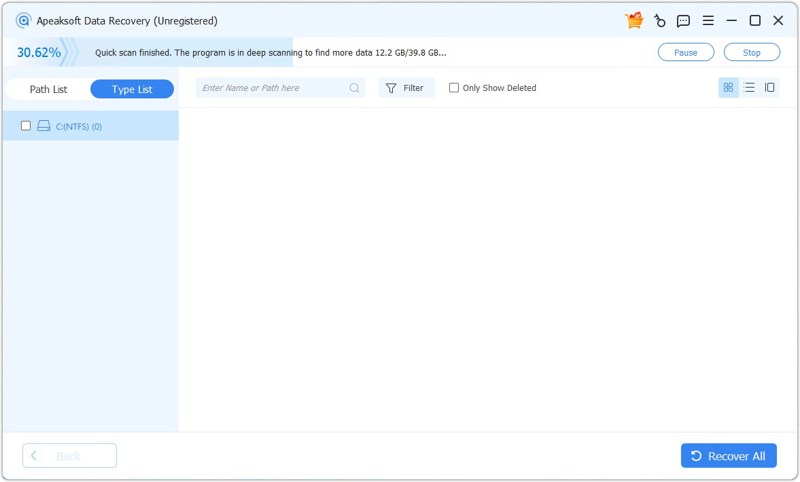
At first, the program will perform a quick scan. Once it is done, it will automatically start a deep scan. Next, go to the Type List tab and select the desired file types, or go to the Path List and navigate to the folder where the lost files are stored. Then, you can preview the recoverable files. To view deleted files, check Only Show Deleted. The Filter option can quickly locate specific files with keywords.
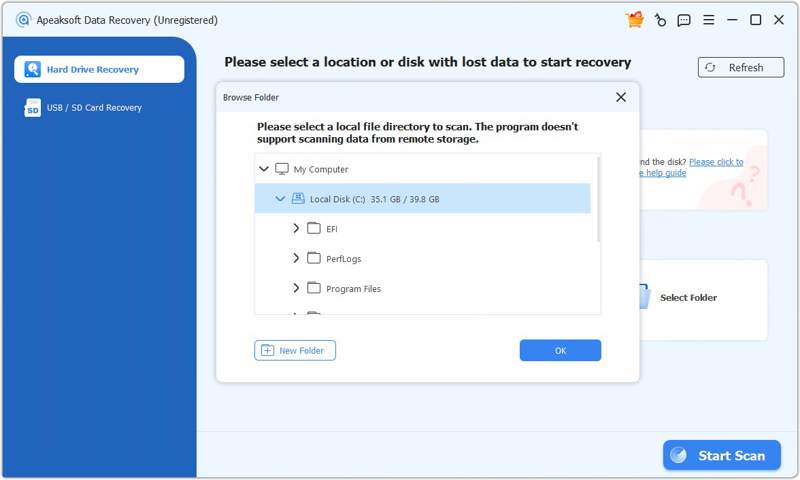
According to our test, the entire scanning process takes about 30 seconds. Of course, the length of the process depends on how many files are on your drive and your hardware.
After scanning the data, you can preview the files, select the files you lost, and click the Recover button. Finally, set an output folder and click Recover.
Testing Result: In our test, Apeaksoft Data Recovery can successfully recover deleted videos. The preview feature can also let us view the video thumbnail, format, and other info. However, if new data overwrites your lost files, the success rate may be low.
Scenario 2: Recover Photos from an SD Card
Operating System: Windows 11 64-bit
CPU: Intel Core i7-6700
SD Card: SanDisk 32GB Ultra microSD
Test Files: 10 JPG Images
If you accidentally delete files from a removable drive or format it, Apeaksoft Data Recovery can recover them. We tested how to recover photos from an SD card using the software.
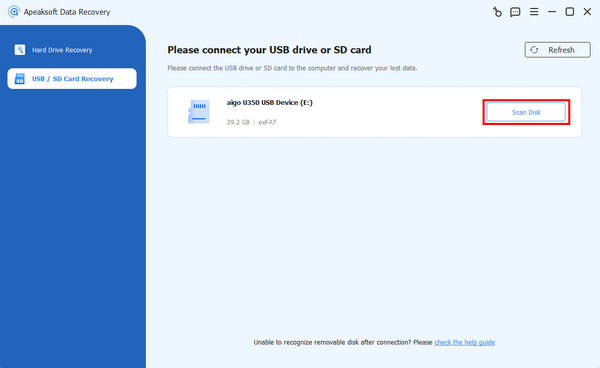
Plug the SD card into a computer. The photos are lost after performing a quick format. We use a Windows 11 laptop to test the software. Launch Apeaksoft Data Recovery and go to the USB/SD Card Recovery tab. Once the software detects your card, select it from the drop-down list, then click the Scan Disk button to start scanning the external device.
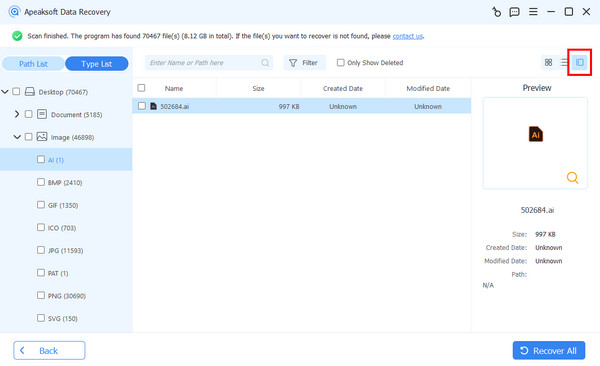
Next, you can preview lost files by type or directory. To recover photos, for example, go to the Type List and choose Image. Use the Filter option to locate the lost photos quickly. Select all the photos you want to get back, then click the Recover button. Select another location and confirm photo recovery.
Testing Result: According to our testing, the success rate is nearly 99.7% when recovering recently deleted photos from removable drives, such as SD cards, USB flash drives, and memory cards. However, the success rate varies depending on the condition of the hardware.
Scenario 3: Recover Permanently Deleted Documents
Operating System: Windows 11 64-bit
CPU: Intel Core i7-6700
Disk: SSD
Test Files: 10 PDF Documents
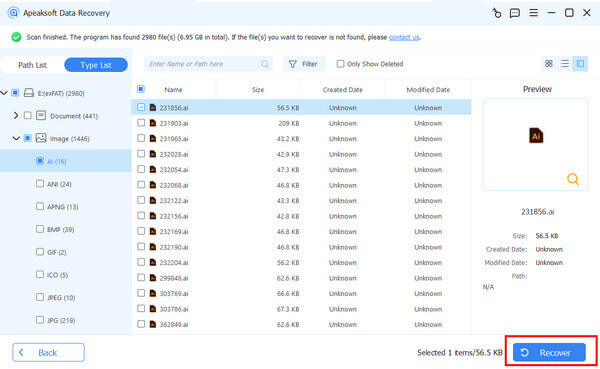
We also tested the success rate of recovering permanently deleted files, such as documents. We deleted some documents and emptied the Recycle Bin. Then, we install and launch Apeaksoft Data Recovery on the computer.
How to Recover: Go to the Hard Drive Recovery tab and select Recycle Bin. Click the Start Scan button to initiate scanning the Recycle Bin folder. It takes about 2 minutes to complete the data scan. When it finishes, go to the Type List tab and select Documents to view permanently deleted documents. Finally, select the desired documents, click the Recover button, choose a different location, then click Recover again.
Testing Result: We successfully recovered the document files we had deleted. Those files can be opened and have no visual format problems.
Test Results Summary of Apeaksoft Data Recovery
In short, Apeaksoft Data Recovery can quickly recover lost data from both internal and external hard drives. The success rate is high when recovering recently deleted files from formatted hard drives. However, it is also determined by your file conditions.
If you are going to use data recovery software, like Apeaksoft Data Recovery, you'd better download, install, and use it directly right after you find that you have lost some files. Otherwise, there's no 100% success rate.
Apeaksoft Data Recovery Pricing
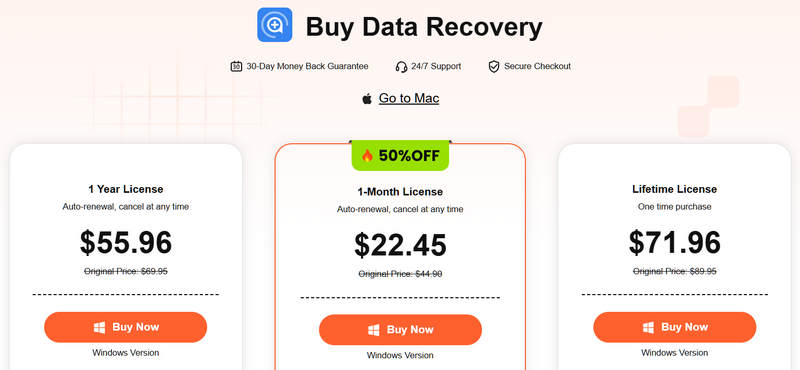
As mentioned previously, you can download Apeaksoft Data Recovery for free from the official website and try it for free. If you are satisfied with the software, you can purchase a license. The 1-Month License costs $22.45 per PC, the 1-Year License costs $55.96 per PC, and the Lifetime License costs $71.96 for 3 PCs.
Before you choose your purchase plan, we highly recommend you use the free version to test its recovery abilities on your device. You can check if the program can retrieve the lost files you want and then pay for it.
Part 3: Pros and Cons of Apeaksoft Data Recovery
Users' Review of Apeaksoft Data Recovery
From Trustpilot:
Very good service. I bought a new computer, and my email account no longer worked. After recovering my emails, everything is working again. The interface is straightforward, and I can use it smoothly once I install it on my computer.
From G2:
I purchased Apeaksoft Data Recovery to recover files on my laptop so that I could hear my favorite songs after I accidentally deleted them. It always works, even for files you deleted a month ago.
From Reddit:
The support team at Apeaksoft resolved my issue quickly and competently. Thanks a lot for this great support. They contacted me very quickly and always helped me solve the problem. The developer provides multiple ways to contact the support team. Moreover, they are professional.
Further Reading
Our Review of Apeaksoft Data Recovery
- Effective for basic data recovery of photos, videos, documents, audio, emails, and more.
- Work with most devices, including computers, external storage, digital cameras, and portable devices.
- Scan for files fast with a Quick Scan and a Deep Scan.
- Deliver helpful assistance for issues.
- Recover data from a variety of failure circumstances.
- Offer a high success rate.
- The free version is limited.
- Success rate may vary depending on the conditions under which it is overwritten.
Part 4: Apeaksoft Data Recovery vs DiskDrill vs EaseUS
There are popular data recovery programs on the market. However, only a part of them can effectively recover data and deliver a high success rate. To help you learn more options, we compared the most popular software.
| Apeaksoft Data Recovery | DiskDrill 6 | EaseUS | |
| Recovery results | Excellent | Excellent | Excellent |
| Recovery speed | Fast | Slow | Fast |
| OS supported | Windows 11/10/8/7/XP/Vista Mac OS X 10.7 and above | Windows 10/11 Mac OS X 10.15 or above | Windows 7 to 11 and macOS 10.15 or above |
| File preview | Yes | Yes | Yes |
| Dual scan | Yes | Yes | Yes |
| Support file system | NTFS, FAT 16, FAT 32, exFAT, and EXT | NTFS, NTFS5, FAT12, FAT16, FAT32, exFAT, EXT3/EXT4, HFS, HFS+, APFS | FAT (FAT12, FAT16, FAT32), exFAT, NTFS, NTFS5, ext2/ext3, HFS+, ReFS |
| Security | Yes | Yes | Yes |
| Price | $22.45 per month, $55.96 per year, and $71.96 lifetime | Basic: Free Pro: $89 Enterprise: $499 | From $69.95/month or $99.95/year or $149.95/lifetime |
Final Verdict: Is Apeaksoft Data Recovery Worth It
Yes, Apeaksoft Data Recovery is a great option to retrieve all sorts of files from a wide range of storage devices with different file systems. It is best for recovering files from a computer's internal hard drive, any removable drive, memory cards, and digital cameras, with popular file systems such as NTFS, FAT16, FAT32, exFAT, EXT, and others.
Bear in mind that any software that promises 100% success rate or a no-risk guarantee won't always match the real experience. Apeaksoft Data Recovery is not ideal for recovering data if your files were overwritten or removed years ago.
Part 5: FAQs About Apeaksoft Data Recovery
Is Apeaksoft Data Recovery safe and legit?
Yes, Apeaksoft Data Recovery is 100% safe when downloaded from the official website or other trusted sources. Don't download it from unsafe or unknown websites, which may install viruses on your computer. It was launched by Apeaksoft Studio, which is a reputable software company. It is a real and legal data recovery tool.
Can Apeaksoft Data Recovery recover overwritten files?
Yes, Apeaksoft Data Recovery can recover overwritten files on your hard drive. However, the success rate is lower than that of recently deleted data.
How to effectively recover data with Apeaksoft Data Recovery?
Firstly, run Apeaksoft as an administrator. This can help the tool access deeper system files. After the data scan, sort and filter the results to look for specific files. Once you realize your files are lost, stop using your computer. Otherwise, the files may be overwritten with new data, reducing the success rate. Plus, you'd better save the scan results so you can find lost files later.
Conclusion
This article reviewed Apeaksoft Data Recovery, one of the top data recovery tools for computers and laptops. You should learn the core features, users' reviews, its benefits and drawbacks, and other necessary information. Furthermore, we shared the test results across various scenarios to help you learn the software through real-world experience. All in all, it is a reputable and safe data recovery software program for beginners and experienced people. The intuitive design can simplify the data recovery workflow.
Related Articles