



Fixfirmware FRP Bypass Review: How It Works, Risks & Best Alternatives

Locked out of your Android phone after a factory reset? Many users may find Fixfirmware FRP APK when searching online for a way to bypass the Google verification screen.
What is Fixfirmware? Is Fixfirmware safe? How to use Fixfirmware? Does it still work?
Don’t worry! This in-depth Fixfirmware FRP Bypass review will walk you through these details one by one. Read more!
Disclaimer
This article is intended for informational and educational purposes only. The methods discussed here should only be used on Android devices that you legally own or have explicit permission to access. Also note that bypassing FRP will void your device's official warranty.
PAGE CONTENT:
Part 1: What Is Fixfirmware FRP
Before moving on with Fixfirmware, let’s find out what FRP is and why you encounter it first. According to Google’s official Android Security documentation, FRP (Factory Reset Protection) is a built-in security protection introduced by Google on Android devices running Android 5.1 and later to prevent unauthorized access. It is triggered when you have factory reset your device. Then, you need to verify the Google account that was previously synced with the device.
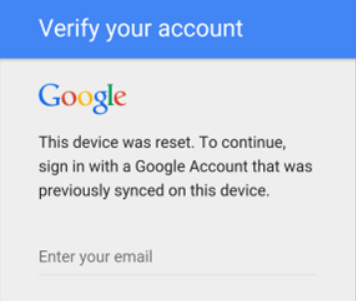
It is indeed necessary to a certain extent, but it will be a great obstacle when you forget the associated Google account credentials or purchase a second-hand device without receiving the previous owner’s account information. That’s when Fixfirmware works.
What Is Fixfirmware
What is Fixfirmware? To put it simply, it is a technology website that collects and posts information about what FRP is, how to unlock and hard reset Android phones, and more. Moreover, you can find FRP bypass download links or APKs on it, which can help you get rid of the Google lock on an Android phone without verification.
What Does Fixfirmware Provide
What does Fixfirmware provide? On the website, users usually can find:
- Explanation and guide of Android FRP
- FRP bypass methods for certain brands (like Samsung)
- Third-party FRP bypass download link
- Guide to Hard Reset and Firmware flashing
- Troubleshooting for Android system problems
To conclude, it distributes the knowledge of FRP in a way that everyone can learn quickly, as well as the FRP Bypass APK on the web.
Part 2: How to Use Fixfirmware APK
Before We Start
Before going into detailed steps, it’s important to clarify the testing environment and limitations of this method. Our testing was conducted under the following conditions:
- Tested device brand: Samsung smartphones
- Android version: Android 8 to Android 11
- Security patch level: Older security patches
- APK source: Third-party FRP-related APK files shared on the Fixfirmware website
- Success rate: Varied. Effectiveness depends on device model, Android version, and system updates
- Time Required: 20-40 minutes (if all required steps are available)
- Difficulty: Advanced (requires multiple system settings and third-party APK installations)
How to Use Fixfirmware FRP Bypass APK
Tips: These methods are shared for informational purposes only and should only be attempted on devices you legally own.
Step 1. Factory reset your Android phone, follow the instructions until you are prompted to verify your Google credentials. Then connect your phone to a Wi-Fi network and set your location to India.
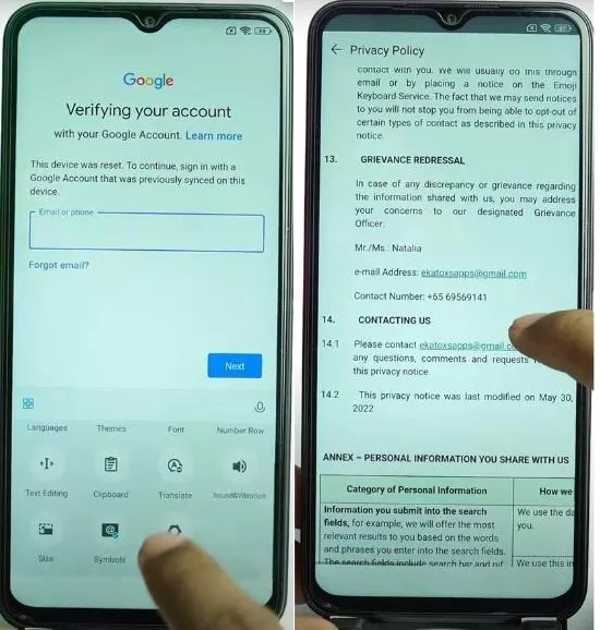
Step 2. Tap Next on the Google verification screen. Then press the field to activate the virtual keyboard, switch to the option, and tap More.
Step 3. Press About, Privacy policy, and locate the Contact Us section.
Step 4. Touch the email link, select Messages, and follow the instructions to open the Messages app.
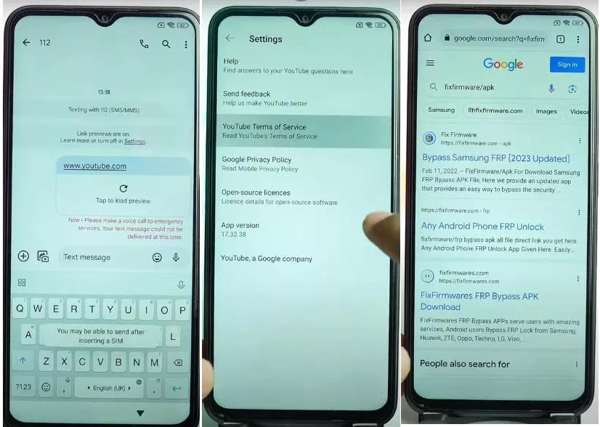
Step 5. Input www.youtube.com, and make a random message. Then you will get a YouTube link. Tap it to open YouTube on your device. Tap the profile button, choose Settings, and touch YouTube Terms of Service.
Step 6. Next, you will be presented with a browser. Enter fixfirmware/apk into the address bar, and search for Fixfirmware FRP Bypass download.
Step 7. Open the webpage, and tap Settings. Then download Package Disabler Pro, Notification Bar, Disabler Pro Fix, and Google Account Add APK.
Step 8. After downloading, tap Alliance On Galaxy Store on the web page, and follow the instructions to add a new Google account.
Step 9. Navigate to the Downloads folder and install the apps.
Step 10. When the installation is done, go back to Downloads, and tap the Settings button from the notification bar. Then head to Privacy, Permission Manager, Files and Media, and Show System.
Step 11. Choose Package Disabler Pro, select Allow files management, and tap Allow.
Step 12. Turn to the fixfirmware/apk screen, disable your Wi-Fi connection, choose Direct Open Disabler Pro, tap Agree, and hit Enable admin.
Step 13. Tap Agree, and connect to a Wi-Fi network. Press the Options button with a three-dot icon. Then tap Import from XML, Select, Downloads, and Disable Play Services successively. Hit Import, and tap OK.
Step 14. Go to settings, tap Accounts and Backup. Tap Manage accounts, Google, and then Continue.
Step 15. When you see Bypass FRP mobile, tap it, and follow the instructions to complete the process.
Step 16. Head to Settings, choose Apps, and select Chrome. Search for and open Activity Manager.
Step 17. Then choose Android Setup, tap Cancel, and choose PreDeferredSetupWizardActivity.
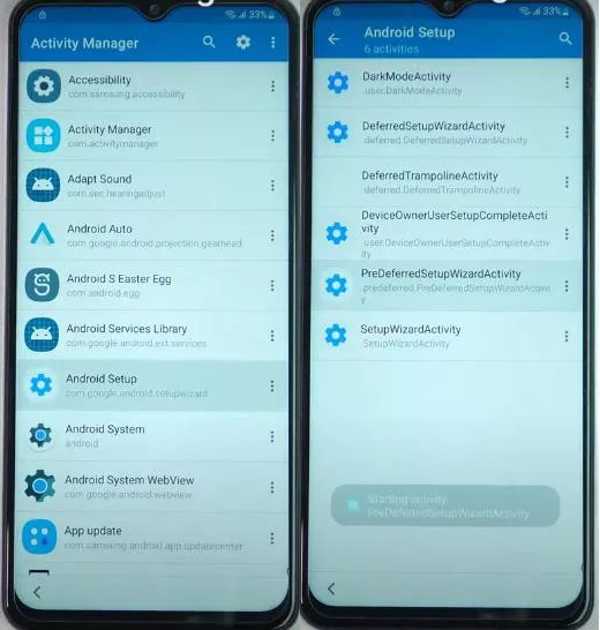
Step 18. Tap the Setup Wizard, choose Always, tap Agree, and continue factory reset. When it finishes, you can regain access to your Android phone.
Tips: Please note that using third-party tools or unofficial methods may involve potential risks, including but not limited to account restrictions, system instability, and data loss.
Our Real-device Test Results for Reference
| Device | Android Version | Security Patch | Result | Notes |
| Samsung Galaxy A10 | Android 9 | Older patch | Success | Completed after installing all required APKs. |
| Samsung Galaxy A12 | Android 11 | Older patch | Partial | Some attempts required repeating several steps. |
| Samsung Galaxy A13 | Android 13 | Latest patch | Failed | Cannot access the browser and YouTube entry |
| Samsung Galaxy A15 | Android 14 | Latest patch | Failed | Required APKs could not be launched during setup. |
Part 3: Alternatives to Fixfirmware FRP If It Fails
Based on our testing, Fixfirmware FRP is not easy to use, especially for non-tech-savvy users. What's more, the Fixfirmware APK method has clear limitations and risks. The success rate varies depending on the device model, Android version, and security patch level.
From this point, you may need an alternative solution if Fixfirmware FRP doesn't work. Apeaksoft DroidAide Android Unlocker is a practical solutions.

Downloaded by over 1,000,000 users
- Alternative to Fixfirmware FRP APK when it doesn't work.
- Simpler and quicker FRP bypass process.
- More brand support, like Xiaomi, Motorola, etc.
- Support the latest Android 17 version.
- 24/7 official customer and technical support.
Secure Download
How to Bypass FRP with One Click
Step 1. Free download this Android unlocker by pressing the button above.
Step 2. Choose Bypass Google FRP Lock.
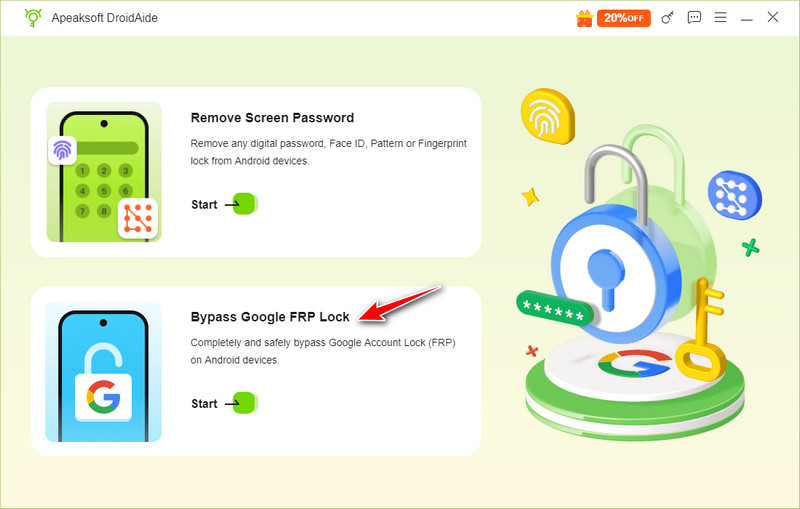
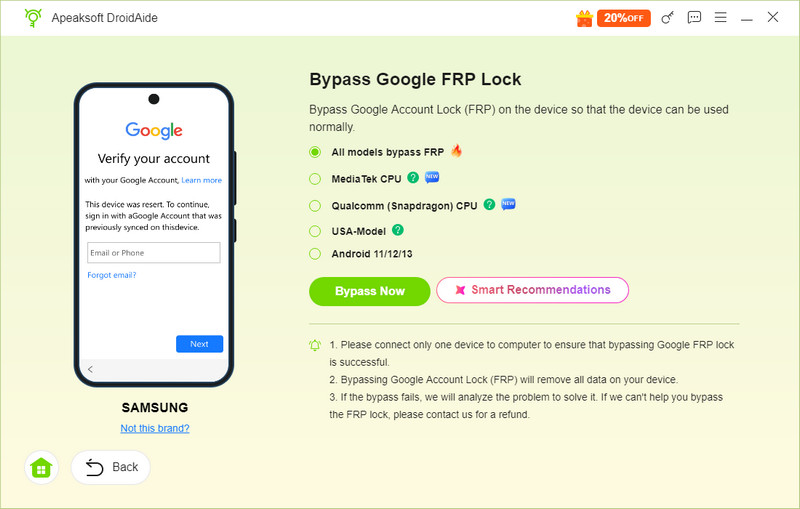
Step 3. Confirm your device information and then click Bypass Now.
Tips: If you don’t know whether your device brand is supported by this software, you can connect it to the computer. Usually, a prompt will pop up in the bottom right corner.
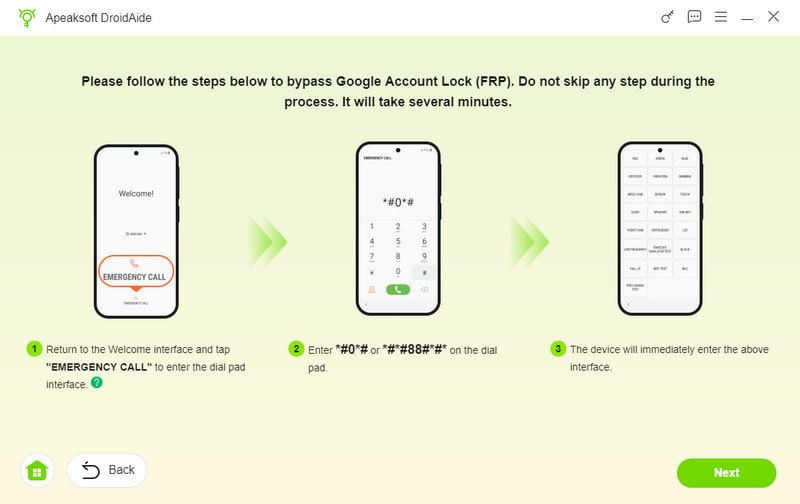
Step 4. Follow the on-screen instructions to configure the environment and activate your device. Then, this program will start the FRP bypass process automatically.
Tips: Please note that results are not guaranteed. Effectiveness may vary depending on the device brand, model, Android version, and security updates.
Part 4: FAQs of Fixfirmware FRP
Is Fixfirmware FRP safe?
It depends. Fixfirmware itself is a legal website, but the FRP bypass APK files it provides are unknown third-party tools, which will involve security and privacy risks, especially if the source is not verified.
Does Fixfirmware FRP really work?
Yes, Fixfirmware FRP works for most Samsung phones and a part of Android phones from other manufacturers. Nevertheless, the official website does not provide a support list, so you have to test it for your device manually.
Is Fixfirmware APK legit?
It depends on how you use it. As emphasized at the beginning, you can only use it on the device that you legally own or are authorized to access. Using Fixfirmware APK on stolen/lost devices is prohibited and may be illegal in some countries or regions.
What is FRP and why am I get stuck?
FRP (Factory Reset Protection) is a security feature of the Android system. It requires the previously synced Google account after a factory reset. You may get stuck if you forgot the account details or reset the phone without removing the account first.
Conclusion
This guide has introduced a widely searched FRP resource website, Fixfirmware FRP, which aims to help users remove FRP in certain scenarios. Bear in mind that improper operation may lead to potential risks or unexpected system issues. Plus, we recommended an alternative solution, Apeaksoft DroidAide Android Unlocker, which is easier and safer to use. Hope you can get access to your device successfully!
 Apeaksoft DroidAide
 Unlock your Android passwords and bypass the FRP lock easily.
Secure Download
Related Articles




